Join us at FabCon Atlanta from March 16 - 20, 2026, for the ultimate Fabric, Power BI, AI and SQL community-led event. Save $200 with code FABCOMM.
Register now!The Power BI Data Visualization World Championships is back! Get ahead of the game and start preparing now! Learn more
Hi,
Here's the example of the data tables I have
SolutionMap: Performance pivot table:
|Solutionid(distinct) | Workload |Partner id | 1 | 2
| 1 | A |1 | 250 | 180 ..... .
| 2 | A |2 | 150 | 100
| 3 | B |3 | 100 | 80
| 4 | C
....
The Performance pivot table has partner id and the revenue for each Solutionid, I need some help to create a measure table that will sum the revenue base on the SolutionID I picked from the list filter ,
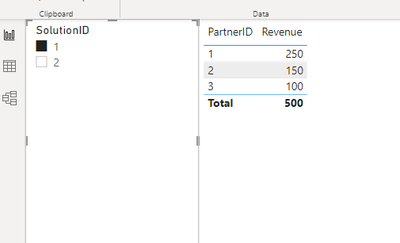
For example, if I select Solution ID 1, it should show:
|Partner id | Total_revenue
|1 | 250
|2 | 150
|3 | 100
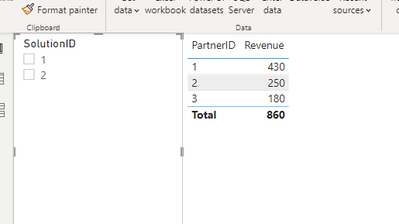
if I selected Solution ID 1,2, it should show:
|Partner id | Total_revenue
|1 | 430
|2 | 250
|3 | 180
How should I do it?
Thank you .
Solved! Go to Solution.
Hi,
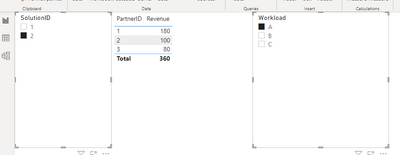
to obtain something like this
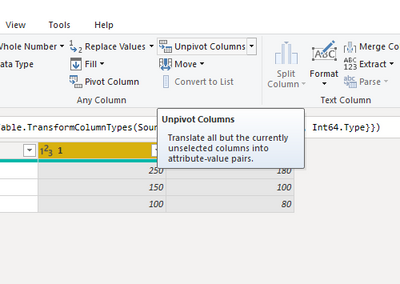
the easiest solution is to unpivot column in performance table
- select your SolutionID columns and then unpivot
- rename the column you obtain conveniently and load.
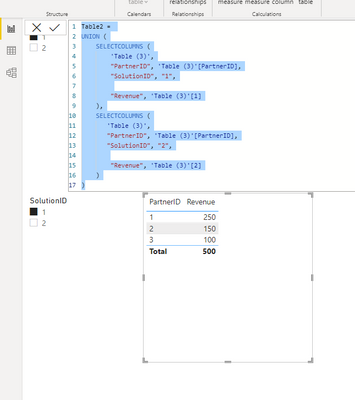
You can obtain the same thing in DAX by creating a new table
If this post is useful to help you to solve your issue consider giving the post a thumbs up
and accepting it as a solution !
thank you that's really help, is there anyway I could apply a workload filter on this too?
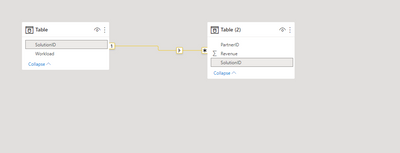
You have only to create a relationship between your two table
then add Workload as a slicer and now you can slice and dice as you want
If this post is useful to help you to solve your issue consider giving the post a thumbs up
and accepting it as a solution !
Hi,
to obtain something like this
the easiest solution is to unpivot column in performance table
- select your SolutionID columns and then unpivot
- rename the column you obtain conveniently and load.
You can obtain the same thing in DAX by creating a new table
If this post is useful to help you to solve your issue consider giving the post a thumbs up
and accepting it as a solution !
thank you that's really help, is there anyway I could apply a workload filter on this too?
You have only to create a relationship between your two table
then add Workload as a slicer and now you can slice and dice as you want
If this post is useful to help you to solve your issue consider giving the post a thumbs up
and accepting it as a solution !
The Power BI Data Visualization World Championships is back! Get ahead of the game and start preparing now!
Check out the November 2025 Power BI update to learn about new features.
| User | Count |
|---|---|
| 20 | |
| 11 | |
| 10 | |
| 4 | |
| 4 |
| User | Count |
|---|---|
| 33 | |
| 30 | |
| 19 | |
| 11 | |
| 10 |