Join us at FabCon Vienna from September 15-18, 2025
The ultimate Fabric, Power BI, SQL, and AI community-led learning event. Save €200 with code FABCOMM.
Get registered- Power BI forums
- Get Help with Power BI
- Desktop
- Service
- Report Server
- Power Query
- Mobile Apps
- Developer
- DAX Commands and Tips
- Custom Visuals Development Discussion
- Health and Life Sciences
- Power BI Spanish forums
- Translated Spanish Desktop
- Training and Consulting
- Instructor Led Training
- Dashboard in a Day for Women, by Women
- Galleries
- Data Stories Gallery
- Themes Gallery
- Contests Gallery
- Quick Measures Gallery
- Notebook Gallery
- Translytical Task Flow Gallery
- TMDL Gallery
- R Script Showcase
- Webinars and Video Gallery
- Ideas
- Custom Visuals Ideas (read-only)
- Issues
- Issues
- Events
- Upcoming Events
Compete to become Power BI Data Viz World Champion! First round ends August 18th. Get started.
- Power BI forums
- Forums
- Get Help with Power BI
- DAX Commands and Tips
- Re: Stop measure results after a specific date
- Subscribe to RSS Feed
- Mark Topic as New
- Mark Topic as Read
- Float this Topic for Current User
- Bookmark
- Subscribe
- Printer Friendly Page


- Mark as New
- Bookmark
- Subscribe
- Mute
- Subscribe to RSS Feed
- Permalink
- Report Inappropriate Content
Stop measure results after a specific date
Hi
I am playing with the PBI Desktop (finance) dummy data to try and learn DAX. I am trying to stop Sales PY measure from returning a result after the last Sale date. I am pretty certain this DAX should work, which makes wonder if the problem is in the data/model.

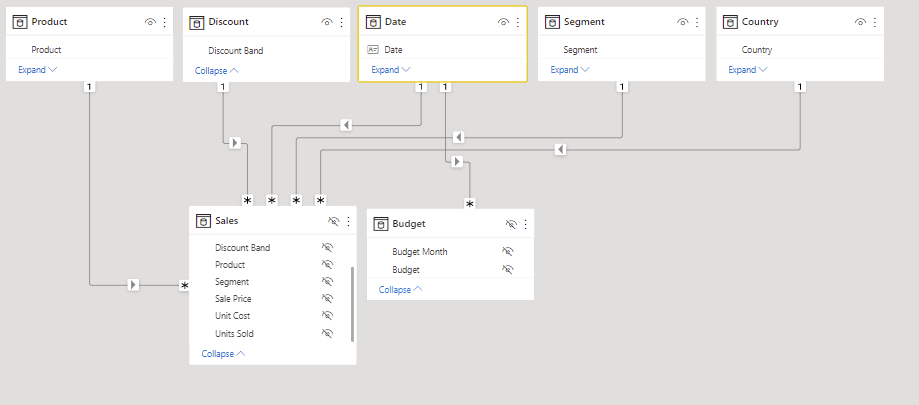
Sales table

Budget table (added by me - not in original dataset)

Just in case you need to see, my [Sales Amt] measure:
Can someone please help?
Solved! Go to Solution.


- Mark as New
- Bookmark
- Subscribe
- Mute
- Subscribe to RSS Feed
- Permalink
- Report Inappropriate Content
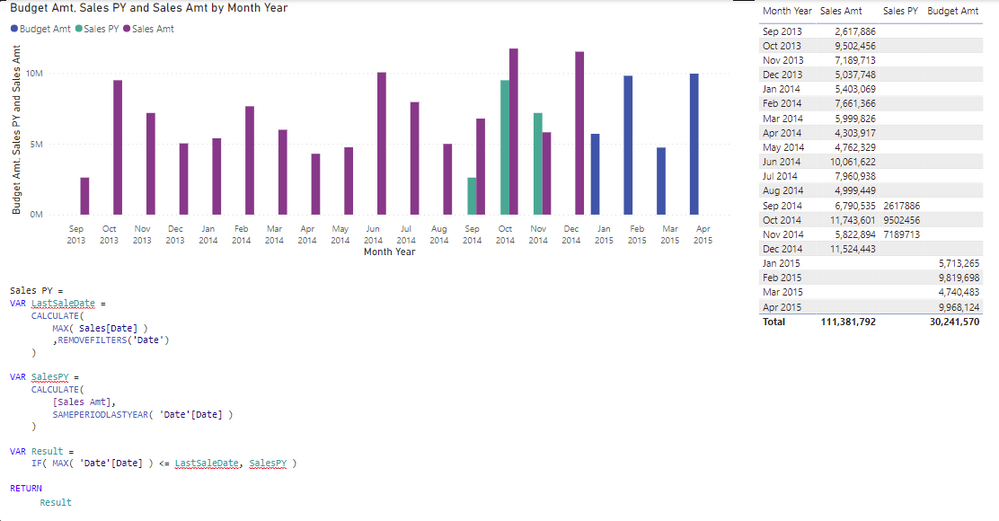
Actually with my suggestion you should use MAX ( Date[Date] ) as condition not SELECTEDVALUE.
What is happening hear is that SELECTEDVALUE returns blank everywhere while MAX ( Sales[Date] ) returns blank when there is no sale which did the job (blank = blank). But it won't work if you are slicing by Date instead of MonthYear.


- Mark as New
- Bookmark
- Subscribe
- Mute
- Subscribe to RSS Feed
- Permalink
- Report Inappropriate Content
This is the way I do it. Add a DatesInThePast True / False column to your Date Table.
Sales Amt PY =
CALCULATE (
    [Sales Amt],
    CALCULATETABLE (
        SAMEPERIODLASTYEAR ( 'Date'[Date] ),
        'Date'[DatesInThePast] = TRUE
    )
)
- Mark as New
- Bookmark
- Subscribe
- Mute
- Subscribe to RSS Feed
- Permalink
- Report Inappropriate Content
- Mark as New
- Bookmark
- Subscribe
- Mute
- Subscribe to RSS Feed
- Permalink
- Report Inappropriate Content
If you want to know more about why I'm using this pattern check out this very good article from SQLBI: Hiding future dates for calculations in DAX - SQLBI
- Mark as New
- Bookmark
- Subscribe
- Mute
- Subscribe to RSS Feed
- Permalink
- Report Inappropriate Content
Thanks again @n8ball. So many resources, it's difficult to keep track. Especially for someone starting out.
I would give you Kudos but I can't see an option for that. Has it been removed?
- Mark as New
- Bookmark
- Subscribe
- Mute
- Subscribe to RSS Feed
- Permalink
- Report Inappropriate Content
- Mark as New
- Bookmark
- Subscribe
- Mute
- Subscribe to RSS Feed
- Permalink
- Report Inappropriate Content
Hi @tamerj1
I tried what you suggested, but get the same result
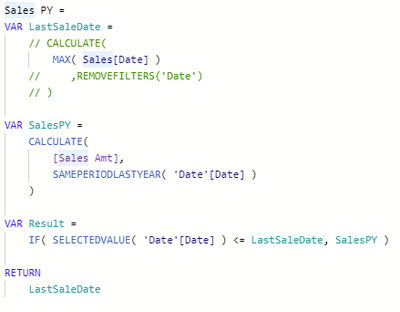
Interestingly, the MAX( Sales[Date] ) seems to be returning what I was expecting.
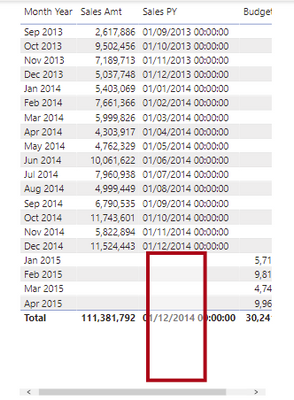
- Mark as New
- Bookmark
- Subscribe
- Mute
- Subscribe to RSS Feed
- Permalink
- Report Inappropriate Content
Actually with my suggestion you should use MAX ( Date[Date] ) as condition not SELECTEDVALUE.
What is happening hear is that SELECTEDVALUE returns blank everywhere while MAX ( Sales[Date] ) returns blank when there is no sale which did the job (blank = blank). But it won't work if you are slicing by Date instead of MonthYear.
- Mark as New
- Bookmark
- Subscribe
- Mute
- Subscribe to RSS Feed
- Permalink
- Report Inappropriate Content

Helpful resources

Power BI Monthly Update - August 2025
Check out the August 2025 Power BI update to learn about new features.

Fabric Community Update - August 2025
Find out what's new and trending in the Fabric community.

| User | Count |
|---|---|
| 17 | |
| 8 | |
| 7 | |
| 6 | |
| 6 |


| User | Count |
|---|---|
| 26 | |
| 13 | |
| 12 | |
| 9 | |
| 8 |


