cancel
Showing results for 
Search instead for 
Did you mean: 

The Power BI Data Visualization World Championships is back! Get ahead of the game and start preparing now! Learn more

Reply
Anonymous
Not applicable

Split column by delimeter in dax

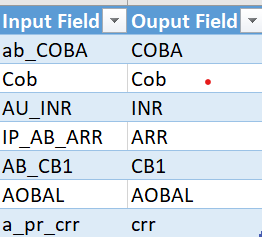
Input and expected outputInput and expected output

Hi ,

I need to split the input column by demieter to display the last character before the occurance of "_" . If there is no "_" then it must display the character itself. So i just need to dispaly the last character after an "_". I need to do this in DAX as i am using Direct Query as my mode of import.Please refer the picture above for your reference.


Thanks

1 ACCEPTED SOLUTION
ValtteriN
Super User
Super User

Hi,

Here is one way to do this:

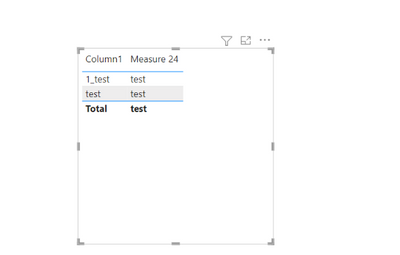
Data:

ValtteriN_0-1669623219526.png


Dax:

Measure 24 =
var _text = MAX('Table (13)'[Column1]) return
RIGHT(_text,LEN(_text)-SEARCH("_",_text,,0))
End result:
 
ValtteriN_1-1669623257518.png

Edit:

I noticed this doesn't account for second instance of "_". For that use this dax:

Measure 24 =
var _text = MAX('Table (13)'[Column1])
 var first_instance = FIND("_",_text,,0)
 var second_instance = if(FIND("_",_text,first_instance+1,0)=0,first_instance,FIND("_",_text,first_instance+1,0))
 return
RIGHT(_text,LEN(_text)-IF(first_instance>0,second_instance))


I hope this post helps to solve your issue and if it does consider accepting it as a solution and giving the post a thumbs up!

My LinkedIn: https://www.linkedin.com/in/n%C3%A4ttiahov-00001/


Did I answer your question? Mark my post as a solution!

Proud to be a Super User!


View solution in original post

4 REPLIES 4
Anonymous
Not applicable

Hi @ValtteriN 
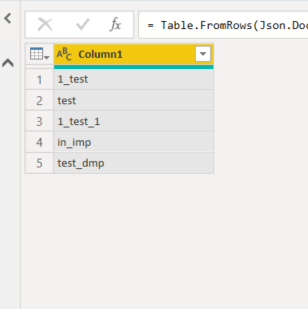
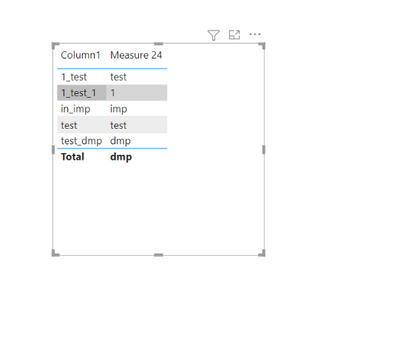
There seems to be an error with this dax as using max will take only value. For example can you add data other than test and check it wont show. data in_imp ,test_dmp .output: imp,dmp. This logic works only when using same word after underscore"_".

Can you check and let me know

Hi,

Here is an example with other data:

ValtteriN_0-1669626942245.png


End result:

ValtteriN_1-1669626961795.png


The MAX here works similarly as SELECTEDVALUE.


Did I answer your question? Mark my post as a solution!

Proud to be a Super User!


ValtteriN
Super User
Super User

Hi,

Here is one way to do this:

Data:

ValtteriN_0-1669623219526.png


Dax:

Measure 24 =
var _text = MAX('Table (13)'[Column1]) return
RIGHT(_text,LEN(_text)-SEARCH("_",_text,,0))
End result:
 
ValtteriN_1-1669623257518.png

Edit:

I noticed this doesn't account for second instance of "_". For that use this dax:

Measure 24 =
var _text = MAX('Table (13)'[Column1])
 var first_instance = FIND("_",_text,,0)
 var second_instance = if(FIND("_",_text,first_instance+1,0)=0,first_instance,FIND("_",_text,first_instance+1,0))
 return
RIGHT(_text,LEN(_text)-IF(first_instance>0,second_instance))


I hope this post helps to solve your issue and if it does consider accepting it as a solution and giving the post a thumbs up!

My LinkedIn: https://www.linkedin.com/in/n%C3%A4ttiahov-00001/


Did I answer your question? Mark my post as a solution!

Proud to be a Super User!


Anonymous
Not applicable

Thanks @ValtteriN 

Helpful resources

Announcements
November Power BI Update Carousel

Power BI Monthly Update - November 2025

Check out the November 2025 Power BI update to learn about new features.

Fabric Data Days Carousel

Fabric Data Days

Advance your Data & AI career with 50 days of live learning, contests, hands-on challenges, study groups & certifications and more!

FabCon Atlanta 2026 carousel

FabCon Atlanta 2026

Join us at FabCon Atlanta, March 16-20, for the ultimate Fabric, Power BI, AI and SQL community-led event. Save $200 with code FABCOMM.