cancel
Showing results for 
Search instead for 
Did you mean: 

Next up in the FabCon + SQLCon recap series: The roadmap for Microsoft SQL and Maximizing Developer experiences in Fabric. All sessions are available on-demand after the live show. Register now

Reply
sonm10
Helper I
Helper I

Slicer to filter two column without context

Hello,

I have a sample dataset as follows:

ProductCategoryTypeSellerBuyerCost
Product1Cat1Type1AC10
Product2Cat2Type1CA20
Product3Cat2Type2CB30
Product4Cat1Type3AC15
Product5Cat3Type3BA16


I have a column Seller and Buyer, that contains their name. A seller for one product can be a buyer for another product and vice versa. So basically, the two coumns will have many similar values. I need to have a single slicer to filter both these columns. The slicer have to be the union of these two column and should filter the rows if either or both the column has the slicer value.

I have implemented a solution as per this: Solved: Re: Once Slicer for multiple columns - Microsoft Power BI Community, where we create a measure on the union column. It was working as expected when the said two columns are available in the visual. The issue arises when the context changes, such as if we only select the Product and Amount fields in a table, the slicer will not have any effect. I require the slicer to filter the rows regardless of the context.

2 ACCEPTED SOLUTIONS
Fowmy
Super User
Super User

@sonm10 

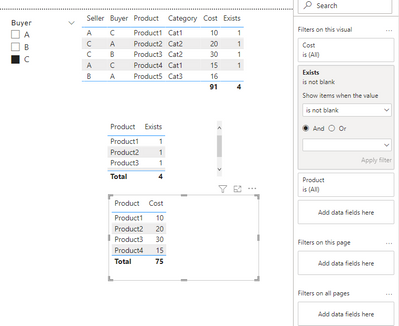
I created a new table combining Seller and Buyer with distinct values then created a measure that identifies if the selected values (One or more) is found then filters the table. Check the attached file


Fowmy_0-1647635270028.png

Exists = 
VAR __SellerBuyerSelected = VALUES( BuyerSeller[Buyer] )
RETURN
    CALCULATE(
        COUNTROWS(table1),
        Table1[Buyer] IN __SellerBuyerSelected || Table1[Seller] IN __SellerBuyerSelected
    )


Did I answer your question? Mark my post as a solution! and hit thumbs up


Subscribe and learn Power BI from these videos

Website LinkedIn PBI User Group

View solution in original post

@Fowmy, Thanks for your solution. It is working as expected however, when we only have the buyer, seller and cost columns in the table, the silcer is not working. For that, I have added an additional field (although not required in that particular table) for the slicer to work.

View solution in original post

2 REPLIES 2
Fowmy
Super User
Super User

@sonm10 

I created a new table combining Seller and Buyer with distinct values then created a measure that identifies if the selected values (One or more) is found then filters the table. Check the attached file


Fowmy_0-1647635270028.png

Exists = 
VAR __SellerBuyerSelected = VALUES( BuyerSeller[Buyer] )
RETURN
    CALCULATE(
        COUNTROWS(table1),
        Table1[Buyer] IN __SellerBuyerSelected || Table1[Seller] IN __SellerBuyerSelected
    )


Did I answer your question? Mark my post as a solution! and hit thumbs up


Subscribe and learn Power BI from these videos

Website LinkedIn PBI User Group

@Fowmy, Thanks for your solution. It is working as expected however, when we only have the buyer, seller and cost columns in the table, the silcer is not working. For that, I have added an additional field (although not required in that particular table) for the slicer to work.

Helpful resources

Announcements
New to Fabric survey Carousel

New to Fabric Survey

If you have recently started exploring Fabric, we'd love to hear how it's going. Your feedback can help with product improvements.

Power BI DataViz World Championships carousel

Power BI DataViz World Championships - June 2026

A new Power BI DataViz World Championship is coming this June! Don't miss out on submitting your entry.

March Power BI Update Carousel

Power BI Community Update - March 2026

Check out the March 2026 Power BI update to learn about new features.