cancel
Showing results for 
Search instead for 
Did you mean: 

The Power BI Data Visualization World Championships is back! Get ahead of the game and start preparing now! Learn more

Reply
matrix_user
Helper III
Helper III

Slicer not categorizing properly - unable to display daily, yearly and f/year periods.

I am having trouble with a period slicer to display correctly.  The weekly, monthly and quartely periods are in working order. But I can not seem to get the daily, yearly to display  correct data and the financial year -  will not come up as part of the slicer.


The table I have created for my period slicer is:

Slicer =
SELECTCOLUMNS (
UNION (
ADDCOLUMNS ( SUMMARIZE ( 'Date', 'Date'[Year] ), "Date", CALCULATE ( MIN ('Date'[Date] ))),
ADDCOLUMNS ( SUMMARIZE ( 'Date', 'Date'[FYear] ), "Date", CALCULATE ( MIN ('Date'[Date]))),
ADDCOLUMNS ( SUMMARIZE ( 'Date', 'Date'[MonthYear_Text] ), "Date", CALCULATE ( MIN ('Date'[Date]))),
ADDCOLUMNS ( SUMMARIZE ( 'Date', 'Date'[QuarterSuffix_Year] ), "Date", CALCULATE ( MIN ('Date'[Date]))),
ADDCOLUMNS ( SUMMARIZE ( 'Coffee_patrons_data', [App_date] ), "Date", CALCULATE ( MIN ('Coffee_patrons_data'[App_date] ))),
ADDCOLUMNS ( SUMMARIZE ( 'Date', 'Date'[WeekNbrSuffix_Year]), "Date", CALCULATE ( MIN ('Date'[Date])))),
"Period", [Year],
"Period Sorting", [Date]
)
 
The drop-down slicer to select daily, week, month etc is:
Selection =
IF(                     
NOT(ISERROR(VALUE(LEFT('Slicer'[Period]))+1)),"Y",                      
IF(                     
NOT(LEFT('Slicer'[Period],1) in {"D","Q","FY","W"}),"M",                        
LEFT('Slicer'[Period],1)))      
 
The selection order for the drop-down is:
Selection Sorting =
VAR Length =            
LEN ( Slicer[Period] )          
VAR Result =            
SWITCH (            
TRUE (),            
Length = 4,6, //Year//                  
Length = 7,5, //Quarter//           
Length = 6,3, //Month//         
        Length = 9,4, //Date//
     Length = 10,4, //Date//
Length = 5,2, //FY//
1)//Week//          
RETURN          
Result        
 
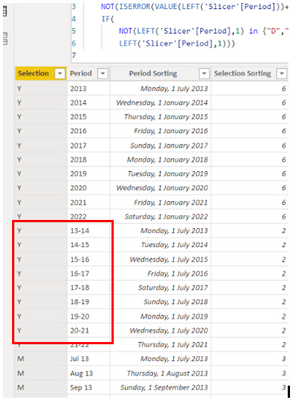
The Selection DAX is not categorising properly.   For a financial period it has categorised it as a "Y". I am also geting the same problem with some months being categorised as "D" 
 
matrix_user_0-1667982593470.pngmatrix_user_1-1667982809405.png

Can someone please help me with this slicer. Below is a sample of the power bi file and data sample. 


Power BI: https://www.dropbox.com/s/8pp0m0vmvjvryce/Coffee%20Attendances%20-%20Copy.pbix?dl=0

Data: https://www.dropbox.com/scl/fi/h8ywgsq110h2f1hfw5tvf/Coffee-patrons-data-Copy.xlsx?dl=0&rlkey=rx8a50...


Thank you and kudos.

1 ACCEPTED SOLUTION
ValtteriN
Super User
Super User

Hi @matrix_user ,

For context to others (as asked by matrix_user):

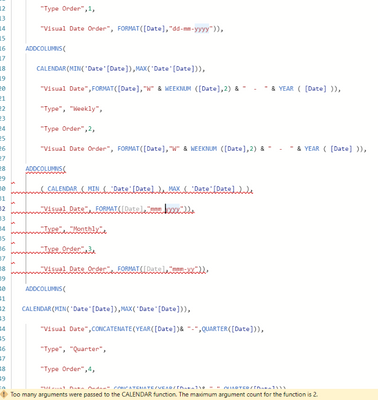
"My DAX is as below but it is not allowing me to create the table.  Please see image also below showing yyyy & yy-yy not accepted:"
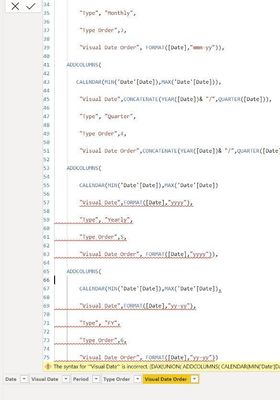
 

ValtteriN_0-1668168120210.jpeg


"Visual Date",FORMAT([Date],"dd-mmm-yyyy"),

"Type", "Daily",

"Type Order",1,

"Visual Date Order", FORMAT([Date],"dd-mmm-yy")),

ADDCOLUMNS(

CALENDAR(MIN('Date'[Date]),MAX('Date'[Date])),

"Visual Date",FORMAT([Date],"yyyy"),

"Type", "Weekly",

"Type Order",2,

"Visual Date Order", FORMAT([Date],"YYYY")),

ADDCOLUMNS(

CALENDAR(MIN('Date'[Date]),MAX('Date'[Date])),

"Visual Date",FORMAT([Date],"mmm-yy"),

"Type", "Monthly",

"Type Order",3,

"Visual Date Order", FORMAT([Date],"mmm-yy")),

ADDCOLUMNS(

CALENDAR(MIN('Date'[Date]),MAX('Date'[Date])),

"Visual Date",CONCATENATE(YEAR([Date])& "/",QUARTER([Date])),

"Type", "Quarter",

"Type Order",4,

"Visual Date Order",CONCATENATE(YEAR([Date])& "/",QUARTER([Date])),

ADDCOLUMNS(

CALENDAR(MIN('Date'[Date]),MAX('Date'[Date])

"Visual Date",FORMAT([Date],"yyyy"),

"Type", "Yearly",

"Type Order",5,

"Visual Date Order", FORMAT([Date],"yyyy")),

ADDCOLUMNS(

CALENDAR(MIN('Date'[Date]),MAX('Date'[Date]),

"Visual Date",FORMAT([Date],"yy-yy"),

"Type", "FY",

"Type Order",6,

"Visual Date Order", FORMAT([Date],"yy-yy"))


The date table I am using with this DAX is:

Date = CALENDAR (MIN('Fact table'[date]), MAX('Fact table'[date]))


dd-mmm-yy

Date_Short = FORMAT([Date],"DD/MM/YY")


Day_Text = FORMAT('Date'[Date], "DDD")


DayNbr_Year = DATEDIFF ( DATE ( YEAR ( 'Date'[Date] ), 1, 1 ), 'Date'[Date], DAY )+1


DayYear_Text = LEFT(FORMAT([Date].[Day],"DD"),3) & " " & LEFT([Date].[Month],3) & " " & RIGHT([Date].[Year],2)


FYear =

VAR fy =

    IF (

        MONTH ( 'Date'[Date] ) <= 6,

        VALUE ( FORMAT ( 'Date'[Date], "YY" ) ) - 1,

        VALUE ( FORMAT ( 'Date'[Date], "YY" ) )

    )

RETURN

    CONCATENATE ( fy, CONCATENATE ( "-", fy + 1 ) )


FYear_Sort = IF(MONTH( 'Date'[Date])>6, MONTH('Date'[Date])-6, MONTH('Date'[Date])+6)


Month = LEFT(FORMAT('Date'[Date],"MMMM"),3) & " " & RIGHT('Date'[Year],4)


MonthNbr_Year (Sort) = FORMAT('Date'[Date],"YYYYMM")


MonthYear_Text = LEFT(FORMAT([Date].[Month],"MMM"),3) & " " & RIGHT([Date].[Year],2)


Quarter = INT(FORMAT('Date'[Date],"Q"))


QuarterSuffix_Year = FORMAT([Date], "\QrtQ-YY")


WeekNbr_Month = WEEKNUM([date],1)-WEEKNUM(DATE([date].[Year],[date].[MonthNo],1),1)+1


WeekNbrSuffix_Year = "W" & WEEKNUM ([Date],2) & "  -  " & YEAR ( [Date] )


Year = FORMAT('Date'[Date], "YYYY")


It seems you are missing ")" in the dax shown in the picture. For creating calendar tables (or in this case dynamic slicer table using calendar as a basis) ADDCOLUMNS + CALENDAR works so that you should close the brackets for CALENDAR before you use ADDCOLUMNS. Basically we are creating a calendar table and then as per the function  name suggests we will add custom columns to the table.

I hope this post helps to solve your issue and if it does consider accepting it as a solution and giving the post a thumbs up!

My LinkedIn: https://www.linkedin.com/in/n%C3%A4ttiahov-00001/


Did I answer your question? Mark my post as a solution!

Proud to be a Super User!


View solution in original post

3 REPLIES 3
ValtteriN
Super User
Super User

Hi @matrix_user ,

For context to others (as asked by matrix_user):

"My DAX is as below but it is not allowing me to create the table.  Please see image also below showing yyyy & yy-yy not accepted:"


ValtteriN_0-1668168120210.jpeg


"Visual Date",FORMAT([Date],"dd-mmm-yyyy"),

"Type", "Daily",

"Type Order",1,

"Visual Date Order", FORMAT([Date],"dd-mmm-yy")),

ADDCOLUMNS(

CALENDAR(MIN('Date'[Date]),MAX('Date'[Date])),

"Visual Date",FORMAT([Date],"yyyy"),

"Type", "Weekly",

"Type Order",2,

"Visual Date Order", FORMAT([Date],"YYYY")),

ADDCOLUMNS(

CALENDAR(MIN('Date'[Date]),MAX('Date'[Date])),

"Visual Date",FORMAT([Date],"mmm-yy"),

"Type", "Monthly",

"Type Order",3,

"Visual Date Order", FORMAT([Date],"mmm-yy")),

ADDCOLUMNS(

CALENDAR(MIN('Date'[Date]),MAX('Date'[Date])),

"Visual Date",CONCATENATE(YEAR([Date])& "/",QUARTER([Date])),

"Type", "Quarter",

"Type Order",4,

"Visual Date Order",CONCATENATE(YEAR([Date])& "/",QUARTER([Date])),

ADDCOLUMNS(

CALENDAR(MIN('Date'[Date]),MAX('Date'[Date])

"Visual Date",FORMAT([Date],"yyyy"),

"Type", "Yearly",

"Type Order",5,

"Visual Date Order", FORMAT([Date],"yyyy")),

ADDCOLUMNS(

CALENDAR(MIN('Date'[Date]),MAX('Date'[Date]),

"Visual Date",FORMAT([Date],"yy-yy"),

"Type", "FY",

"Type Order",6,

"Visual Date Order", FORMAT([Date],"yy-yy"))


The date table I am using with this DAX is:

Date = CALENDAR (MIN('Fact table'[date]), MAX('Fact table'[date]))


dd-mmm-yy

Date_Short = FORMAT([Date],"DD/MM/YY")


Day_Text = FORMAT('Date'[Date], "DDD")


DayNbr_Year = DATEDIFF ( DATE ( YEAR ( 'Date'[Date] ), 1, 1 ), 'Date'[Date], DAY )+1


DayYear_Text = LEFT(FORMAT([Date].[Day],"DD"),3) & " " & LEFT([Date].[Month],3) & " " & RIGHT([Date].[Year],2)


FYear =

VAR fy =

    IF (

        MONTH ( 'Date'[Date] ) <= 6,

        VALUE ( FORMAT ( 'Date'[Date], "YY" ) ) - 1,

        VALUE ( FORMAT ( 'Date'[Date], "YY" ) )

    )

RETURN

    CONCATENATE ( fy, CONCATENATE ( "-", fy + 1 ) )


FYear_Sort = IF(MONTH( 'Date'[Date])>6, MONTH('Date'[Date])-6, MONTH('Date'[Date])+6)


Month = LEFT(FORMAT('Date'[Date],"MMMM"),3) & " " & RIGHT('Date'[Year],4)


MonthNbr_Year (Sort) = FORMAT('Date'[Date],"YYYYMM")


MonthYear_Text = LEFT(FORMAT([Date].[Month],"MMM"),3) & " " & RIGHT([Date].[Year],2)


Quarter = INT(FORMAT('Date'[Date],"Q"))


QuarterSuffix_Year = FORMAT([Date], "\QrtQ-YY")


WeekNbr_Month = WEEKNUM([date],1)-WEEKNUM(DATE([date].[Year],[date].[MonthNo],1),1)+1


WeekNbrSuffix_Year = "W" & WEEKNUM ([Date],2) & "  -  " & YEAR ( [Date] )


Year = FORMAT('Date'[Date], "YYYY")


It seems you are missing ")" in the dax shown in the picture. For creating calendar tables (or in this case dynamic slicer table using calendar as a basis) ADDCOLUMNS + CALENDAR works so that you should close the brackets for CALENDAR before you use ADDCOLUMNS. Basically we are creating a calendar table and then as per the function  name suggests we will add custom columns to the table.

I hope this post helps to solve your issue and if it does consider accepting it as a solution and giving the post a thumbs up!

My LinkedIn: https://www.linkedin.com/in/n%C3%A4ttiahov-00001/


Did I answer your question? Mark my post as a solution!

Proud to be a Super User!


Hi,


I cleaned up the DAX but it has moved on to detect other errors to do with month.


matrix_user_0-1668291870250.png


Anonymous
Not applicable

Helpful resources

Announcements
Power BI DataViz World Championships

Power BI Dataviz World Championships

The Power BI Data Visualization World Championships is back! Get ahead of the game and start preparing now!

November Power BI Update Carousel

Power BI Monthly Update - November 2025

Check out the November 2025 Power BI update to learn about new features.

FabCon Atlanta 2026 carousel

FabCon Atlanta 2026

Join us at FabCon Atlanta, March 16-20, for the ultimate Fabric, Power BI, AI and SQL community-led event. Save $200 with code FABCOMM.