Join us at FabCon Atlanta from March 16 - 20, 2026, for the ultimate Fabric, Power BI, AI and SQL community-led event. Save $200 with code FABCOMM.
Register now!The Power BI Data Visualization World Championships is back! Get ahead of the game and start preparing now! Learn more
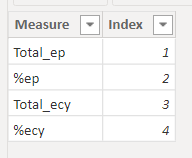
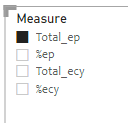
I have created a Slicer to control/filter a table.
then i created a measure like below, and i use this measure in the table visual. but it only filter one column at a time. how do i change the dax in order to enable the multiple filter.
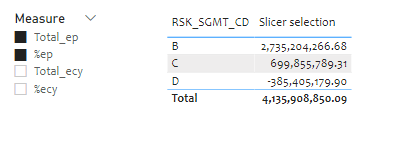
as you can see, two values were selected in the slicer, but the table only shows one column. how do i edit the dax to enable multiple value return? Thank you!
Solved! Go to Solution.
@Anonymous , That is possible using calculation groups, you need external tool for that
https://www.sqlbi.com/blog/marco/2020/07/15/creating-calculation-groups-in-power-bi-desktop/
Unfortunately switching to matrix didn't work. I think the DAX needs work, SELECTEDVALUE only return one value, but I don't know how.
@Anonymous , That is possible using calculation groups, you need external tool for that
https://www.sqlbi.com/blog/marco/2020/07/15/creating-calculation-groups-in-power-bi-desktop/
Thank you. I'll look into it and see if it fits what I try to accomplish.
The Power BI Data Visualization World Championships is back! Get ahead of the game and start preparing now!
| User | Count |
|---|---|
| 20 | |
| 11 | |
| 10 | |
| 4 | |
| 4 |
| User | Count |
|---|---|
| 32 | |
| 28 | |
| 19 | |
| 11 | |
| 10 |