Join us at FabCon Atlanta from March 16 - 20, 2026, for the ultimate Fabric, Power BI, AI and SQL community-led event. Save $200 with code FABCOMM.
Register now!The Power BI Data Visualization World Championships is back! Get ahead of the game and start preparing now! Learn more
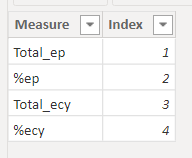
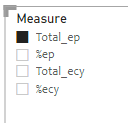
I have created a Slicer to control/filter a table.
then i created a measure like below, and i use this measure in the table visual. but it only filter one column at a time. how do i change the dax in order to enable the multiple filter.
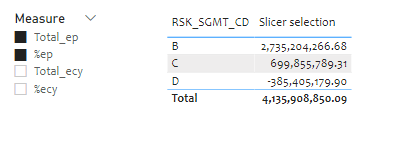
as you can see, two values were selected in the slicer, but the table only shows one column. how do i edit the dax to enable multiple value return? Thank you!
Solved! Go to Solution.
@Anonymous , That is possible using calculation groups, you need external tool for that
https://www.sqlbi.com/blog/marco/2020/07/15/creating-calculation-groups-in-power-bi-desktop/
Unfortunately switching to matrix didn't work. I think the DAX needs work, SELECTEDVALUE only return one value, but I don't know how.
@Anonymous , That is possible using calculation groups, you need external tool for that
https://www.sqlbi.com/blog/marco/2020/07/15/creating-calculation-groups-in-power-bi-desktop/
Thank you. I'll look into it and see if it fits what I try to accomplish.
The Power BI Data Visualization World Championships is back! Get ahead of the game and start preparing now!
Check out the November 2025 Power BI update to learn about new features.
| User | Count |
|---|---|
| 20 | |
| 11 | |
| 10 | |
| 4 | |
| 4 |
| User | Count |
|---|---|
| 32 | |
| 28 | |
| 19 | |
| 11 | |
| 10 |