Join us at FabCon Atlanta from March 16 - 20, 2026, for the ultimate Fabric, Power BI, AI and SQL community-led event. Save $200 with code FABCOMM.
Register now!The Power BI Data Visualization World Championships is back! Get ahead of the game and start preparing now! Learn more
Hi,
I'm pretty new to PowerBI and need help setting up an employee turnover dashboard for HR.
Requirements are to be able to see employee headcount history to date and employee turnover by: location, department and company.
My table data is set out as follows:
Employee ID | Full Name | Company | Department | Location | Job Role | Type | Date | Staff
Type = Entry / Exit to inform the Date column
Staff = 1 for each employee
Please could some please help advise the best way i could add an additional turnover column to this table (below) as a %. The usual calculation used in HR is: Total leavers / average employees in that time period.
Many thanks!
Solved! Go to Solution.
@Anonymous ,
Please see the below video.
Incase you need to use a different date which is not connect through a realtionship, you can use USERELATIONSHIP formula.
https://www.youtube.com/watch?v=sONvctPlplY
Thanks and Regards,
Harsh Nathani
@Anonymous ,
Please see if the below link works for you.
https://finance-bi.com/power-bi-employee-turnover-rate/
Regards,
Harsh Nathani
Thank you, this looks like what i'm looking for. I will have a go!
Thanks for your help.
@Anonymous ,
Great. Do let me know if it was useful.
Cheers,
Harsh Nathani
Did I help you ? Mark my post as a solution!
Appreciate with a Kudos!!
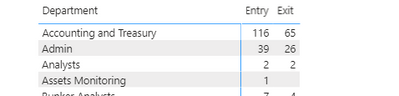
Hi, i've had a go and the measures do work but the table data that is coming through on the report tab is incorrect.
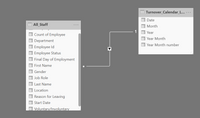
I'm wondering if it is going back to the relationship, as there are 2 date fields in one table and only one of the date fields can link to the calendar table? Please can you advise?
Thanks,
Harriet
@Anonymous ,
Please see the below video.
Incase you need to use a different date which is not connect through a realtionship, you can use USERELATIONSHIP formula.
https://www.youtube.com/watch?v=sONvctPlplY
Thanks and Regards,
Harsh Nathani
The Power BI Data Visualization World Championships is back! Get ahead of the game and start preparing now!
Check out the November 2025 Power BI update to learn about new features.
| User | Count |
|---|---|
| 20 | |
| 10 | |
| 9 | |
| 4 | |
| 4 |
| User | Count |
|---|---|
| 33 | |
| 31 | |
| 19 | |
| 12 | |
| 11 |