Hello Community,
First time posting here as I did not see the solution to my problem..
What I need is the following:
GOAL : ‘Week over week%’ calculation under 2 conditions:
(1) Picks the most recent week of data available (avoid blank) under the selected filters (‘Year’ & ‘Month’ from the Date table)
(2) Week over week calculation takes into account the days from both current vs previous week
*I want to display the most recent Week-to-date-data on a Card automatically when choosing Year & Month on a slicer. Please see detail below:
Current environment:
- Week starts on Sunday to Saturday
- Current date : May 24, 2023
- Dashboard is set up so that users will mainly choose only ‘Year’ and ‘Month’.
- Created a date table (dimDate) , where one of the columns I use mainly for this calculation where current week is ‘0’ : [Week Relative Offset] = DATEDIFF( TODAY(), dimDate[Date], week)

Requirement (1)
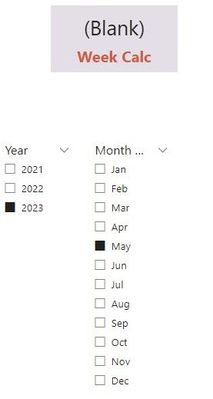
- The problem I am having is that when I select the current month (May), it returns a Blank, I am assuming because it is pointed to the last week in the current month (May 28th) where there is no data for.
- I have tried creating a measure ([Week Calc]) giving me the most recent week for 'Total QTY'. When I select 'May' on the date slicer, I need it to avoid all blank weeks and pick up on the latest week which actually contains data.
****
Week Calc =
VAR CountWeeks = MAX ( dimDate [Week Relative Offset] )
RETURN
CALCULATE(
[Total QTY],
dimDate [Week Relative Offset] = CountWeeks
)
****
Requirement 2
- Combining with the above Req. 1, when calculating Week over Week%, I would also like to incorporate days of that week (current vs previous).
- In this example, for the current week (May 21st total = 1,566) with (Sun = 847) and (Mon=719) data, I want to compare it to the same days from the previous week of May 14 where (Sun = 793) and (Mon = 782).
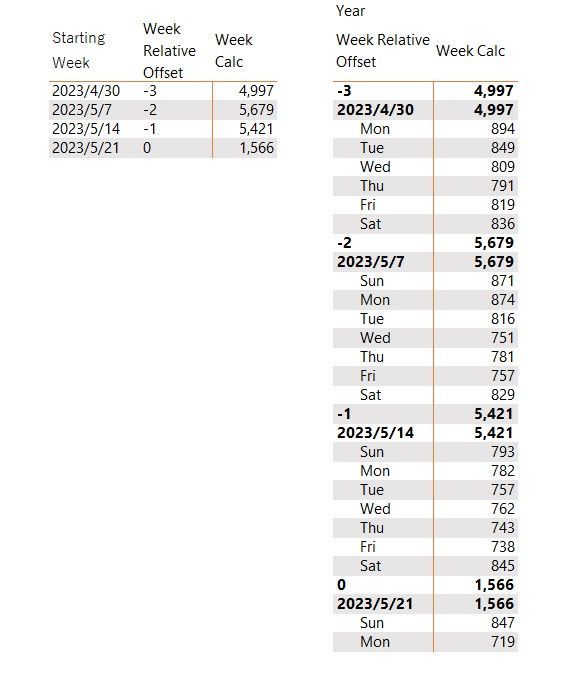
So my goal is:
WOW% for the current week to date = ( (847+719) – (793+782) ) / (793+782)
Thank you very much in advance!!


