Hi
I trying to repeat a DAX calculation discused by Pragmatic Works here https://youtu.be/eKgcLcrebzI (44mins 41 sec for the actual full expression). This was to help deal with bad data basically. So I have managed to get this to expression to work on another project with some success, but when I tried it for my new project all failed. I think it could be to do with SEARCH is a scalar function and I am needing "row by row" context; please correct me if I am getting the evaluation context aspect wrong, and I need a filter for Row Context..
So this i my example -
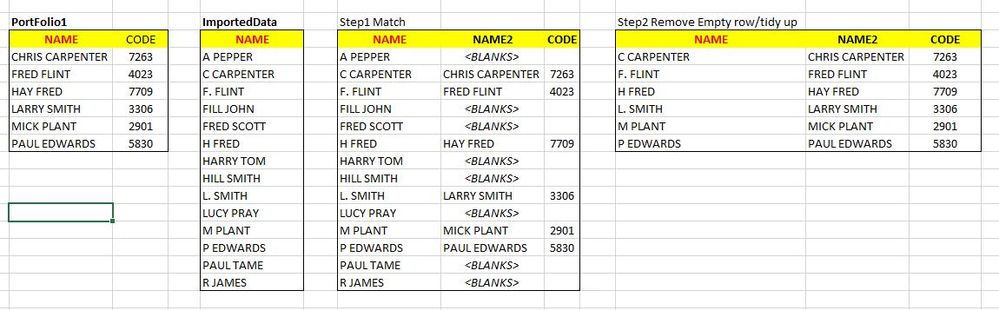 Search for similiar data in columns
Table 1: My main reference table, this has the a full user names and cost centre codes. My starting point.
Table 2: This is my imported data, excel report, there are a number of columns in this table but I am only looking at the one column called name.
Step1 Match: So I am wanting search for the name from table one and see if exists in table two, if not then just a blank field.
Step2Remove: the final or outcome once I or DAX removes the blanks. So the first column is what I imported, column two is the correct full name and its cost centre.
My model has several other table, which are a one-to-many relationship. Would this be a factor as to why the expression is maybe not working?
This is my attemp at the DAX expression:
Match Name =
calculate(
MAX('Portfolio1'[NAME]),
should there be a filter here?? SEARCH('Portfolio1'[NAME], ImportedData[NAME],,0)
)>0
The relationship with Portfolio1 to ImportedData, is a ONE-TO-MANY
Many thanks
Chris Carpenter


