cancel
Showing results for 
Search instead for 
Did you mean: 

The Power BI Data Visualization World Championships is back! Get ahead of the game and start preparing now! Learn more

Reply
giuliapiazza94
Helper IV
Helper IV

% Sales and grand TOTAL

Hi guys,

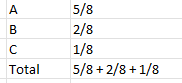
I have a table like this

giuliapiazza94_0-1639646659868.png

and I'd like a % value on grand total like this

giuliapiazza94_1-1639646708365.png

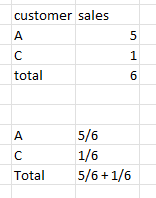
But if I filter customer (only A and C) I'd like this

giuliapiazza94_2-1639646991431.png


Can you help me please? 😊


1 ACCEPTED SOLUTION

Hi, thank you so much but I have found a easier fomula dax.


Sales % = DIVIDE (SUM(sales), calculate( SUM(sales), ALLSELECTED ('Table customers' (customer))) and work very well 😀

View solution in original post

4 REPLIES 4
Samarth_18
Community Champion
Community Champion

Hi @giuliapiazza94 ,


Create two measure like below:-

Sales_ = 
SUMX (
    SUMMARIZE ( Sales_data, Sales_data[customer], "sum", [Sales_Total] ),
    [sum]
)
Sales_Total = 
VAR maxevery =
    CALCULATE (
        sum ( 'Sales_data'[sales] ),
        FILTER ( ALL ( 'Sales_data' ), 'Sales_data'[customer] = MAX ( 'Sales_data'[customer] ) )
    )
VAR total_sum =
    calculate(SUM ( 'Sales_data'[sales] ),ALL(Sales_data))
RETURN
 DIVIDE ( maxevery, total_sum )


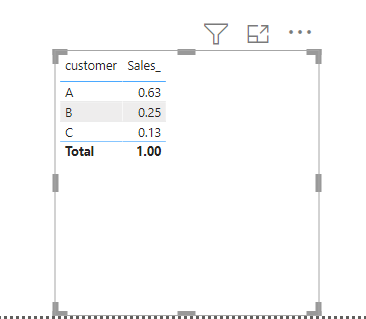
Now use customer column and sales_ measure in a table visual

Samarth_18_0-1639649297242.png


Thanks,

Samarth


Best Regards,
Samarth

If this post helps, please consider accepting it as the solution to help the other members find it more quickly.
Appreciate your Kudos!!
Connect on Linkedin

Hi, thank you so much but I have found a easier fomula dax.


Sales % = DIVIDE (SUM(sales), calculate( SUM(sales), ALLSELECTED ('Table customers' (customer))) and work very well 😀

@giuliapiazza94 , Just check if its working correctly when you select value from filter. 🙂

Best Regards,
Samarth

If this post helps, please consider accepting it as the solution to help the other members find it more quickly.
Appreciate your Kudos!!
Connect on Linkedin

it works if I filter customer and the other tables too (like calendar) 🙂

Helpful resources

Announcements
Power BI DataViz World Championships

Power BI Dataviz World Championships

The Power BI Data Visualization World Championships is back! Get ahead of the game and start preparing now!

December 2025 Power BI Update Carousel

Power BI Monthly Update - December 2025

Check out the December 2025 Power BI Holiday Recap!

FabCon Atlanta 2026 carousel

FabCon Atlanta 2026

Join us at FabCon Atlanta, March 16-20, for the ultimate Fabric, Power BI, AI and SQL community-led event. Save $200 with code FABCOMM.