Join us at FabCon Atlanta from March 16 - 20, 2026, for the ultimate Fabric, Power BI, AI and SQL community-led event. Save $200 with code FABCOMM.
Register now!The Power BI Data Visualization World Championships is back! Get ahead of the game and start preparing now! Learn more
Hi
I hope someone can help!
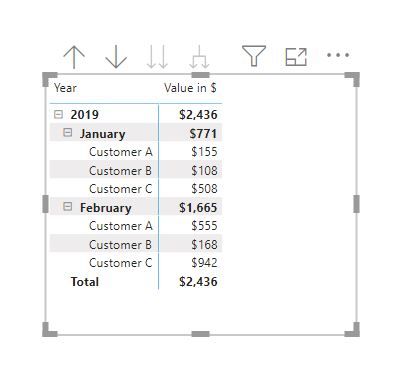
I am trying to create a calculated column or measure that will track the cumulative total of customers subscription values by month
IE Total of Customer As $ IN January, Total of Customers Bs $ In January, Total of Cusotomer As $ in February, etc
AND
Total for January, Total for February, etc
Any help greatly appreciated 🙂
i currently have the data in a table similar to the below.
| Customer | Subsctiption ID | Consumption Date | Value in $ |
| Customer A | 1 | 01/01/2019 | 45 |
| Customer A | 2 | 01/01/2019 | 20 |
| Customer A | 3 | 01/01/2019 | 15 |
| Customer A | 4 | 01/01/2019 | 75 |
| Customer B | 5 | 01/01/2019 | 78 |
| Customer B | 6 | 01/01/2019 | 15 |
| Customer B | 7 | 01/01/2019 | 15 |
| Customer C | 8 | 01/01/2019 | 463 |
| Customer C | 9 | 01/01/2019 | 45 |
| Customer A | 1 | 01/02/2019 | 499 |
| Customer A | 2 | 01/02/2019 | 42 |
| Customer A | 3 | 01/02/2019 | 12 |
| Customer A | 4 | 01/02/2019 | 2 |
| Customer B | 5 | 01/02/2019 | 85 |
| Customer B | 6 | 01/02/2019 | 0 |
| Customer B | 7 | 01/02/2019 | 83 |
| Customer C | 8 | 01/02/2019 | 846 |
| Customer C | 9 | 01/02/2019 | 96 |
Hi @robsmith1980 ,
Incase this is what you are looking for, you will need to create a Calendar Table using CalendarAuto() and link it with you consumption date.
Drag Month and Year from the Calendar and Customer and Value in $ from the Subscriber Table.
Regards,
Harsh Nathani
Did I answer your question? Mark my post as a solution! Appreciate with a Kudos!!
In case it did not help, please provide additional information and mark me with @ so that I can investigate further
Hi @robsmith1980 ,
Did the solution work for you.
Please mark as solution for other community members to benefit.
Regards,
Harsh Nathani
Did I answer your question? Mark my post as a solution! Appreciate with a Kudos!! (Click the Thumbs Up Button)
Hi Rob,
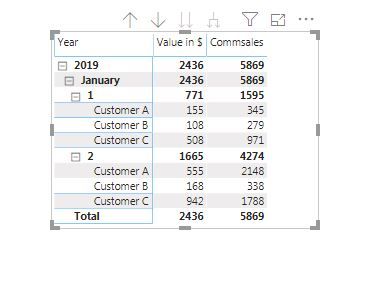
I tried to solve your query not sure if that exactly matches your requirement.
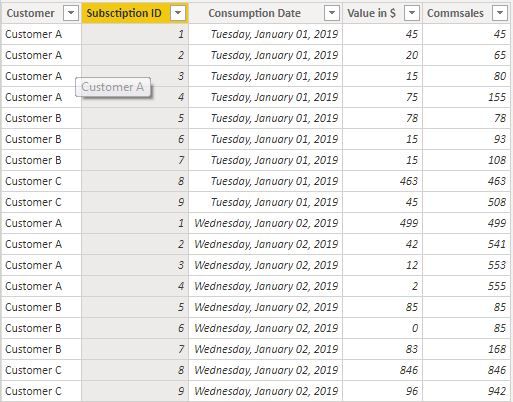
I added a calculated Column Commsales. See the table below
Dax to achieve this:
What is the expected output from your sample data?
Please see this post regarding How to Get Your Question Answered Quickly: https://community.powerbi.com/t5/Community-Blog/How-to-Get-Your-Question-Answered-Quickly/ba-p/38490
Check out the November 2025 Power BI update to learn about new features.
Advance your Data & AI career with 50 days of live learning, contests, hands-on challenges, study groups & certifications and more!
| User | Count |
|---|---|
| 21 | |
| 10 | |
| 9 | |
| 4 | |
| 4 |
| User | Count |
|---|---|
| 34 | |
| 31 | |
| 20 | |
| 13 | |
| 11 |