Join us at FabCon Atlanta from March 16 - 20, 2026, for the ultimate Fabric, Power BI, AI and SQL community-led event. Save $200 with code FABCOMM.
Register now!The Power BI Data Visualization World Championships is back! Get ahead of the game and start preparing now! Learn more
How to create SUM measure on multiple partitions?
Example (that almost works as estimated)
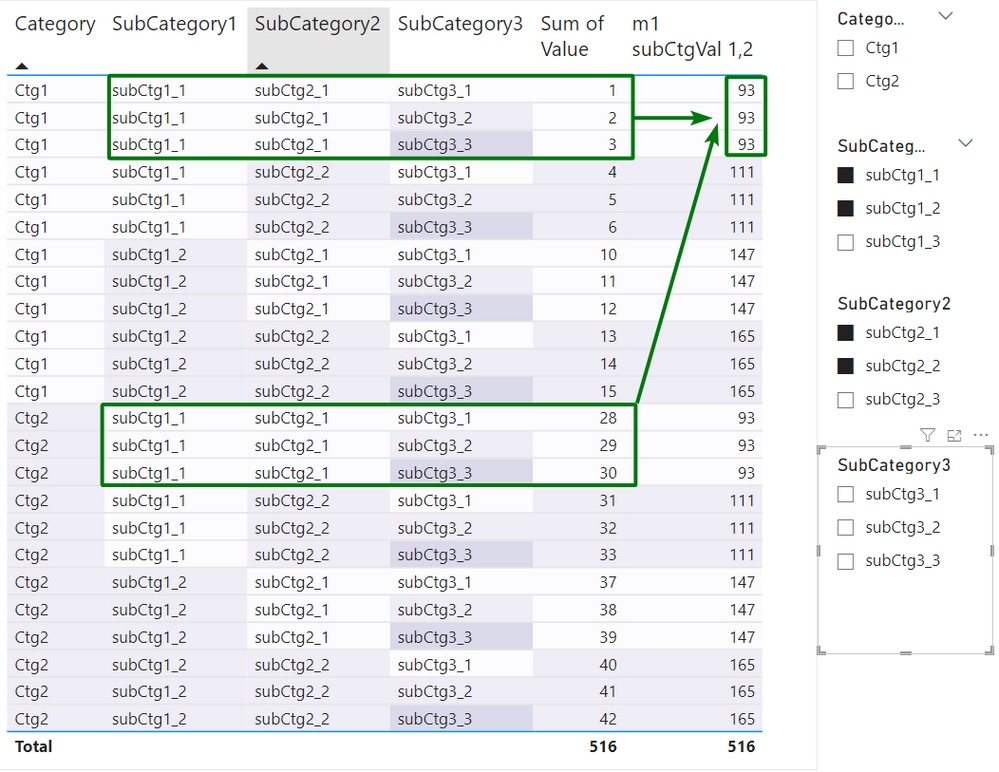
Task: create measure, that will provide Sum of values based on 2 partitions (SubCategory1, SubCategory2)
Like on this screen:
Measure definition (thanks to @AlexisOlson , details here )
m1 subCtgVal 1,2 =
VAR Result =
CALCULATE(
SUM(MyTable[Value]),
ALLSELECTED(MyTable), -- Removes RowContext Transition
SUMMARIZE(
MyTable,
MyTable[SubCategory1], -- Partition1
MyTable[SubCategory2] -- Partition2
)
)
RETURN Result
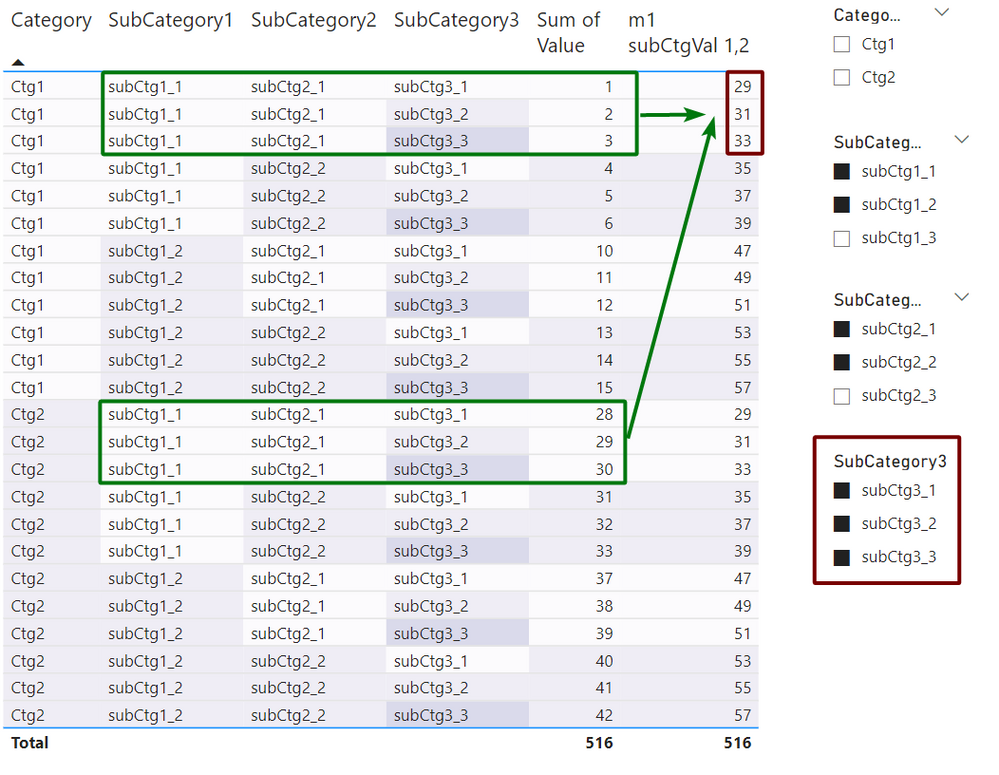
Problem: it works as estimated only until you touch SubCategory3 filter.
When you use SubCategory3 filter, it behaves like 3 partition SUM ((SubCategory1, SubCategory2, SubCategory3):
Please help to fix if possible.
Source (Download)
m1 subCtgVal 1,2 =
VAR Result =
CALCULATE(
SUM(MyTable[Value]),
ALLEXCEPT(MyTable, MyTable[SubCategory1], MyTable[SubCategory2]), -- Removes RowContext Transition
SUMMARIZE(
MyTable,
MyTable[SubCategory1], -- Partition1
MyTable[SubCategory2] -- Partition2
)
)
RETURN Result
Not as easy, unfortunately...
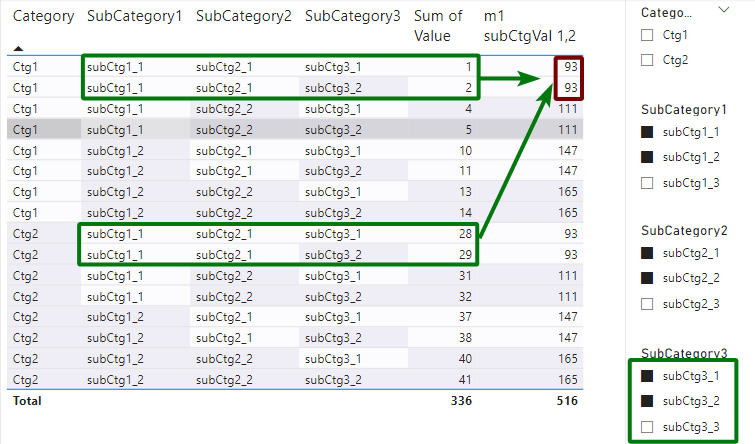
It shouldn't ignore slicer selection...
In following selection it should show 60, not 93:
The below seems to work
m1 subCtgVal 1,2 =
VAR ChosenCats = ALLSELECTED( 'MyTable'[SubCategory1], 'MyTable'[SubCategory2], 'MyTable'[SubCategory3])
VAR Result =
CALCULATE(
SUM(MyTable[Value]),
ALLEXCEPT( 'MyTable', 'MyTable'[SubCategory1], 'MyTable'[SubCategory2]),
ChosenCats,
SUMMARIZE(
MyTable,
MyTable[SubCategory1], -- Partition1
MyTable[SubCategory2] -- Partition2
)
)
RETURN Result
The ALLEXCEPT seems redundant here since we already have the SUMMARIZE putting the partition filtering back.
How about this simplified version?
VAR ChosenCats = ALLSELECTED ( MyTable )
VAR Result =
CALCULATE (
SUM ( MyTable[Value] ),
ChosenCats,
SUMMARIZE (
MyTable,
MyTable[SubCategory1], -- Partition1
MyTable[SubCategory2] -- Partition2
)
)
RETURN
Result
Edit: Hang on... This should be the same as the original measure. Let me dig in and see why that one isn't working as expected. Will update later.
Edit 2: The above appears to work fine. I think the difference is that ALLSELCTED inside of CALCULATE means transforming a shadow filter context into an explicit filter context rather than being used as a more typical table filter when we pass it in as a variable.
Works! 🙂
Just Instead of
VAR ChosenCats = ALLSELECTED( 'MyTable'[SubCategory1], 'MyTable'[SubCategory2], 'MyTable'[SubCategory3])
recommend to use
VAR ChosenCats = ALLSELECTED( MyTable )It looks like more generic solution
The Power BI Data Visualization World Championships is back! Get ahead of the game and start preparing now!
Check out the November 2025 Power BI update to learn about new features.
| User | Count |
|---|---|
| 20 | |
| 10 | |
| 9 | |
| 4 | |
| 4 |
| User | Count |
|---|---|
| 34 | |
| 31 | |
| 20 | |
| 12 | |
| 11 |