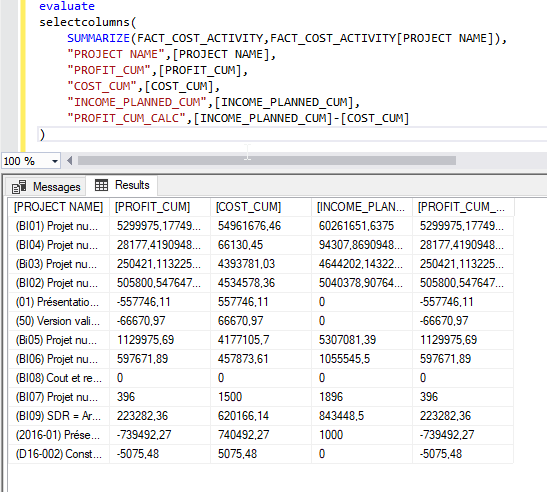
The broken one is PROFIT_CUM.
PROFIT_CUM_CALC is where I recreate the measure using the aggregated 'base measures' instead of aggregating the PROFIT_CUM measure. Here's the code for the evaluate :
evaluate
selectcolumns(
    SUMMARIZE(FACT_COST_ACTIVITY,FACT_COST_ACTIVITY[PROJECT NAME]),
    "PROJECT NAME",[PROJECT NAME],
    "PROFIT_CUM",[PROFIT_CUM],
    "COST_CUM",[COST_CUM],
    "INCOME_PLANNED_CUM",[INCOME_PLANNED_CUM],
    "PROFIT_CUM_CALC",[INCOME_PLANNED_CUM]-[COST_CUM]
)
Here's the full breakdown of the broken measure :
PROFIT_CUM := [INCOME_PLANNED_CUM]-[COST_CUM]
INCOME_PLANNED_CUM:=
SUMX(
    VALUES(FACT_COST_ACTIVITY[ID_DIM_ACTIVITY]);
    VAR
        LAST_DATES =
        CALCULATE(
            MAX(FACT_COST_ACTIVITY[THE_DATE])
        )

RETURN
    CALCULATE(
        sum(FACT_COST_ACTIVITY[INCOME_PLANNED_CUM_COL]);
        DIM_DATE[THE_DATE] = LAST_DATES
    )
)
INCOME_PLANNED_CUM_COL :=
IF(
FACT_COST_ACTIVITY[EXPENSE_ONLY_COL]; //BOOLEAN column in related dimension
FACT_COST_ACTIVITY[COST_REAL_CUM]; //column
FACT_COST_ACTIVITY[INCOME_BUDGET] //column
*
MIN(
FACT_COST_ACTIVITY[QUANTITY_RATIO_CUM_COL];
1
)
)QUANTITY_RATIO_CUM_COL :=
IF(
FACT_COST_ACTIVITY[EXPENSE_ONLY_COL] = 1 && FACT_COST_ACTIVITY[QUANTITY_REAL_CUM] > 0;
1;
DIVIDE(
FACT_COST_ACTIVITY[QUANTITY_REAL_CUM]; //column
FACT_COST_ACTIVITY[QUANTITY_BUDGET_COL]; //column (in related table)
0
)
)COST_CUM:=
SUMX(
VALUES(FACT_COST_ACTIVITY[ID_DIM_ACTIVITY]);
VAR
LAST_DATES =
CALCULATE(
MAX(FACT_COST_ACTIVITY[THE_DATE])
)
RETURN
CALCULATE(
sum(FACT_COST_ACTIVITY[COST_REAL_CUM]); //column
DIM_DATE[THE_DATE] = LAST_DATES
)
)
+
IF(not ISBLANK([QUANTITY_CUM]);0)