Join us at FabCon Atlanta from March 16 - 20, 2026, for the ultimate Fabric, Power BI, AI and SQL community-led event. Save $200 with code FABCOMM.
Register now!The Power BI Data Visualization World Championships is back! Get ahead of the game and start preparing now! Learn more
Hello everyone!
To summarize my infos:
WHAT I HAVE: A database that shows when (DATE) a new machine (MACHINE) was added in my mini factoty and its level of importance (LEVEL OF IMPORTANCE) [Check out the picture in the end of this post].
WHAT I WANT: I want to check out the evolution of my machines in my mini factory detailing it by level of importance according when they were bought (DATE) [Check out the picture in the end of this post].
WHAT I'VE TRIED: I've tried this DAX Measure:
Picture:
Thanks for helping me!
Hi,
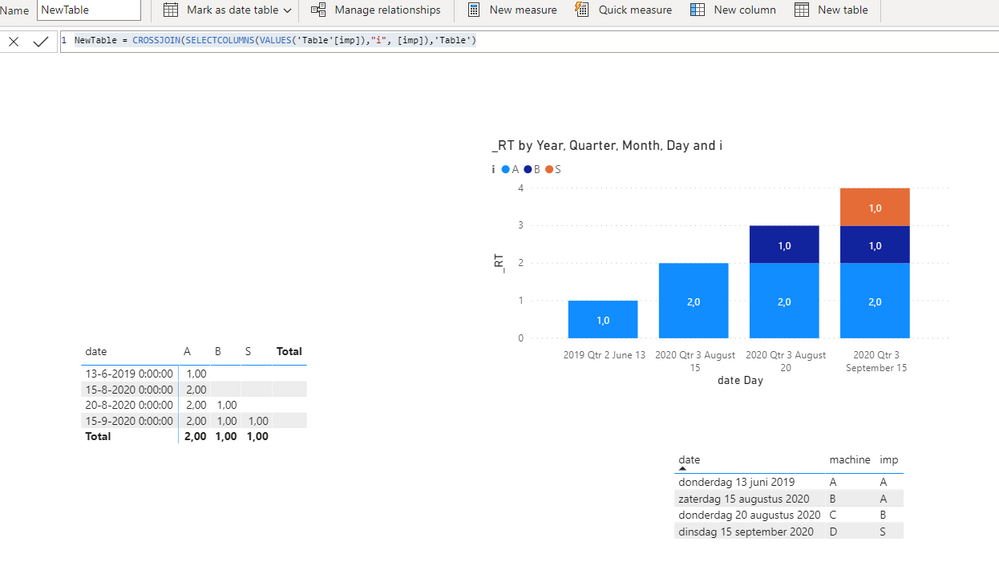
The code below should do the trick.
_RT =
var _no = CALCULATE(DISTINCTCOUNT(NewTable[i]), ALL(NewTable[i]))
return
COUNTROWS(FILTER(ALL(NewTable), NewTable[imp] = SELECTEDVALUE(NewTable[i]) && [date] <= MAX(NewTable[date]))) / _no
It does require you to transform your table / add a new version of it:
NewTable = CROSSJOIN(SELECTCOLUMNS(VALUES('Table'[imp]),"i", [imp]),'Table')
In this video I show how to create the dashboard as seen below.
Link to the file here.
Pls mark as solution if so. Thumbs up for the effort are appreciated.
Kind regards,
Steve.
Proud to be a Super User!
Awesome Keyboard Shortcusts in Power BI, thumbs up if you like the article
My Community Blog Articles (check them out!)
My Blog - Power M code to automatically detect column types -
How to create test data using DAX!
The Power BI Data Visualization World Championships is back! Get ahead of the game and start preparing now!
| User | Count |
|---|---|
| 14 | |
| 5 | |
| 5 | |
| 3 | |
| 3 |
| User | Count |
|---|---|
| 24 | |
| 10 | |
| 10 | |
| 6 | |
| 6 |