Join us at FabCon Atlanta from March 16 - 20, 2026, for the ultimate Fabric, Power BI, AI and SQL community-led event. Save $200 with code FABCOMM.
Register now!The Power BI Data Visualization World Championships is back! Get ahead of the game and start preparing now! Learn more
Hi folks!
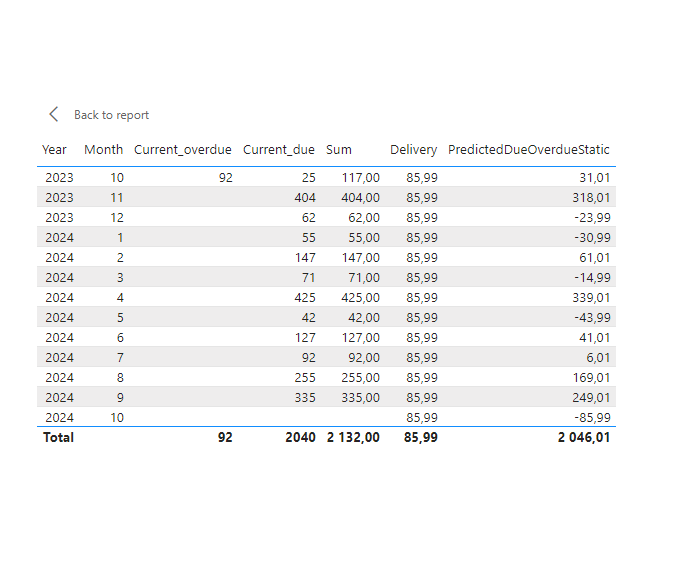
I'm currenrly stucked with occured issue. I want to create measure over "PredictedDueOverdueStatic" measure which is given below. All my trials returned either very big number or the same number as "PredictedDueOverdueStatic" measure.
I have DimDate table with single relationship with facttable[case_deadline] and employeetable[date].
I have following measures:
Current_overdue =
CALCULATE(SUM(facttable[cases]),table[status]="Overdue")
Current_due =
CALCULATE(SUM(facttable[cases]),table[status]="Due")
Sum =
SUM(table[sum_cases])
Delivery = (105.5*[EmployeeAllocation])/28.6
&&
EmployeeAllocation =
var _fte = SUMX(FILTER(EmployeeTable,CONTAINSSTRING(EmployeeTable[TaskName],"highrisk")),EmployeeTable[declaredhours]/8)
var days =
CALCULATE(
DISTINCTCOUNT(EmployeeTable[Date]),
FILTER(
EmployeeTable,
WEEKDAY([Date],2)<6
&& EmployeeTable[Date] <= TODAY()
))
var _f = CALCULATE(DIVIDE(_fte,days,0))
return
_f
PredictedDueOverdueStatic =
[Sum] - [Delivery]
Any help would be valuable.
Thank you.
bump.
Thanks
Any help would be very valuable.
Thanks
Without the sample data (model) and/or the .pbix file tough to suggest.
Assuming you have YYYY-MM and use that in the visual and try first.
Second step, replace with the year and month as separate columns
PredictedDueOverdueStatic =
-- Running Total
IF (
-- To avoid showing for no sum rows
not ISBLANK(table[Sum]),
-- RT Calculation
SUMX(
-- Get the list of all dates, in my case I have YYYY-MM in the visual
filter(ALLSELECTED( 'Date'), 'Date'[YYYY-MM] <= SELECTEDVALUE('Date'[YYYY-MM]) ),
-- sum diff of two measures
[Sum] - [Delivery]
)
)
---------- below works ------------------
Based on the Adventure works dw 2020, I can recommend this ...
-- Measures created
Total Sales = sum(Sales[Sales Amount])
North America Sales =
SUMX( FILTER( ALLSELECTED('Sales Territory'), 'Sales Territory'[Group] = "North America" ), [Total Sales])
RT measure:
RT Sales - Rest of the world =
IF (
-- To avoid showing for no sales months
not ISBLANK(Sales[Total Sales]),
-- RT Calculation
SUMX(
-- Get the list of all dates, in my case I have YYYY-MM in the visual
filter(ALLSELECTED( 'Date'), 'Date'[YYYY-MM] <= SELECTEDVALUE('Date'[YYYY-MM]) ),
-- Sum diff of two measures
[Total Sales] - [North America Sales]
)
)
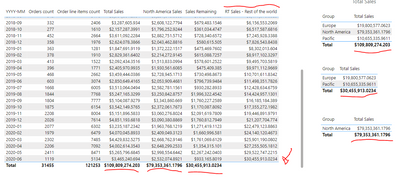
Hope this gives some direction for your need!
Hi,
Thanks for your suggestion.
Unfortunately, it did not help even with some minor measure tuning.
I changed my SQL query to get all customers id so I used calculate(count),status="Due". For overdue I created calculated column with the following logic: if status="Overdue" then return today date. then count of a new column with userrelationship in it. Then sum overdue+due. Another steps are similar.
The Power BI Data Visualization World Championships is back! Get ahead of the game and start preparing now!
Check out the November 2025 Power BI update to learn about new features.
| User | Count |
|---|---|
| 19 | |
| 11 | |
| 9 | |
| 4 | |
| 4 |
| User | Count |
|---|---|
| 35 | |
| 32 | |
| 20 | |
| 12 | |
| 10 |