
cancel
Showing results for 
Search instead for 
Did you mean: 

The Power BI Data Visualization World Championships is back! Get ahead of the game and start preparing now! Learn more

Reply
francofava
New Member

Reverse sort in date table

I have created a date table using the code below. 

Accounting_Posting_Date = 

ADDCOLUMNS (

CALENDAR (DATE(2015,1,1), DATE(2030,12,31)),

"DateAsInteger", FORMAT ( [Date], "YYYYMMDD" ),

"Period", FORMAT ( [Date], "YYYYMM" ),

"Year", YEAR ( [Date] ),

"Monthnumber", FORMAT ( [Date], "MM" ),

"YearMonthnumber", FORMAT ( [Date], "YYYY/MM" ),

"YearMonthShort", FORMAT ( [Date], "YYYY/mmm" ),

"MonthNameShort", FORMAT ( [Date], "mmm" ),

"MonthNameLong", FORMAT ( [Date], "mmmm" ),

"DayOfWeekNumber", WEEKDAY ( [Date] ),

"DayOfWeek", FORMAT ( [Date], "dddd" ),

"DayOfWeekShort", FORMAT ( [Date], "ddd" ),

"Quarter", "Q" & FORMAT ( [Date], "Q" ),

"YearQuarter", FORMAT ( [Date], "YYYY" ) & "/Q" & FORMAT ( [Date], "Q" )

)
 
I am using the PERIOD in a matrix column, but cannot manage to reverse the periods.
francofava_0-1670505571853.png
 
I've tried creating a new column
 "RANK_" = -Accounting_Posting_date[Period] 
and then use it to sort the period column but I get an error message about a circular dependency.
francofava_1-1670505774279.png

thanks!

1 ACCEPTED SOLUTION
francofava
New Member

I've managed to solve it by adding the column directly when creating the table and then referring to it when sorting the other columns

Accounting_Posting_Date =
ADDCOLUMNS (
CALENDAR (DATE(2015,1,1), DATE(2030,12,31)),
"DateAsInteger", FORMAT ( [Date], "YYYYMMDD" ),
"Period", FORMAT ( [Date], "YYYYMM" ),
"Year", YEAR ( [Date] ),
"Monthnumber", FORMAT ( [Date], "MM" ),
"YearMonthnumber", FORMAT ( [Date], "YYYY/MM" ),
"YearMonthShort", FORMAT ( [Date], "YYYY/mmm" ),
"MonthNameShort", FORMAT ( [Date], "mmm" ),
"MonthNameLong", FORMAT ( [Date], "mmmm" ),
"DayOfWeekNumber", WEEKDAY ( [Date] ),
"DayOfWeek", FORMAT ( [Date], "dddd" ),
"DayOfWeekShort", FORMAT ( [Date], "ddd" ),
"Quarter", "Q" & FORMAT ( [Date], "Q" ),
"YearQuarter", FORMAT ( [Date], "YYYY" ) & "/Q" & FORMAT ( [Date], "Q" ),
"Period_rank", -value(FORMAT ( [Date], "YYYYMM" ))
)

View solution in original post

4 REPLIES 4
francofava
New Member

I've managed to solve it by adding the column directly when creating the table and then referring to it when sorting the other columns

Accounting_Posting_Date =
ADDCOLUMNS (
CALENDAR (DATE(2015,1,1), DATE(2030,12,31)),
"DateAsInteger", FORMAT ( [Date], "YYYYMMDD" ),
"Period", FORMAT ( [Date], "YYYYMM" ),
"Year", YEAR ( [Date] ),
"Monthnumber", FORMAT ( [Date], "MM" ),
"YearMonthnumber", FORMAT ( [Date], "YYYY/MM" ),
"YearMonthShort", FORMAT ( [Date], "YYYY/mmm" ),
"MonthNameShort", FORMAT ( [Date], "mmm" ),
"MonthNameLong", FORMAT ( [Date], "mmmm" ),
"DayOfWeekNumber", WEEKDAY ( [Date] ),
"DayOfWeek", FORMAT ( [Date], "dddd" ),
"DayOfWeekShort", FORMAT ( [Date], "ddd" ),
"Quarter", "Q" & FORMAT ( [Date], "Q" ),
"YearQuarter", FORMAT ( [Date], "YYYY" ) & "/Q" & FORMAT ( [Date], "Q" ),
"Period_rank", -value(FORMAT ( [Date], "YYYYMM" ))
)
Uspace87
Resolver III
Resolver III

@francofava 


you should create an index and then sort you "Period" column by the index. 


Try to sort it by "Month Number" and see what happens.

thanks @Uspace87 

Can I do this in DAX?

the few examples that I've tried also gave me the circular dependency error

@francofava 


you don't need to do it in dax.


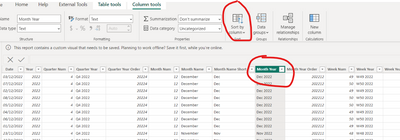
In you calendar table just sort you "Period" column by "Month_Year". The first time it will do it descending and the ascending or the other way around.


Uspace87_0-1670507822690.pngUspace87_1-1670507842094.png


Helpful resources

Announcements
Power BI DataViz World Championships

Power BI Dataviz World Championships

The Power BI Data Visualization World Championships is back! Get ahead of the game and start preparing now!

December 2025 Power BI Update Carousel

Power BI Monthly Update - December 2025

Check out the December 2025 Power BI Holiday Recap!

FabCon Atlanta 2026 carousel

FabCon Atlanta 2026

Join us at FabCon Atlanta, March 16-20, for the ultimate Fabric, Power BI, AI and SQL community-led event. Save $200 with code FABCOMM.