Join us at FabCon Atlanta from March 16 - 20, 2026, for the ultimate Fabric, Power BI, AI and SQL community-led event. Save $200 with code FABCOMM.
Register now!The Power BI Data Visualization World Championships is back! Get ahead of the game and start preparing now! Learn more
I have a dataset that looks like this -->
| Category | Brand | SKU | COGS |
| Candy Bars | Chocolate King | 6oz | $ 1.50 |
| Candy Bars | Chocolate King | 10oz | $ 2.00 |
| Candy Bars | Crunchie Bar | 8oz | $ 1.85 |
| Gum | Chewy Gum | Fruit Flavored | $ 0.50 |
| Gum | Chewy Gum | Mint Flavored | $ 0.65 |
When returning the value for Cogs, I only want to display the value for the SKU level.
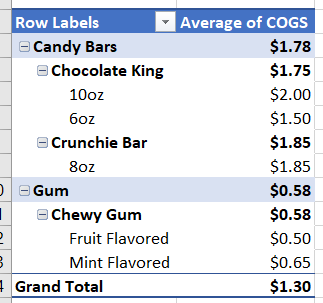
So in the matrix visual, right now it looks like this (using AVERAGE Dax formula) -->
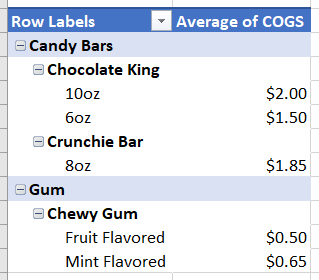
Instead I only want this -->
Help?
Solved! Go to Solution.
@nj-matt , you can use isinscope and make the value blank when SKU is not in scope
example measure, where COGS is a measure too
if(not(isinscope(Table[SKU])), blank(), [COGS])
Refer this blog
https://www.kasperonbi.com/use-isinscope-to-get-the-right-hierarchy-level-in-dax/
@nj-matt , you can use isinscope and make the value blank when SKU is not in scope
example measure, where COGS is a measure too
if(not(isinscope(Table[SKU])), blank(), [COGS])
Refer this blog
https://www.kasperonbi.com/use-isinscope-to-get-the-right-hierarchy-level-in-dax/
That did it, thanks!
The Power BI Data Visualization World Championships is back! Get ahead of the game and start preparing now!
| User | Count |
|---|---|
| 19 | |
| 13 | |
| 10 | |
| 4 | |
| 4 |
| User | Count |
|---|---|
| 31 | |
| 28 | |
| 19 | |
| 11 | |
| 10 |