Join us at FabCon Atlanta from March 16 - 20, 2026, for the ultimate Fabric, Power BI, AI and SQL community-led event. Save $200 with code FABCOMM.
Register now!The Power BI Data Visualization World Championships is back! Get ahead of the game and start preparing now! Learn more
I've already make an calculated table in visual studio and it look like this.
CountRows is created using CalculatedColumn where it will count how many rows with the same year and month.
I need to show not just exact same years and month, but also last year and last 2 year in my visualization.
How to make dax measure to show last year and last 2 year without using aggregate like sum? Because CountRows already counted.
I want when my filter year = 2022 ; month = 12 it will show value from 2021-12 for my last year visualisation.
*sorry for my bad english, hope you all can understand.
Hi @agustira97 ,
you could try using the following:
= CALCULATE(SUM(countrows]), SAMEPERIODLASTYEAR(DateTime[DateKey]))the SUM() will not alternate the aggregation you expect.
For 2 years, you can try to use instead :
DATEADD(dates, -2, year) Feel free to adjust the period or the timeframe you want.
I hope that was useful.
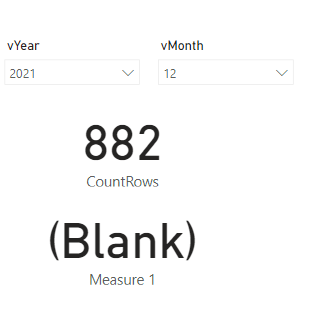
Thank you for your answer... So I made a new calculated column name 'FullDate' that return date format.
I've also already try run just dateadd, and yeah I got the date that I want.
But when I used it with
CALCULATE(SUM(CalculatedTable1[CountRows]), DATEADD(CalculatedTable1[Full_Date], -1, year)) , the result in my PBI is blank? why?
Check out the November 2025 Power BI update to learn about new features.
Advance your Data & AI career with 50 days of live learning, contests, hands-on challenges, study groups & certifications and more!
| User | Count |
|---|---|
| 19 | |
| 10 | |
| 9 | |
| 4 | |
| 4 |
| User | Count |
|---|---|
| 31 | |
| 31 | |
| 20 | |
| 12 | |
| 12 |