Join us at FabCon Atlanta from March 16 - 20, 2026, for the ultimate Fabric, Power BI, AI and SQL community-led event. Save $200 with code FABCOMM.
Register now!The Power BI Data Visualization World Championships is back! Get ahead of the game and start preparing now! Learn more
Folks -
Im looking for a solution to something I would imagine to be very simple. Please help!
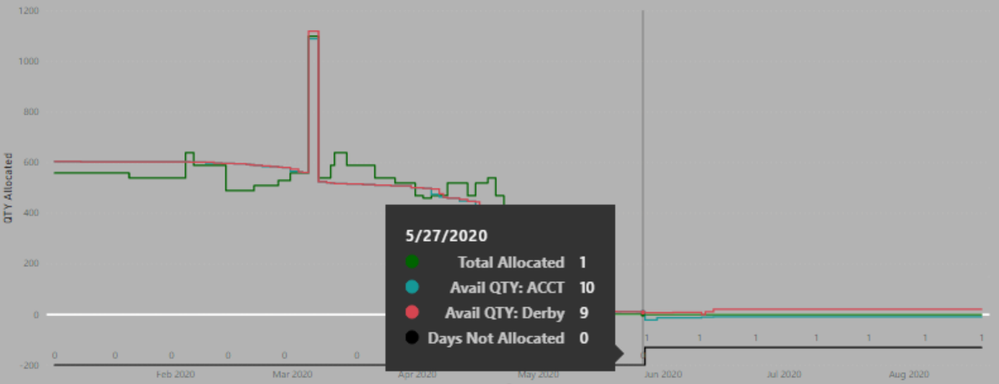
In the below screenshot you will see a visual which illustrates when specific product's inventory levels go to 0. Once 0, another column starts to calculate "Days not Allocated". I would like to retrieve the LASTDATE that SKU had a Days Not Allocated of 0.
For the selected SKU that date would be 5/27/2020.
If anymore information is need please let me know.
Thanks!
Solved! Go to Solution.
@AlexAlberga727 - Perhaps:
Measure = MAXX(FILTER('Table',[Avail Qty] > 0),[Date])
If a column. If a measure, create a table variable that represents the data in your visual (summarized by date for instance, use ADDCOLUMNS to add your measure, do your MAXX over that table variable.
Try the following:
measure = CALCULATE(LASTDATE(Table[Date]), [DaysNotAllocated] = 0)
If my answer resolves your issue, please give Kudos and mark as solution.
Thank you
@AlexAlberga727 - Perhaps:
Measure = MAXX(FILTER('Table',[Avail Qty] > 0),[Date])
If a column. If a measure, create a table variable that represents the data in your visual (summarized by date for instance, use ADDCOLUMNS to add your measure, do your MAXX over that table variable.
The Power BI Data Visualization World Championships is back! Get ahead of the game and start preparing now!
| User | Count |
|---|---|
| 19 | |
| 13 | |
| 8 | |
| 4 | |
| 4 |
| User | Count |
|---|---|
| 29 | |
| 19 | |
| 18 | |
| 11 | |
| 10 |