FabCon is coming to Atlanta
Join us at FabCon Atlanta from March 16 - 20, 2026, for the ultimate Fabric, Power BI, AI and SQL community-led event. Save $200 with code FABCOMM.
Register now!- Power BI forums
- Get Help with Power BI
- Desktop
- Service
- Report Server
- Power Query
- Mobile Apps
- Developer
- DAX Commands and Tips
- Custom Visuals Development Discussion
- Health and Life Sciences
- Power BI Spanish forums
- Translated Spanish Desktop
- Training and Consulting
- Instructor Led Training
- Dashboard in a Day for Women, by Women
- Galleries
- Data Stories Gallery
- Themes Gallery
- Contests Gallery
- QuickViz Gallery
- Quick Measures Gallery
- Visual Calculations Gallery
- Notebook Gallery
- Translytical Task Flow Gallery
- TMDL Gallery
- R Script Showcase
- Webinars and Video Gallery
- Ideas
- Custom Visuals Ideas (read-only)
- Issues
- Issues
- Events
- Upcoming Events
The Power BI Data Visualization World Championships is back! Get ahead of the game and start preparing now! Learn more
- Power BI forums
- Forums
- Get Help with Power BI
- DAX Commands and Tips
- Re: Retrieve rows for max date and 2nd to max date
- Subscribe to RSS Feed
- Mark Topic as New
- Mark Topic as Read
- Float this Topic for Current User
- Bookmark
- Subscribe
- Printer Friendly Page


- Mark as New
- Bookmark
- Subscribe
- Mute
- Subscribe to RSS Feed
- Permalink
- Report Inappropriate Content
Retrieve rows for max date and 2nd to max date
I have a filter that retrieves the correct set of rows for the most recent date in a table:
Solved! Go to Solution.


- Mark as New
- Bookmark
- Subscribe
- Mute
- Subscribe to RSS Feed
- Permalink
- Report Inappropriate Content
Hi @FarmerKenny
Try this:
Occupation Summary =
VAR _A =
    FILTER( 'SitStat', 'SitStat'[MetricName] = "Occupation Summary" )
VAR _1D =
    CALCULATE(
        MAX( 'SitStat'[create_dt] ),
        FILTER( 'SitStat', 'SitStat'[MetricName] = "Occupation Summary" )
    )
VAR _2D =
    CALCULATE(
        MAX( 'SitStat'[create_dt] ),
        FILTER(
            ALL( 'SitStat' ),
            'SitStat'[MetricName] = "Occupation Summary"
                && 'SitStat'[create_dt] < _1D
        )
    )
RETURN
    FILTER( _A, 'SitStat'[create_dt] = _1D || 'SitStat'[create_dt] = _2D )
If this post helps, please consider accepting it as the solution to help the other members find it more quickly.
Appreciate your Kudos!!
LinkedIn: www.linkedin.com/in/vahid-dm/
- Mark as New
- Bookmark
- Subscribe
- Mute
- Subscribe to RSS Feed
- Permalink
- Report Inappropriate Content
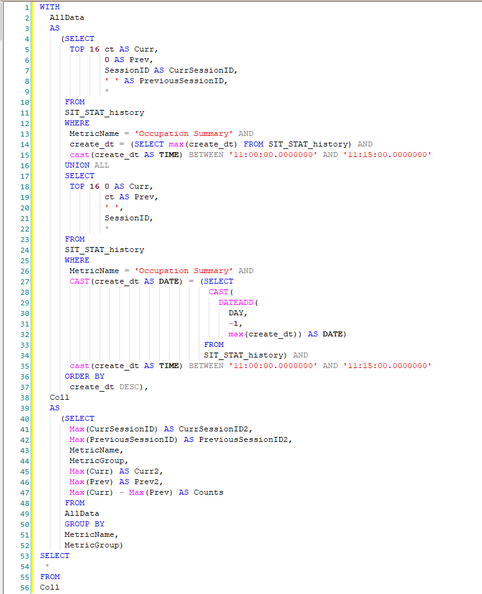
I worked on this over the weekend, and since DAX is new to me, I wrote it in T-SQL. (Perhaps MS should support a SQL to DAX conversion utility...)
- Mark as New
- Bookmark
- Subscribe
- Mute
- Subscribe to RSS Feed
- Permalink
- Report Inappropriate Content
Hi @FarmerKenny
Try this:
Occupation Summary =
VAR _A =
    FILTER( 'SitStat', 'SitStat'[MetricName] = "Occupation Summary" )
VAR _1D =
    CALCULATE(
        MAX( 'SitStat'[create_dt] ),
        FILTER( 'SitStat', 'SitStat'[MetricName] = "Occupation Summary" )
    )
VAR _2D =
    CALCULATE(
        MAX( 'SitStat'[create_dt] ),
        FILTER(
            ALL( 'SitStat' ),
            'SitStat'[MetricName] = "Occupation Summary"
                && 'SitStat'[create_dt] < _1D
        )
    )
RETURN
    FILTER( _A, 'SitStat'[create_dt] = _1D || 'SitStat'[create_dt] = _2D )
If this post helps, please consider accepting it as the solution to help the other members find it more quickly.
Appreciate your Kudos!!
LinkedIn: www.linkedin.com/in/vahid-dm/
- Mark as New
- Bookmark
- Subscribe
- Mute
- Subscribe to RSS Feed
- Permalink
- Report Inappropriate Content
@VahidDM , that was the closest to the actual solution. I appreciate your work here, unfortunately the the rows are all for the same day, just duplicated. I solved this probem over the weekend, but I had to do it in SQL, which I will post below.

- Mark as New
- Bookmark
- Subscribe
- Mute
- Subscribe to RSS Feed
- Permalink
- Report Inappropriate Content

- Mark as New
- Bookmark
- Subscribe
- Mute
- Subscribe to RSS Feed
- Permalink
- Report Inappropriate Content
Sorry, I should have used a variable so I didn't forget about that filter in the RETURN part. (It's hard to write DAX blind...)
This is what I meant to write:
Occupation Summary =
VAR FilterMetric = FILTER ( 'SitStat', 'SitStat'[MetricName] = "Occupation Summary" )
VAR Top2Dates =
    TOPN (
        2,
        SUMMARIZE ( FilterMetric, 'SitStat'[create_dt] ),
        'SitStat'[create_dt]
    )
RETURN
    FILTER ( FilterMetric, 'SitStat'[create_dt] IN Top2Dates )
- Mark as New
- Bookmark
- Subscribe
- Mute
- Subscribe to RSS Feed
- Permalink
- Report Inappropriate Content
Sorry, that did not add the previous days rows to the return set. Thank you for your prompt response, though.
- Mark as New
- Bookmark
- Subscribe
- Mute
- Subscribe to RSS Feed
- Permalink
- Report Inappropriate Content
The TOPN function returns the top N rows of a table, so if there are multiple rows with the same maximal date, you'll have to adjust what you're taking TOPN over.
So something a bit more complicated like this:
Occupation Summary =
VAR Top2Dates =
    TOPN (
        2,
        SUMMARIZE (
            FILTER ( 'SitStat', 'SitStat'[MetricName] = "Occupation Summary" ),
            'SitStat'[create_dt]
        ),
        'SitStat'[create_dt]
    )
RETURN
FILTER ( 'SitStat', 'SitStat'[create_dt] IN Top2Dates )- Mark as New
- Bookmark
- Subscribe
- Mute
- Subscribe to RSS Feed
- Permalink
- Report Inappropriate Content
Alexis, that is getting closer, but it doubled up on the rows for the filter, but the dates are not the highest or second highest.

- Mark as New
- Bookmark
- Subscribe
- Mute
- Subscribe to RSS Feed
- Permalink
- Report Inappropriate Content
Sorry, I don't think I can do much better coding blind.
- Mark as New
- Bookmark
- Subscribe
- Mute
- Subscribe to RSS Feed
- Permalink
- Report Inappropriate Content
The TOPN function might work for you.
Try this:
Occupation Summary =
TOPN (
    2,
    FILTER ( 'SitStat', 'SitStat'[MetricName] = "Occupation Summary" ),
    'SitStat'[create_dt]
)
- Mark as New
- Bookmark
- Subscribe
- Mute
- Subscribe to RSS Feed
- Permalink
- Report Inappropriate Content
Thanks, I know that coding with out a database to access is tough. I appreciate your attempts, and I will post the successful code here when I get this to work.
- Mark as New
- Bookmark
- Subscribe
- Mute
- Subscribe to RSS Feed
- Permalink
- Report Inappropriate Content
I worked on this over the weekend, and since DAX is new to me, I wrote it in T-SQL. (Perhaps MS should support a SQL to DAX conversion utility...)

Helpful resources

Power BI Dataviz World Championships
The Power BI Data Visualization World Championships is back! Get ahead of the game and start preparing now!

Power BI Monthly Update - November 2025
Check out the November 2025 Power BI update to learn about new features.

FabCon Atlanta 2026
Join us at FabCon Atlanta, March 16-20, for the ultimate Fabric, Power BI, AI and SQL community-led event. Save $200 with code FABCOMM.

| User | Count |
|---|---|
| 20 | |
| 10 | |
| 9 | |
| 4 | |
| 4 |


| User | Count |
|---|---|
| 32 | |
| 31 | |
| 18 | |
| 12 | |
| 11 |


