cancel
Showing results for 
Search instead for 
Did you mean: 

We've captured the moments from FabCon & SQLCon that everyone is talking about, and we are bringing them to the community, live and on-demand. Starts on April 14th. Register now

Reply
C_PriceOH
Frequent Visitor

Remove Table Filters While Using Virtual Table Measures

Hello!


I'm currently trying to return the max value from a virtual table that I will use in another virtual table, along with removing the table filters when I place this max value in a table visual. Specifically, the 'MAX Efficiency Score' measure will be utilized in the 'Efficiency Score' measure (see 'var table7' in the 'Efficiency Score' measure). 


Efficiency Score = 
var table1 = SUMMARIZE('Fuel (Traveling)', 'Fuel (Traveling)'[Driver Fleet Name], 'Fuel (Traveling)'[DriverName/ID], "EffScore", -[True Avg. Travel Difference])
var table2 = ADDCOLUMNS(table1, "DriverCountFleet", CALCULATE(DISTINCTCOUNT('Fuel (Traveling)'[DriverID]), ALLEXCEPT('Fuel (Traveling)', 'Fuel (Traveling)'[Driver Fleet Name], 'Combined Calendar'[Date - Copy])), "OrderCountFleet", CALCULATE(DISTINCTCOUNT('Fuel (Traveling)'[Order ID]), ALLEXCEPT('Fuel (Traveling)', 'Fuel (Traveling)'[Driver Fleet Name], 'Combined Calendar'[Date - Copy])), "OrderCountDriver", CALCULATE(DISTINCTCOUNT('Fuel (Traveling)'[Order ID])) + 0)
var table4 = ADDCOLUMNS(table2, "AvgOrders", DIVIDE([OrderCountFleet], [DriverCountFleet]))
var table5 = ADDCOLUMNS(table4, "Ratio", DIVIDE([OrderCountDriver], [AvgOrders]))
var table6 = ADDCOLUMNS(table5, "Score", IF([Ratio] > 1, [EffScore] * 1, [EffScore] * [Ratio]))
var table7 = ADDCOLUMNS(table6, "FinalScore", [Score]/[MAX Efficiency Score])
var table8 = SUMX(table7, [Score])
return table8
MAX Efficiency Score = 
var table1 = SUMMARIZE('Fuel (Traveling)', 'Fuel (Traveling)'[Driver Fleet Name], 'Fuel (Traveling)'[DriverName/ID], "EffScore", -[True Avg. Travel Difference])
var table2 = ADDCOLUMNS(table1, "DriverCountFleet", CALCULATE(DISTINCTCOUNT('Fuel (Traveling)'[DriverID]), ALLEXCEPT('Fuel (Traveling)', 'Fuel (Traveling)'[Driver Fleet Name], 'Combined Calendar'[Date - Copy])), "OrderCountFleet", CALCULATE(DISTINCTCOUNT('Fuel (Traveling)'[Order ID]), ALLEXCEPT('Fuel (Traveling)', 'Fuel (Traveling)'[Driver Fleet Name], 'Combined Calendar'[Date - Copy])), "OrderCountDriver", CALCULATE(DISTINCTCOUNT('Fuel (Traveling)'[Order ID])) + 0)
var table4 = ADDCOLUMNS(table2, "AvgOrders", DIVIDE([OrderCountFleet], [DriverCountFleet]))
var table5 = ADDCOLUMNS(table4, "Ratio", DIVIDE([OrderCountDriver], [AvgOrders]))
var table6 = ADDCOLUMNS(table5, "Score", IF([Ratio] > 1, [EffScore] * 1, [EffScore] * [Ratio]))
var final = ADDCOLUMNS(table6, "MaxValue", MAXX(table6, [Score]))
return CALCULATE(MAXX(final, [MaxValue]), ALL('Fuel (Traveling)'))


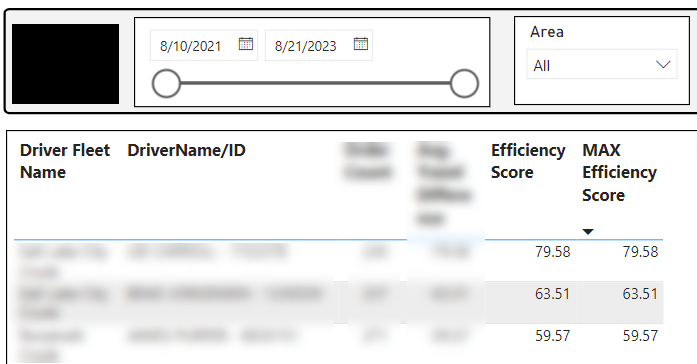
My current issue is that I can't get the 'MAX Efficiency Score' measure to return the max score of 79.58 (in the case below) for each row of my table visual below. For background, the table visual below contains the same fields (Driver Fleet Name and DriverName/ID) that are used in the SUMMARIZE functions above. I also set the dashboard up so the 'Efficiency Score' and 'MAX Efficiency Score' values dynamically update when the date slider is used, which is why I referenced the 'Combined Calendar[Date - Copy] field in the measures above. I'd really appreciate any help I could get on this issue. Thanks!
 

C_PriceOH_0-1693591869097.png


3 REPLIES 3
C_PriceOH
Frequent Visitor

Hi @some_bih, thank you for those two possible solutions! With the 'Max Efficiency Score' measure, I'm only looking to interact with the date slicer and not the 'Driver Fleet Name' and 'DriverName/ID' filters in the table. I believe the ALLEXCEPT is function I'll need, but I'm still returning the max value within each Driver Fleet/DriverName combination instead of the overall max. Do you see anything I could be doing wrong?


MAX Efficiency Score = 
var table1 = SUMMARIZE('Fuel (Traveling)', 'Fuel (Traveling)'[Driver Fleet Name], 'Fuel (Traveling)'[DriverName/ID], "EffScore", -[True Avg. Travel Difference])
var table2 = ADDCOLUMNS(table1, "DriverCountFleet", CALCULATE(DISTINCTCOUNT('Fuel (Traveling)'[DriverID]), ALLEXCEPT('Fuel (Traveling)', 'Fuel (Traveling)'[Driver Fleet Name], 'Combined Calendar'[Date - Copy])), "OrderCountFleet", CALCULATE(DISTINCTCOUNT('Fuel (Traveling)'[Order ID]), ALLEXCEPT('Fuel (Traveling)', 'Fuel (Traveling)'[Driver Fleet Name], 'Combined Calendar'[Date - Copy])), "OrderCountDriver", CALCULATE(DISTINCTCOUNT('Fuel (Traveling)'[Order ID])) + 0)
var table4 = ADDCOLUMNS(table2, "AvgOrders", DIVIDE([OrderCountFleet], [DriverCountFleet]))
var table5 = ADDCOLUMNS(table4, "Ratio", DIVIDE([OrderCountDriver], [AvgOrders]))
var table6 = ADDCOLUMNS(table5, "Score", IF([Ratio] > 1, [EffScore] * 1, [EffScore] * [Ratio]))
var final = ADDCOLUMNS(table6, "MaxValue", CALCULATE(MAXX(table6, [Score]), ALLEXCEPT('Combined Calendar','Combined Calendar'[Date - Copy])))
return MAXX(final, [MaxValue])


C_PriceOH_0-1693920055668.png


Hi @C_PriceOH I do not see overall model and relationships, your measure so I do not want to spend your time on checking what could be "solution" when you want to use ALLEXCEPT, I do not have enought data / info.

I suggest you to create both measure I provide you and check if it works, if yes insert them into your visuals and "be happy" and accept solution.


Did I answer your question? Mark my post as a solution!

Proud to be a Super User!


some_bih
Community Champion
Community Champion

Hi @C_PriceOH as I do not understand your exact situation with visuals (do you interact with slicer / filter) please find two possible solution

1. Max Effeciency Score AllSel= CALCULATE ([Efficiency Score], ALLSELECTED()) -- this will include all your selection with slicer / filter

2. Max Effeciency Score All= CALCULATE ([Efficiency Score], ALL()) -- this will NOT include your selection with slicer / filter


Hope this help. Kudos appreciate / accept as solution.


Did I answer your question? Mark my post as a solution!

Proud to be a Super User!


Helpful resources

Announcements
New to Fabric survey Carousel

New to Fabric Survey

If you have recently started exploring Fabric, we'd love to hear how it's going. Your feedback can help with product improvements.

Power BI DataViz World Championships carousel

Power BI DataViz World Championships - June 2026

A new Power BI DataViz World Championship is coming this June! Don't miss out on submitting your entry.

Join our Fabric User Panel

Join our Fabric User Panel

Share feedback directly with Fabric product managers, participate in targeted research studies and influence the Fabric roadmap.

March Power BI Update Carousel

Power BI Community Update - March 2026

Check out the March 2026 Power BI update to learn about new features.