cancel
Showing results for 
Search instead for 
Did you mean: 

The Power BI Data Visualization World Championships is back! Get ahead of the game and start preparing now! Learn more

Reply
Anonymous
Not applicable

Refering to Variable Column - Simple Case

Hello My Friends,


How Are You?


So I Have a Table Like this:


Travel IDMotiveValue
1A1000
2A2000
1B1000
1C2000
2B

1000

3A3000
4A2000
4B1000


So, what i need is to take All Travels IDs wich has the same number and SUM it!


If the Sum's Value is between 0 and 1000 Show it as Low Cost

If the Sum's Value is Over 1001 Show it as High Cost


After that I Wanna count how many Low Cost, How Many High Cost Travels i have


Is it possible to do this without creating a New Table? Just creating a New Measure?


I Was trying to create a new measure, than summarize my table and finally do an "If", but i can not refer to my Variables Columns using "IF"


Awnser =

VAR MyVar = Summarize('Table'; 'Table'[Travel ID]; "TOTAL"; Sum('Table'[Travel ID]))

RETURN

If ( MyVar[TOTAL] < 1001 ; "Low Cost"; "High Cost)


1 ACCEPTED SOLUTION
camargos88
Community Champion
Community Champion

Hi @Anonymous ,


First create a table with your ranges:

Capture.PNG


After create this measure:

Measure =
VAR _tb = ADDCOLUMNS(SUMMARIZE('Table'; 'Table'[Travel ID]; "Total"; SUM('Table'[Value])); "RangeDesc";
SELECTCOLUMNS(FILTER(tb_range; [Total] >= tb_range[Min] && [Total] <= tb_range[Max]); "RangeDesc"; tb_range[DescriptionRange]))
RETURN COUNTX(_tb; [RangeDesc])
 
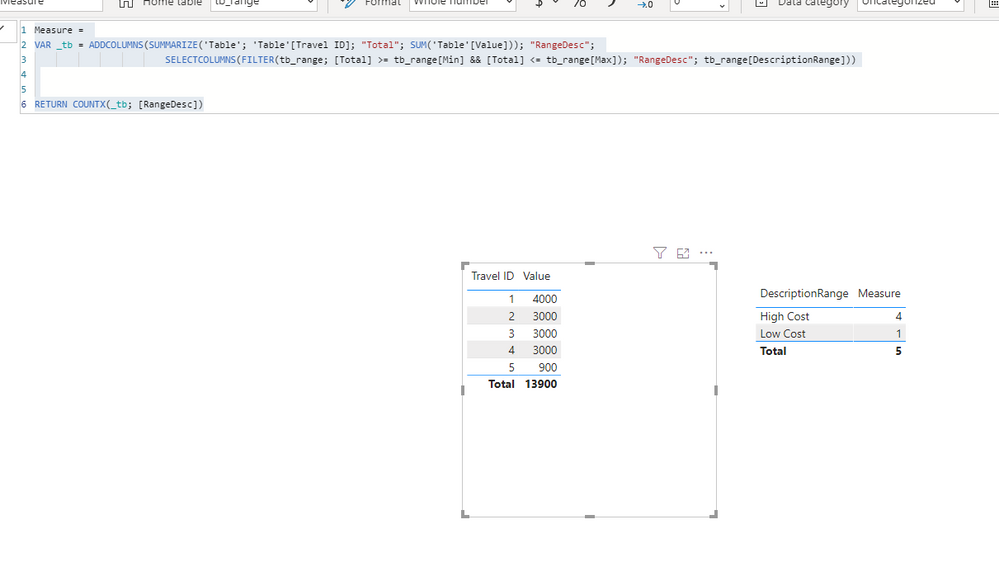
Capture 1.PNG
 
I've inputed another value, less than 1000 to try the results.
 
Did I answer your question? Mark my post as a solution!
Ricardo


Did I answer your question? Mark my post as a solution!

Proud to be a Super User!


View solution in original post

1 REPLY 1
camargos88
Community Champion
Community Champion

Hi @Anonymous ,


First create a table with your ranges:

Capture.PNG


After create this measure:

Measure =
VAR _tb = ADDCOLUMNS(SUMMARIZE('Table'; 'Table'[Travel ID]; "Total"; SUM('Table'[Value])); "RangeDesc";
SELECTCOLUMNS(FILTER(tb_range; [Total] >= tb_range[Min] && [Total] <= tb_range[Max]); "RangeDesc"; tb_range[DescriptionRange]))
RETURN COUNTX(_tb; [RangeDesc])
 
Capture 1.PNG
 
I've inputed another value, less than 1000 to try the results.
 
Did I answer your question? Mark my post as a solution!
Ricardo


Did I answer your question? Mark my post as a solution!

Proud to be a Super User!


Helpful resources

Announcements
Power BI DataViz World Championships

Power BI Dataviz World Championships

The Power BI Data Visualization World Championships is back! Get ahead of the game and start preparing now!

November Power BI Update Carousel

Power BI Monthly Update - November 2025

Check out the November 2025 Power BI update to learn about new features.

FabCon Atlanta 2026 carousel

FabCon Atlanta 2026

Join us at FabCon Atlanta, March 16-20, for the ultimate Fabric, Power BI, AI and SQL community-led event. Save $200 with code FABCOMM.