cancel
Showing results for 
Search instead for 
Did you mean: 

Level up your Power BI skills this month - build one visual each week and tell better stories with data! Get started

Reply
S3
Helper III
Helper III

Re:

Hello, 

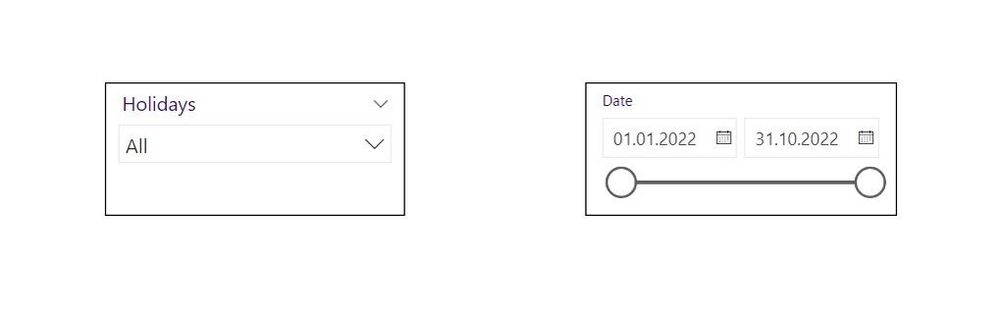
I would like to ask if it's possible to change the date slicer based on choosing from the slicer containing Holiday names, so if one choose Easter Holidays, the toggle of the date would change to the dates of that holiday. Or have I been searching in vain because such solution doesn't exist? (I've been trying for several days now)

FE2BBFBF-4C55-4B76-BDEF-770BEFB232A0_4_5005_c.jpeg


1 ACCEPTED SOLUTION
Anonymous
Not applicable

Hi  @S3 ,

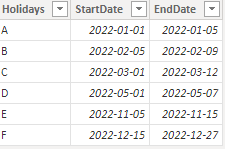
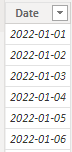
I created some data:

HolidayTable:

vyangliumsft_0-1667454852361.png

Table:

vyangliumsft_1-1667454852364.png


You might consider using List Slicer.
Here are the steps you can follow:

1. Create measure.

Flag =
var _select=SELECTEDVALUE('HolidayTable'[Holidays])
var _selectstart=MAXX(FILTER(ALL(HolidayTable),'HolidayTable'[Holidays]=_select),[StartDate])
var _selectEnd=MAXX(FILTER(ALL(HolidayTable),'HolidayTable'[Holidays]=_select),[EndDate])
return
IF(
   MAX('Table'[Date])>=_selectstart&&
  MAX('Table'[Date])<=_selectEnd,1,0)

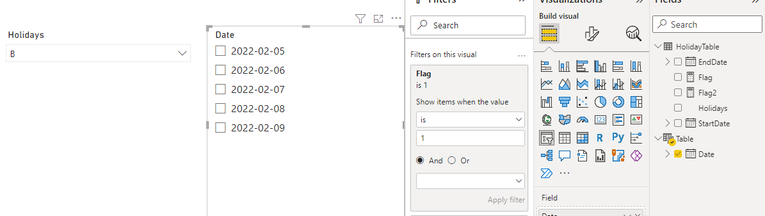
2. Place [Flag]in Filters, set is=1, apply filter.

vyangliumsft_2-1667454852365.png

3. Result:

vyangliumsft_3-1667454852371.png


Best Regards,

Liu Yang

If this post helps, then please consider Accept it as the solution to help the other members find it more quickly

View solution in original post

4 REPLIES 4
Anonymous
Not applicable

Hi  @S3 ,

I created some data:

HolidayTable:

vyangliumsft_0-1667454852361.png

Table:

vyangliumsft_1-1667454852364.png


You might consider using List Slicer.
Here are the steps you can follow:

1. Create measure.

Flag =
var _select=SELECTEDVALUE('HolidayTable'[Holidays])
var _selectstart=MAXX(FILTER(ALL(HolidayTable),'HolidayTable'[Holidays]=_select),[StartDate])
var _selectEnd=MAXX(FILTER(ALL(HolidayTable),'HolidayTable'[Holidays]=_select),[EndDate])
return
IF(
   MAX('Table'[Date])>=_selectstart&&
  MAX('Table'[Date])<=_selectEnd,1,0)

2. Place [Flag]in Filters, set is=1, apply filter.

vyangliumsft_2-1667454852365.png

3. Result:

vyangliumsft_3-1667454852371.png


Best Regards,

Liu Yang

If this post helps, then please consider Accept it as the solution to help the other members find it more quickly

Hello @v-yangliu-msft 

thanks a lot. The date list changes according to the other slicer, however, if I choose Select All in the date list, then all dates will get selected, even the ones that are not in the list (I know this because the value in the table will show the value of all dates) and if I choose another holiday after having chosen certain dates of the options of the previous holiday, then the dates I chose before will stay until I choose manually each date of the new dates showing..

Thank you @Anonymous !

amitchandak
Super User
Super User

@S3 , Date Range slicer, usually do not respond to other slicers

Share with Power BI Enthusiasts: Full Power BI Video (20 Hours) YouTube
Microsoft Fabric Series 60+ Videos YouTube
Microsoft Fabric Hindi End to End YouTube

Helpful resources

Announcements
April Power BI Update Carousel

Power BI Monthly Update - April 2026

Check out the April 2026 Power BI update to learn about new features.

Fabric SQL PBI Data Days

Data Days 2026 coming soon!

Sign up to receive a private message when registration opens and key events begin.

New to Fabric survey Carousel

New to Fabric Survey

If you have recently started exploring Fabric, we'd love to hear how it's going. Your feedback can help with product improvements.

Power BI DataViz World Championships carousel

Power BI DataViz World Championships - June 2026

A new Power BI DataViz World Championship is coming this June! Don't miss out on submitting your entry.