Join us at FabCon Atlanta from March 16 - 20, 2026, for the ultimate Fabric, Power BI, AI and SQL community-led event. Save $200 with code FABCOMM.
Register now!The Power BI Data Visualization World Championships is back! Get ahead of the game and start preparing now! Learn more
Hello,
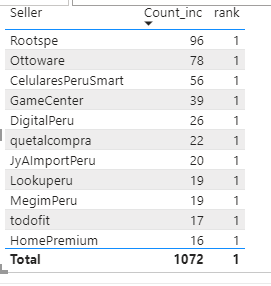
I have created the following measures, but what I get is not what I am expecting. I can fix the problem but changing the all function for
Solved! Go to Solution.
Since you don't likely have a single row for each seller in that table, you will not get the expected behavior. I think you will need separate measures for your different scenarios (when different columns in the table), or have them all as variables and choose from them with ISINSCOPE, etc.. If you will have those 3 columns, you can use ALL( ) with all 3 in it.
Pat
To learn more about Power BI, follow me on Twitter or subscribe on YouTube.
Since you don't likely have a single row for each seller in that table, you will not get the expected behavior. I think you will need separate measures for your different scenarios (when different columns in the table), or have them all as variables and choose from them with ISINSCOPE, etc.. If you will have those 3 columns, you can use ALL( ) with all 3 in it.
Pat
To learn more about Power BI, follow me on Twitter or subscribe on YouTube.
I never heard of isinscope. Could you please write an example with column seller and store please
I don't recommend that approach. You would be writing mulitple variables each with a different RANKX expression. Writing a Rankx measure for each scenario is simpler.
Pat
To learn more about Power BI, follow me on Twitter or subscribe on YouTube.
The Power BI Data Visualization World Championships is back! Get ahead of the game and start preparing now!
| User | Count |
|---|---|
| 13 | |
| 5 | |
| 5 | |
| 3 | |
| 3 |
| User | Count |
|---|---|
| 25 | |
| 10 | |
| 10 | |
| 6 | |
| 6 |