cancel
Showing results for 
Search instead for 
Did you mean: 

The Power BI Data Visualization World Championships is back! Get ahead of the game and start preparing now! Learn more

Reply
Chelsea_Yu
Regular Visitor

Ranking by a measure and default "Others" as the last one of the ranking

Hello,

Your help on this will be appreciated.

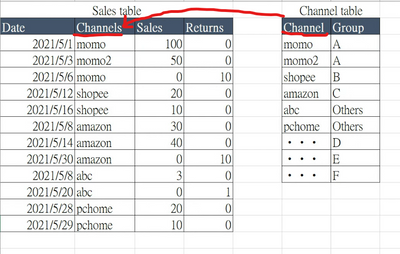
There are 2 tables and I wanna creat a ranking measure that rank by "Net Sales" measure for "Group".

Chelsea_Yu_0-1656254385759.png

Net Sales = SUM(Sales) - SUM(Returns)

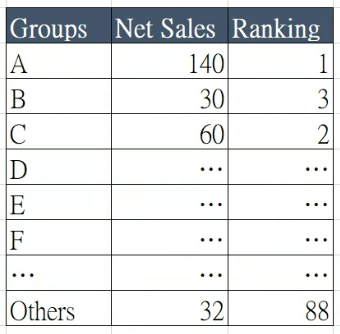
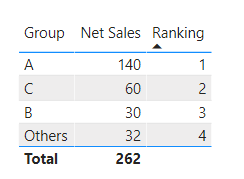
I want to see the Group ranking by net sales like below...

and no matter what amount of net sales does Group "Others" get, always put "Others" at the last one of the ranking.

Chelsea_Yu_1-1656254980967.png

How could I write the RANKX DAX ?

Thanks in advance.


1 ACCEPTED SOLUTION
tamerj1
Super User
Super User

Hi @Chelsea_Yu 
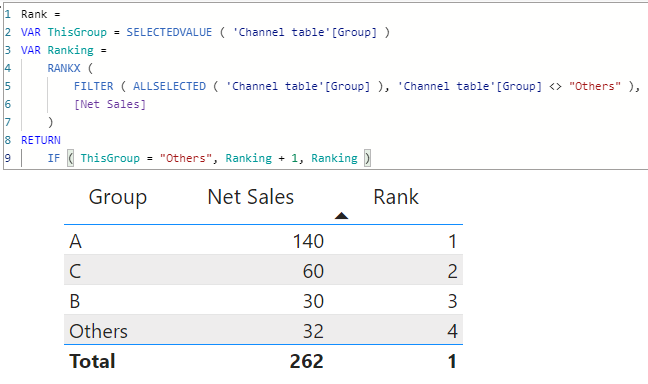
Please use the following measure

1.png


Rank = 
VAR ThisGroup = SELECTEDVALUE ( 'Channel table'[Group] )
VAR Ranking =
    RANKX ( 
        FILTER ( ALLSELECTED ( 'Channel table'[Group] ), 'Channel table'[Group] <> "Others" ),
        [Net Sales]
    )
RETURN
    IF ( ThisGroup = "Others", Ranking + 1, Ranking )


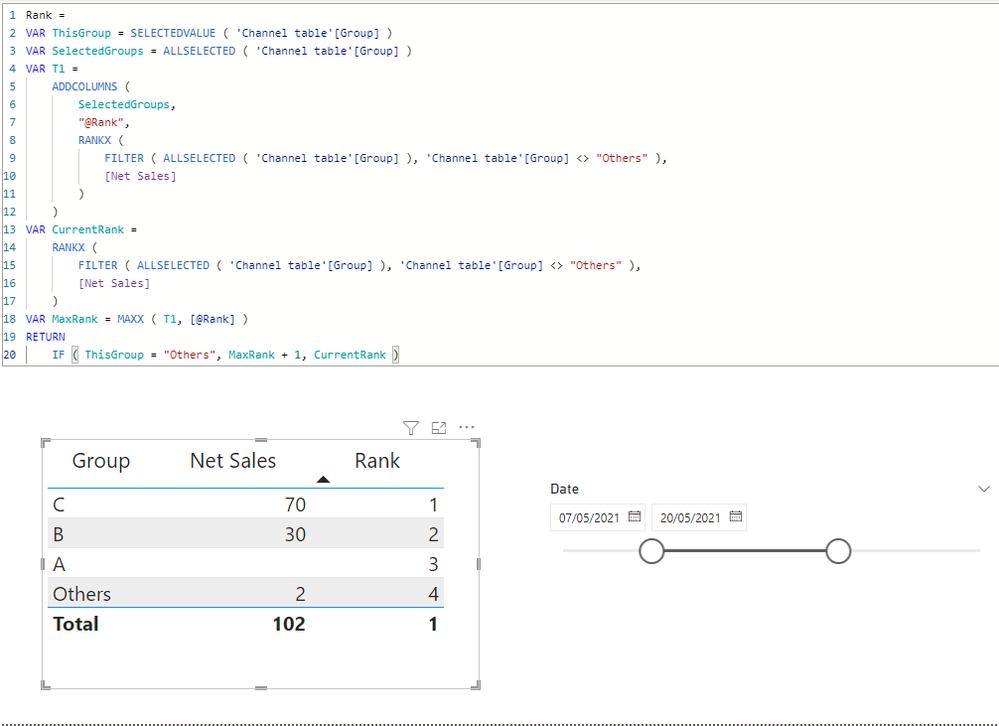
Another method:

1.png


Rank = 
VAR ThisGroup = SELECTEDVALUE ( 'Channel table'[Group] )
VAR SelectedGroups = ALLSELECTED ( 'Channel table'[Group] )
VAR T1 = 
    ADDCOLUMNS ( 
        SelectedGroups, 
        "@Rank",
        RANKX ( 
            FILTER ( ALLSELECTED ( 'Channel table'[Group] ), 'Channel table'[Group] <> "Others" ),
            [Net Sales]
        )
    )
VAR CurrentRank = 
    RANKX ( 
        FILTER ( ALLSELECTED ( 'Channel table'[Group] ), 'Channel table'[Group] <> "Others" ),
        [Net Sales]
    )
VAR MaxRank = MAXX ( T1, [@Rank] )
RETURN
    IF ( ThisGroup = "Others", MaxRank + 1, CurrentRank )


View solution in original post

5 REPLIES 5
tamerj1
Super User
Super User

Hi @Chelsea_Yu 
Please use the following measure

1.png


Rank = 
VAR ThisGroup = SELECTEDVALUE ( 'Channel table'[Group] )
VAR Ranking =
    RANKX ( 
        FILTER ( ALLSELECTED ( 'Channel table'[Group] ), 'Channel table'[Group] <> "Others" ),
        [Net Sales]
    )
RETURN
    IF ( ThisGroup = "Others", Ranking + 1, Ranking )


Another method:

1.png


Rank = 
VAR ThisGroup = SELECTEDVALUE ( 'Channel table'[Group] )
VAR SelectedGroups = ALLSELECTED ( 'Channel table'[Group] )
VAR T1 = 
    ADDCOLUMNS ( 
        SelectedGroups, 
        "@Rank",
        RANKX ( 
            FILTER ( ALLSELECTED ( 'Channel table'[Group] ), 'Channel table'[Group] <> "Others" ),
            [Net Sales]
        )
    )
VAR CurrentRank = 
    RANKX ( 
        FILTER ( ALLSELECTED ( 'Channel table'[Group] ), 'Channel table'[Group] <> "Others" ),
        [Net Sales]
    )
VAR MaxRank = MAXX ( T1, [@Rank] )
RETURN
    IF ( ThisGroup = "Others", MaxRank + 1, CurrentRank )


Hi @tamerj1 ,


Yes this is what I need!!!

Thank you tamerj1, and sorry for the late reply. 🙂

Best Regards,

Chelsea

v-cazheng-msft
Community Support
Community Support

Hi @Chelsea_Yu,


You may try this Calculated column.

Ranking =
VAR rankExceptOthers =
    RANKX (
        FILTER ( 'Channel table', 'Channel table'[Group] <> "Others" ),
        CALCULATE('Channel table'[Net Sales],ALLEXCEPT('Channel table','Channel table'[Group])),
        ,
        DESC,
        DENSE
    )
VAR countGroup =
    CALCULATE ( DISTINCTCOUNT ( 'Channel table'[Group] ), ALL ( 'Channel table' ) )
RETURN
    IF ( 'Channel table'[Group] = "Others", countGroup, rankExceptOthers )


The result looks like this.

vcazhengmsft_0-1656466215866.png


Also, attached the pbix file as reference.


If there is any post helps, then please consider Accept it as the solution to help the other members find it more quickly. If I misunderstand your needs or you still have problems on it, please feel free to let me know. Thanks a lot!


Best Regards,

Community Support Team _ Caiyun

Hi Caiyun, @v-cazheng-msft 

Thanks for your reply.
But I've found that it dosen't work when I want to rank the group within a certain period of time.
Please refer to the table below, the ranking is not accroding to the net sales during 5/13 - 5/31.

Chelsea_Yu_0-1656674347178.png

Your reply seems pretty close to the solution, could the way may be creating a ranking measure by temp table in dax instead of a column ?


Best Regards,
Chelsea


tamerj1
Super User
Super User

Hi @Chelsea_Yu 

you my try

RANKX (
VALUES ( Channel[Groups] ),

IF ( 

Channel[Groups] = "Others",

0,

[Net Sales]
)

)


Helpful resources

Announcements
Power BI DataViz World Championships

Power BI Dataviz World Championships

The Power BI Data Visualization World Championships is back! Get ahead of the game and start preparing now!

December 2025 Power BI Update Carousel

Power BI Monthly Update - December 2025

Check out the December 2025 Power BI Holiday Recap!

FabCon Atlanta 2026 carousel

FabCon Atlanta 2026

Join us at FabCon Atlanta, March 16-20, for the ultimate Fabric, Power BI, AI and SQL community-led event. Save $200 with code FABCOMM.