cancel
Showing results for 
Search instead for 
Did you mean: 

Data Days is here! Join us now for 60+ days of learning, challenges, and connection. Learn more

Reply
rahulmmenon
New Member

RANKX formula confusion

Dear Team,


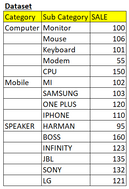
I have a dataset in which Category, Sub Category and Sales are given.

I wish to create a matrix in which i want to see RANK based Category and Sub category when selected.

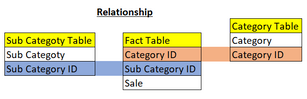
I have created one Fact table and 2 Dimention tables (Category table & Sub category table) and established relationships.

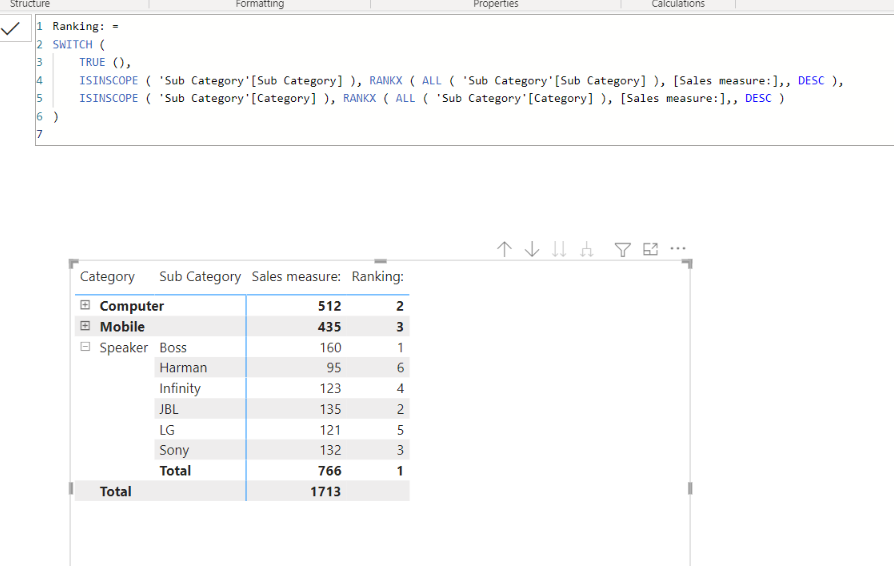
I want to see RANKS of each category in Matrix and while expanding the category button, rank should modify based on Sub category within same category.

Please note: sales column is from "Fact table", Sub category column from "Sub category table" and Category column from "Category table" as shown below.

rahulmmenon_0-1673784374260.png   

rahulmmenon_1-1673784642115.png


rahulmmenon_2-1673785030064.png


1 ACCEPTED SOLUTION
Jihwan_Kim
Super User
Super User

Hi,

I suggest creating a data model like below.

Jihwan_Kim_0-1673794517281.png


Jihwan_Kim_1-1673794806319.png


Sales measure: = 
SUM( Data[Sales] )


Ranking: =
SWITCH (
    TRUE (),
    ISINSCOPE ( 'Sub Category'[Sub Category] ), RANKX ( ALL ( 'Sub Category'[Sub Category] ), [Sales measure:],, DESC ),
    ISINSCOPE ( 'Sub Category'[Category] ), RANKX ( ALL ( 'Sub Category'[Category] ), [Sales measure:],, DESC )
)


If this post helps, then please consider accepting it as the solution to help other members find it faster, and give a big thumbs up.


Click here to visit my LinkedIn page

View solution in original post

2 REPLIES 2
Jihwan_Kim
Super User
Super User

Hi,

I suggest creating a data model like below.

Jihwan_Kim_0-1673794517281.png


Jihwan_Kim_1-1673794806319.png


Sales measure: = 
SUM( Data[Sales] )


Ranking: =
SWITCH (
    TRUE (),
    ISINSCOPE ( 'Sub Category'[Sub Category] ), RANKX ( ALL ( 'Sub Category'[Sub Category] ), [Sales measure:],, DESC ),
    ISINSCOPE ( 'Sub Category'[Category] ), RANKX ( ALL ( 'Sub Category'[Category] ), [Sales measure:],, DESC )
)


If this post helps, then please consider accepting it as the solution to help other members find it faster, and give a big thumbs up.


Click here to visit my LinkedIn page

Hi Jihwan,


thanks for your support on this. This gives a solution for my problem when the Category and Sub category columns are in same Dimention table. I actually wanted to do the same where Category and Sub category are two different Dimention tables. 

But, since this gives a solution, i would like to go ahead with this. 

thanks once again for your support.

Helpful resources

Announcements
Fabric Data Days is here Carousel

Fabric Data Days 2026

Don't miss out on Data Days, June 15 through August 7. Learn Fabric, Power BI, SQL, AI and more.

May Power BI Update Carousel

Power BI Monthly Update - May 2026

Check out the May 2026 Power BI update to learn about new features.

Power BI DataViz World Championships carousel

Power BI DataViz World Championships - June 2026

A new Power BI DataViz World Championship is coming this June! Don't miss out on submitting your entry.