cancel
Showing results for 
Search instead for 
Did you mean: 

Next up in the FabCon + SQLCon recap series: The roadmap for Microsoft SQL and Maximizing Developer experiences in Fabric. All sessions are available on-demand after the live show. Register now

Reply
Arlenio
Regular Visitor

RANK X inst understanding value > 0

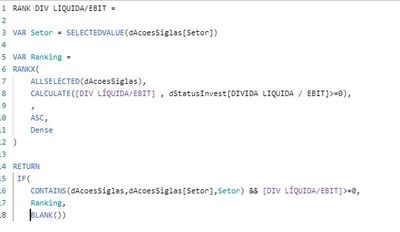
I have this rank measure that is ranking less than 0, as "rank 1". But I want it to be classified as last. And as you can see in my calculate, I'm only ranking values> = 0. Would anyone know how to help me?

rank.JPG


2.JPG

1 ACCEPTED SOLUTION
Anonymous
Not applicable

// Your measure for ranking should be:

[Ranking Measure] =
if( HASONEFILTER( T[Papel] ),

	var __maxValue =
		// You can replace this value
		// with some big, big value that
		// you know will never appear as
		// the value of [Div Liquida/ebit].
		// This will speed up this calculation.
		MAXX(
			ALLSELECTED( T[Papel] ),
			[Div Liquida/ebit]
		)
	var __greaterMaxValue = __maxValue + 1
	var __currentMeasure = [Div Liquida/ebit]
	var __result =
		if( __currentMeasure < 0,
			__greaterMaxValue,
			__currentMeasure
		)
	return
		__result
		
)
		
// The measure above just assigns to the negative
// values of the measure a value higher than
// the highest value for all the visible values
// of the measure. You should then use this measure
// in the RANKX function. The measure also checks
// if only one Papel value is visible in the current
// context. If not, then it returns BLANK(). So, you'll
// have to make sure that you're calculating ranks
// against single Papel values. But it makes no sense
// to calculate a rank against an amalgamated set of
// values as this has no meaning anyway.


Best

D

View solution in original post

1 REPLY 1
Anonymous
Not applicable

// Your measure for ranking should be:

[Ranking Measure] =
if( HASONEFILTER( T[Papel] ),

	var __maxValue =
		// You can replace this value
		// with some big, big value that
		// you know will never appear as
		// the value of [Div Liquida/ebit].
		// This will speed up this calculation.
		MAXX(
			ALLSELECTED( T[Papel] ),
			[Div Liquida/ebit]
		)
	var __greaterMaxValue = __maxValue + 1
	var __currentMeasure = [Div Liquida/ebit]
	var __result =
		if( __currentMeasure < 0,
			__greaterMaxValue,
			__currentMeasure
		)
	return
		__result
		
)
		
// The measure above just assigns to the negative
// values of the measure a value higher than
// the highest value for all the visible values
// of the measure. You should then use this measure
// in the RANKX function. The measure also checks
// if only one Papel value is visible in the current
// context. If not, then it returns BLANK(). So, you'll
// have to make sure that you're calculating ranks
// against single Papel values. But it makes no sense
// to calculate a rank against an amalgamated set of
// values as this has no meaning anyway.


Best

D
Helpful resources

Announcements
New to Fabric survey Carousel

New to Fabric Survey

If you have recently started exploring Fabric, we'd love to hear how it's going. Your feedback can help with product improvements.

Power BI DataViz World Championships carousel

Power BI DataViz World Championships - June 2026

A new Power BI DataViz World Championship is coming this June! Don't miss out on submitting your entry.

Join our Fabric User Panel

Join our Fabric User Panel

Share feedback directly with Fabric product managers, participate in targeted research studies and influence the Fabric roadmap.

March Power BI Update Carousel

Power BI Community Update - March 2026

Check out the March 2026 Power BI update to learn about new features.