Join us at FabCon Atlanta from March 16 - 20, 2026, for the ultimate Fabric, Power BI, AI and SQL community-led event. Save $200 with code FABCOMM.
Register now!Get Fabric Certified for FREE during Fabric Data Days. Don't miss your chance! Request now
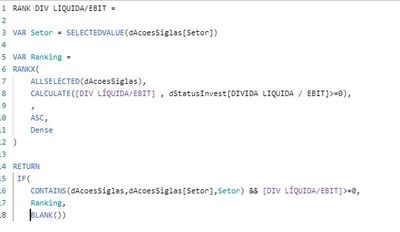
I have this rank measure that is ranking less than 0, as "rank 1". But I want it to be classified as last. And as you can see in my calculate, I'm only ranking values> = 0. Would anyone know how to help me?
Solved! Go to Solution.
// Your measure for ranking should be:
[Ranking Measure] =
if( HASONEFILTER( T[Papel] ),
var __maxValue =
// You can replace this value
// with some big, big value that
// you know will never appear as
// the value of [Div Liquida/ebit].
// This will speed up this calculation.
MAXX(
ALLSELECTED( T[Papel] ),
[Div Liquida/ebit]
)
var __greaterMaxValue = __maxValue + 1
var __currentMeasure = [Div Liquida/ebit]
var __result =
if( __currentMeasure < 0,
__greaterMaxValue,
__currentMeasure
)
return
__result
)
// The measure above just assigns to the negative
// values of the measure a value higher than
// the highest value for all the visible values
// of the measure. You should then use this measure
// in the RANKX function. The measure also checks
// if only one Papel value is visible in the current
// context. If not, then it returns BLANK(). So, you'll
// have to make sure that you're calculating ranks
// against single Papel values. But it makes no sense
// to calculate a rank against an amalgamated set of
// values as this has no meaning anyway.
Best
D
// Your measure for ranking should be:
[Ranking Measure] =
if( HASONEFILTER( T[Papel] ),
var __maxValue =
// You can replace this value
// with some big, big value that
// you know will never appear as
// the value of [Div Liquida/ebit].
// This will speed up this calculation.
MAXX(
ALLSELECTED( T[Papel] ),
[Div Liquida/ebit]
)
var __greaterMaxValue = __maxValue + 1
var __currentMeasure = [Div Liquida/ebit]
var __result =
if( __currentMeasure < 0,
__greaterMaxValue,
__currentMeasure
)
return
__result
)
// The measure above just assigns to the negative
// values of the measure a value higher than
// the highest value for all the visible values
// of the measure. You should then use this measure
// in the RANKX function. The measure also checks
// if only one Papel value is visible in the current
// context. If not, then it returns BLANK(). So, you'll
// have to make sure that you're calculating ranks
// against single Papel values. But it makes no sense
// to calculate a rank against an amalgamated set of
// values as this has no meaning anyway.
Best
D
Check out the November 2025 Power BI update to learn about new features.
Advance your Data & AI career with 50 days of live learning, contests, hands-on challenges, study groups & certifications and more!
| User | Count |
|---|---|
| 11 | |
| 10 | |
| 9 | |
| 7 | |
| 6 |
| User | Count |
|---|---|
| 25 | |
| 22 | |
| 19 | |
| 17 | |
| 10 |