This time we’re going bigger than ever. Fabric, Power BI, SQL, AI and more. We're covering it all. You won't want to miss it.
Learn moreLevel up your Power BI skills this month - build one visual each week and tell better stories with data! Get started
I currently have my quarterly targer set at 6. For me to get a daily target value in the case I selected a particular date, it gives me what I want. However I need the target value to reset every quarter. Below is what I have as my solution
Assuming I have a fixed expected quarterly target of 6.
This is how I want the table broken down if there is a date selection with their respective quarters.
| Quarter | Date | Target |
| Q1 2022 | 1/7/2022 | 0.47 |
| Q1 2022 | 3/25/2022 | 5.67 |
| Q1 2022 | 3/31/2022 | 6.00 |
| Q2 2022 | 4/8/2022 | 0.67 |
However, When I have it selected as a quarter, I get the numbers compounded like this. I get 6.07 when I select just Q2 2022 since it is taking 1st day of Q2 2022 which is 4/1/2022.
| Quarter | Target |
| Q1 2022 | 6.00 |
| Q2 2022 | 6.07 |
Expected Result: I want the target valies to reset every quarter so that it compounds to 6 by the end of every quarter.
| Quarter | Target |
| Q1 2022 | 6.00 |
| Q2 2022 | 0.07 |
Thank you for your help.
Solved! Go to Solution.
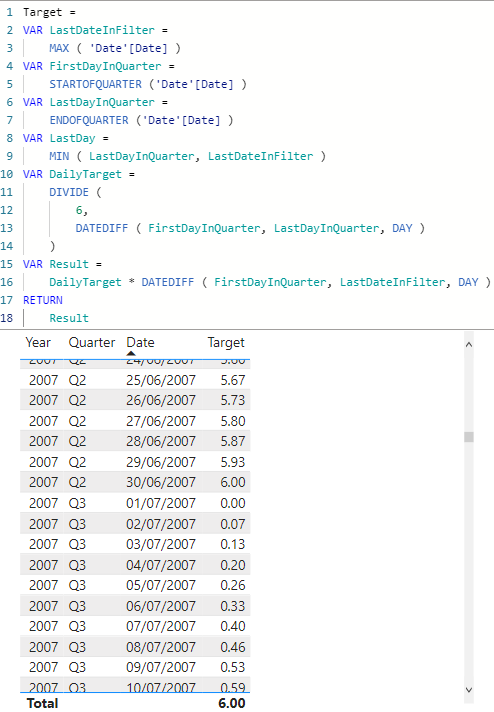
Hi @yve214
You can try
Target =
VAR LastDateInFilter =
MAX ( 'Date'[Date] )
VAR FirstDayInQuarter =
STARTOFQUARTER ('Date'[Date] )
VAR LastDayInQuarter =
ENDOFQUARTER ('Date'[Date] )
VAR DailyTarget =
DIVIDE (
6,
DATEDIFF ( FirstDayInQuarter, LastDayInQuarter, DAY )
)
VAR Result =
DailyTarget * DATEDIFF ( FirstDayInQuarter, LastDateInFilter, DAY )
RETURN
Result
Hi @yve214
You can try
Target =
VAR LastDateInFilter =
MAX ( 'Date'[Date] )
VAR FirstDayInQuarter =
STARTOFQUARTER ('Date'[Date] )
VAR LastDayInQuarter =
ENDOFQUARTER ('Date'[Date] )
VAR DailyTarget =
DIVIDE (
6,
DATEDIFF ( FirstDayInQuarter, LastDayInQuarter, DAY )
)
VAR Result =
DailyTarget * DATEDIFF ( FirstDayInQuarter, LastDateInFilter, DAY )
RETURN
Result
Check out the April 2026 Power BI update to learn about new features.
Sign up to receive a private message when registration opens and key events begin.
If you have recently started exploring Fabric, we'd love to hear how it's going. Your feedback can help with product improvements.
| User | Count |
|---|---|
| 5 | |
| 4 | |
| 3 | |
| 3 | |
| 3 |
| User | Count |
|---|---|
| 9 | |
| 9 | |
| 7 | |
| 6 | |
| 6 |