The ultimate Fabric, Power BI, SQL, and AI community-led learning event. Save €200 with code FABCOMM.
Get registeredEnhance your career with this limited time 50% discount on Fabric and Power BI exams. Ends August 31st. Request your voucher.
I currently have my quarterly targer set at 6. For me to get a daily target value in the case I selected a particular date, it gives me what I want. However I need the target value to reset every quarter. Below is what I have as my solution
Assuming I have a fixed expected quarterly target of 6.
This is how I want the table broken down if there is a date selection with their respective quarters.
| Quarter | Date | Target |
| Q1 2022 | 1/7/2022 | 0.47 |
| Q1 2022 | 3/25/2022 | 5.67 |
| Q1 2022 | 3/31/2022 | 6.00 |
| Q2 2022 | 4/8/2022 | 0.67 |
However, When I have it selected as a quarter, I get the numbers compounded like this. I get 6.07 when I select just Q2 2022 since it is taking 1st day of Q2 2022 which is 4/1/2022.
| Quarter | Target |
| Q1 2022 | 6.00 |
| Q2 2022 | 6.07 |
Expected Result: I want the target valies to reset every quarter so that it compounds to 6 by the end of every quarter.
| Quarter | Target |
| Q1 2022 | 6.00 |
| Q2 2022 | 0.07 |
Thank you for your help.
Solved! Go to Solution.
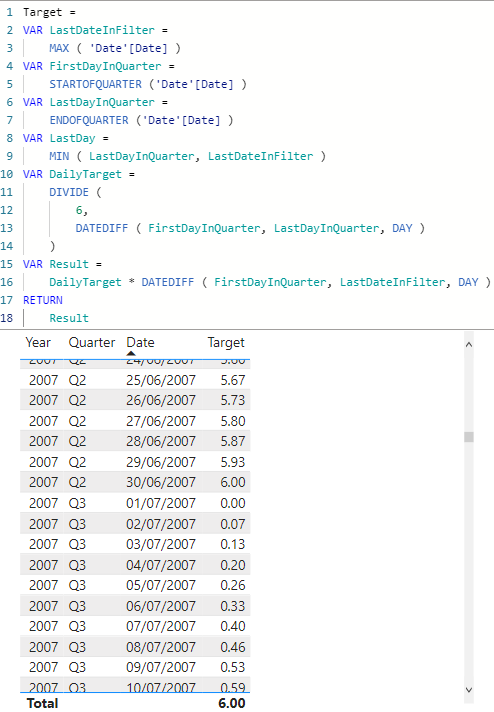
Hi @yve214
You can try
Target =
VAR LastDateInFilter =
MAX ( 'Date'[Date] )
VAR FirstDayInQuarter =
STARTOFQUARTER ('Date'[Date] )
VAR LastDayInQuarter =
ENDOFQUARTER ('Date'[Date] )
VAR DailyTarget =
DIVIDE (
6,
DATEDIFF ( FirstDayInQuarter, LastDayInQuarter, DAY )
)
VAR Result =
DailyTarget * DATEDIFF ( FirstDayInQuarter, LastDateInFilter, DAY )
RETURN
Result
Hi @yve214
You can try
Target =
VAR LastDateInFilter =
MAX ( 'Date'[Date] )
VAR FirstDayInQuarter =
STARTOFQUARTER ('Date'[Date] )
VAR LastDayInQuarter =
ENDOFQUARTER ('Date'[Date] )
VAR DailyTarget =
DIVIDE (
6,
DATEDIFF ( FirstDayInQuarter, LastDayInQuarter, DAY )
)
VAR Result =
DailyTarget * DATEDIFF ( FirstDayInQuarter, LastDateInFilter, DAY )
RETURN
Result
| User | Count |
|---|---|
| 15 | |
| 8 | |
| 6 | |
| 6 | |
| 6 |
| User | Count |
|---|---|
| 23 | |
| 14 | |
| 13 | |
| 8 | |
| 8 |