Join us at FabCon Atlanta from March 16 - 20, 2026, for the ultimate Fabric, Power BI, AI and SQL community-led event. Save $200 with code FABCOMM.
Register now!The Power BI Data Visualization World Championships is back! Get ahead of the game and start preparing now! Learn more
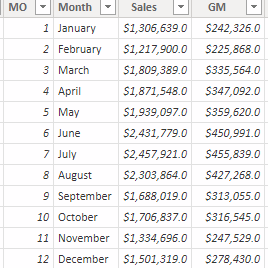
I need help figuring out the right DAX statement to show a prorated amount based on date filters, YTD, MTD, Daily using the monthly budget data shown in the table below. I also have to take into consideration the number of working days for the month excluding weekends and holidays if there are any for that month.
Thank you in advance!
Solved! Go to Solution.
Hi,
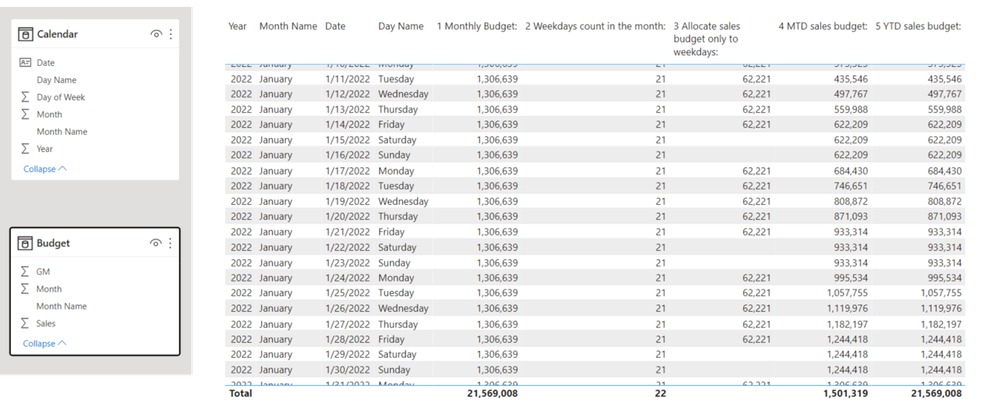
Please check the below picture and the attached pbix file.
All measures are in the attached pbix file with steps that are numbered in front of each measure's name.
I only considered weekends because I do not know when are your holidays.
I only calculated Sales Budget, and calculations for GM Budget are the same process.
Hi,
Please check the below picture and the attached pbix file.
All measures are in the attached pbix file with steps that are numbered in front of each measure's name.
I only considered weekends because I do not know when are your holidays.
I only calculated Sales Budget, and calculations for GM Budget are the same process.
Hi Jihwan,
Thank you for providing solution to my post about prorated budget. I didn't take into consideration the categories so each month's working days is getting counted more than once. Would you be able to get the prorated budget for all of the categories in a month?
| Month | MO | Sales Budget | Profit Budget | Category |
| Jan | 1 | $ 1,306,639 | $ 242,326 | Category1 |
| Feb | 2 | $ 1,217,900 | $ 225,868 | Category1 |
| Mar | 3 | $ 1,809,389 | $ 335,564 | Category1 |
| Apr | 4 | $ 1,871,548 | $ 347,092 | Category1 |
| May | 5 | $ 1,939,097 | $ 359,620 | Category1 |
| Jun | 6 | $ 2,431,779 | $ 450,991 | Category1 |
| Jul | 7 | $ 2,457,921 | $ 455,839 | Category1 |
| Aug | 8 | $ 2,303,864 | $ 427,268 | Category1 |
| Sep | 9 | $ 1,688,019 | $ 313,055 | Category1 |
| Oct | 10 | $ 1,706,837 | $ 316,545 | Category1 |
| Nov | 11 | $ 1,334,696 | $ 247,529 | Category1 |
| Dec | 12 | $ 1,501,319 | $ 278,430 | Category1 |
| Jan | 1 | $ 707,206 | $ 205,965 | Category2 |
| Feb | 2 | $ 705,694 | $ 205,525 | Category2 |
| Mar | 3 | $ 1,622,676 | $ 472,584 | Category2 |
| Apr | 4 | $ 1,313,584 | $ 382,565 | Category2 |
| May | 5 | $ 1,606,444 | $ 467,857 | Category2 |
| Jun | 6 | $ 1,404,395 | $ 409,013 | Category2 |
| Jul | 7 | $ 1,116,400 | $ 325,138 | Category2 |
| Aug | 8 | $ 1,245,360 | $ 362,695 | Category2 |
| Sep | 9 | $ 1,078,278 | $ 314,035 | Category2 |
| Oct | 10 | $ 760,724 | $ 221,551 | Category2 |
| Nov | 11 | $ 771,767 | $ 224,768 | Category2 |
| Dec | 12 | $ 630,658 | $ 183,671 | Category2 |
| Jan | 1 | $ 3,527,697 | $ 792,906 | Category3 |
| Feb | 2 | $ 3,903,140 | $ 877,293 | Category3 |
| Mar | 3 | $ 6,366,679 | $ 1,431,013 | Category3 |
| Apr | 4 | $ 6,392,293 | $ 1,436,770 | Category3 |
| May | 5 | $ 8,669,700 | $ 1,948,654 | Category3 |
| Jun | 6 | $ 9,036,646 | $ 2,031,131 | Category3 |
| Jul | 7 | $ 8,208,031 | $ 1,844,886 | Category3 |
| Aug | 8 | $ 7,586,690 | $ 1,705,230 | Category3 |
| Sep | 9 | $ 6,551,668 | $ 1,472,592 | Category3 |
| Oct | 10 | $ 4,759,158 | $ 1,069,697 | Category3 |
| Nov | 11 | $ 3,910,475 | $ 878,942 | Category3 |
| Dec | 12 | $ 3,357,914 | $ 754,745 | Category3 |
@Anonymous , You can refer my blog on the topic
Distributing/Allocating the Monthly Target(Convert to Daily Target): Measure ( Daily/MTD): https://community.powerbi.com/t5/Community-Blog/Power-BI-Distributing-Allocating-the-Monthly-Target-Convert-to/ba-p/1657798
This is for a year, but the approach is to create a table
Distributing/Allocating the Yearly Target(Convert to Daily Target): https://community.powerbi.com/t5/Community-Blog/Distributing-Allocating-the-Yearly-Target-Convert-to-Daily/ba-p/1463290
Check out the November 2025 Power BI update to learn about new features.
Advance your Data & AI career with 50 days of live learning, contests, hands-on challenges, study groups & certifications and more!
| User | Count |
|---|---|
| 21 | |
| 10 | |
| 9 | |
| 4 | |
| 4 |
| User | Count |
|---|---|
| 34 | |
| 31 | |
| 20 | |
| 13 | |
| 11 |