We've captured the moments from FabCon & SQLCon that everyone is talking about, and we are bringing them to the community, live and on-demand. Starts on April 14th. Register now
I'm trying to create a measure to get Sales Amount w.r.t Delivered Date where CalenderYear is 2007 but having trouble with same.
For Sales Amount w.r.t Delivered Date works well and show amount for Delivered Date CY 2007 with UserRelationship, but when i try to filter only for 2007 its show blank rows
.
user relationship w.r.t Deliver Date CY not working
I'm using ContosoDw for reference and below is code of two measure.
Sales w.r.t Delivered Date
Delivered Amount = CALCULATE ( [SalesAmount], USERELATIONSHIP ( Sales[DeliveryDateKey], 'Date'[DateKey] ) )
Sales w.r.t to DeliveredDate for Year 2007
Delivered Amount in 2007 = CALCULATE ( [Sales Amount], FILTER ( CALCULATETABLE ( Sales, USERELATIONSHIP( Sales[DeliveryDateKey], 'Date'[DateKey] ) ), RELATED ( 'Date'[Calendar Year Number] ) = 2007 ) )
Solved! Go to Solution.
Hello,
Try this (with the correct table and column names from your model) ;
Hello,
Try this (with the correct table and column names from your model) ;
Hi Adrian,
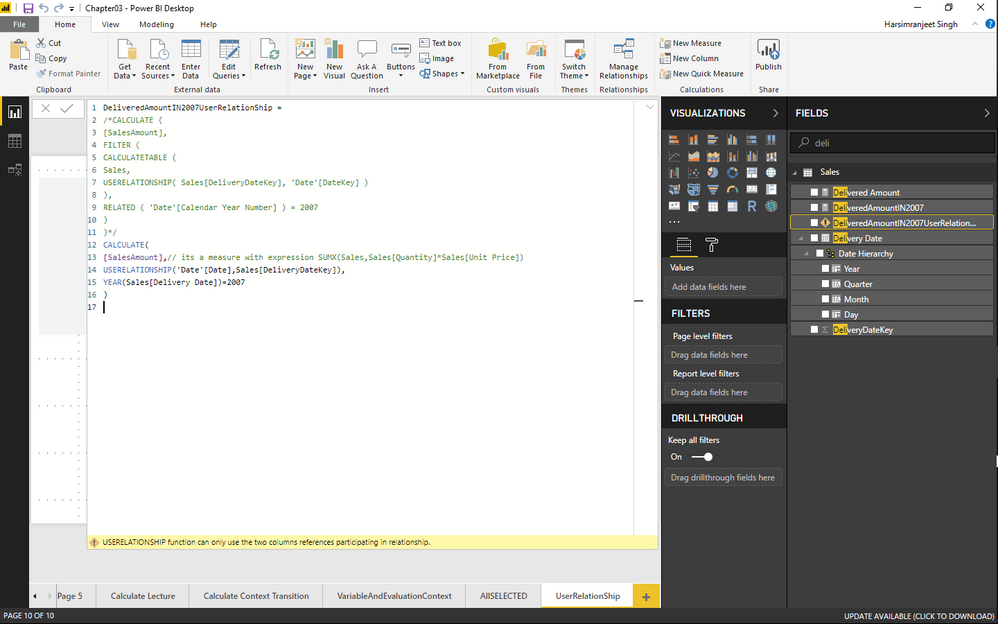
Its showing below error (USERRELATIONSHIP function can only use the two columns references participating in relationship), while using your concept. I've replaced SUM(Sales[Amount]) with measure already build.
Which is using an below code as an expression
SUMX(Sales,Sales[Quantity]*Sales[Unit Price])
Yeah it worked, and last error was due to wrong column used for relationship.
The only thing is ,its only showing for CY2007 and not repeating for all CY.
This will show the delivered amount in 2017 on all year lines;
yeah @avanderschilden changing your first expression from
CALCULATE(
[SalesAmount],// its a measure with expression SUMX(Sales,Sales[Quantity]*Sales[Unit Price])
USERELATIONSHIP('Date'[DateKey],Sales[DeliveryDateKey]),
YEAR('Date'[Date])=2007 // Changed from YEAR(Sales[DeliveryDate])=2007 allowed 2007 sales w.r.t to delivered date on all CY
)Thanks for your guidance, much appreciated ![]()
Regards,
Harry
If you have recently started exploring Fabric, we'd love to hear how it's going. Your feedback can help with product improvements.
A new Power BI DataViz World Championship is coming this June! Don't miss out on submitting your entry.
Share feedback directly with Fabric product managers, participate in targeted research studies and influence the Fabric roadmap.
| User | Count |
|---|---|
| 16 | |
| 12 | |
| 10 | |
| 6 | |
| 5 |