Join us at FabCon Atlanta from March 16 - 20, 2026, for the ultimate Fabric, Power BI, AI and SQL community-led event. Save $200 with code FABCOMM.
Register now!Vote for your favorite vizzies from the Power BI Dataviz World Championship submissions. Vote now!
Hi @shanipowerbi ,
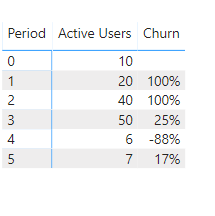
Try this: Added a column just not sure that I got the churn formula correct.
If this solves your issues, please mark it as the solution, so that others can find it easily. Kudos are nice too.
Nathaniel
Churn = Var PrevpV =CALCULATE(SUM(Churn[Active Users ]),Filter(All(Churn),Churn[Period]=EARLIER(Churn[Period])-1))
Var Presentper = Churn[Active Users ]
var Dif = Presentper-PrevpV
return Divide (dif,PrevpV)
Proud to be a Super User!
Thanks for the feedback, our formula is
Current - Prevous / Previous
So, in Our cas for Exmple : Period 1 is our Current and 0 is Previous.
Which is what I am showing. (Current - Previous)/Previous
var Dif = Presentper-PrevpV
return Divide (dif,PrevpV) If this solves your issues, please mark it as the solution, so that others can find it easily. Kudos are nice too.
Nathaniel
Proud to be a Super User!
@Nathaniel_C , I really appreciate your time and effort you put in. Please understand some of my previous calculations.
1 - I have a table name Active Users Data (Contain Invoice Date, Conversion Date, User ID's)
2 - I have calculated Measure total active users by using "Total Active Users = DISTINCTCOUNT('Active Users Data'[user_ids])"
3 - I have calculated Column Period by using "Period = DATEDIFF('Active Users Data'[User with Conversion Data.ConversionDate],'Active Users Data'[created_at],MONTH)".
4 - I have got this Table. Conversion Date / Active Users / Period, which tell me the customer retention.
5 - I have made the cohort Table the help of above table.
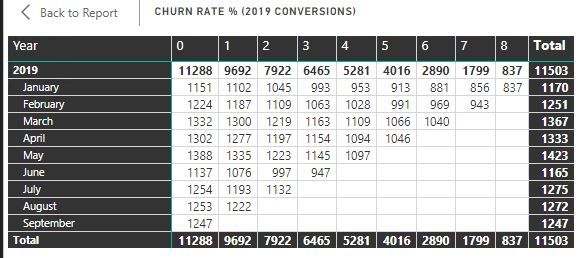
6 - For Calculating Churn in Need Period Month Users, that's what i looking for.
Please help you can. Hope I explained well this time
Regards
Zeeshan
Vote for your favorite vizzies from the Power BI World Championship submissions!
If you love stickers, then you will definitely want to check out our Community Sticker Challenge!
Check out the January 2026 Power BI update to learn about new features.
| User | Count |
|---|---|
| 8 | |
| 6 | |
| 3 | |
| 3 | |
| 3 |
| User | Count |
|---|---|
| 19 | |
| 12 | |
| 11 | |
| 6 | |
| 6 |