cancel
Showing results for 
Search instead for 
Did you mean: 

The Power BI Data Visualization World Championships is back! Get ahead of the game and start preparing now! Learn more

Reply
TDouglass
Frequent Visitor

Power Pivot Summary Total and Expand does not equal detail when drilling to transactions

Good Morning,


I have a situation that I am not sure where to start looking.  We have a pivot table that has a cube as its source that is created from Power BI Tabular Model.  The rows displayed in the pivot table is not summarizing to the transaction detail that I get when I double click on the cell.


For example


  Power Pivot

        Category  pounds total is 1,000

               sku 1    is 300

               sku 2    is 200

               sku 3    is 500


However, when i double click on the 1000 on the category to display the transactions that makeup this 1,000 i get 

             order 1   sku  1     150

             order 2   sku 1       150

            order 1   sku  2      100

            order 3   sku  2       100

            order 2   sku 3         300

            order 4   sku 3          200

            order 5   sku 4         200


What are some reasons that the sku 4 would not show up on the power pivot table?  I do have some filters on the pivot table fields but i removed them all and pivot table did not include the 200.  I would expect that the 200 should be included in the summary as all the criteria fit.


I also have another version where I have my filters as slicers and the 200 from order 5 sku 4 do show up on the pivot table.

1 REPLY 1
Stachu
Community Champion
Community Champion

Without having the sample data I can only guess - can you provide an anonymised sample?
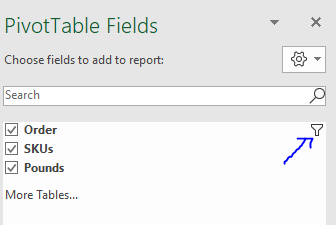
Without more information my first guess would be that some other dimension is filtering out either order5 or sku4. It could be related to time, other product attributes etc. In Excel if a dimension is filtered then in the field list a funnel is shown (as below - Order is filtered)
Capture.PNG
Other option is that the calculation on the Category level is not a simple sum, but e.g. a weighted one - if that's the case you would need to provide syntax for it


Did I answer your question? Mark my post as a solution!
Thank you for the kudos 🙂

Helpful resources

Announcements
November Power BI Update Carousel

Power BI Monthly Update - November 2025

Check out the November 2025 Power BI update to learn about new features.

Fabric Data Days Carousel

Fabric Data Days

Advance your Data & AI career with 50 days of live learning, contests, hands-on challenges, study groups & certifications and more!

FabCon Atlanta 2026 carousel

FabCon Atlanta 2026

Join us at FabCon Atlanta, March 16-20, for the ultimate Fabric, Power BI, AI and SQL community-led event. Save $200 with code FABCOMM.