cancel
Showing results for 
Search instead for 
Did you mean: 

The Power BI Data Visualization World Championships is back! Get ahead of the game and start preparing now! Learn more

Reply
turcelaygoy
Helper I
Helper I

Possible loop in DAX

Hello!


I was trying to calculate the variation of some faults in the different units of products and I have been able to see the variation between to independent units of products. I was wondering if there is any way of programing loops so I can run the database and see the acumulated variation that is happening through those units of products. 


Example:

Right now I'm able to calculate the variation between units 5 and 10 doing: (Number of faults in unit 10-Number of faults in unit 5)/Number of faults in unit 5*100


But I would like to calculate the variation taking into account all the units of products that are between 5 and 10; 5,6,7,8,9 and 10.


I hope someone can help me with this problem 🙂


Thank you!

1 ACCEPTED SOLUTION

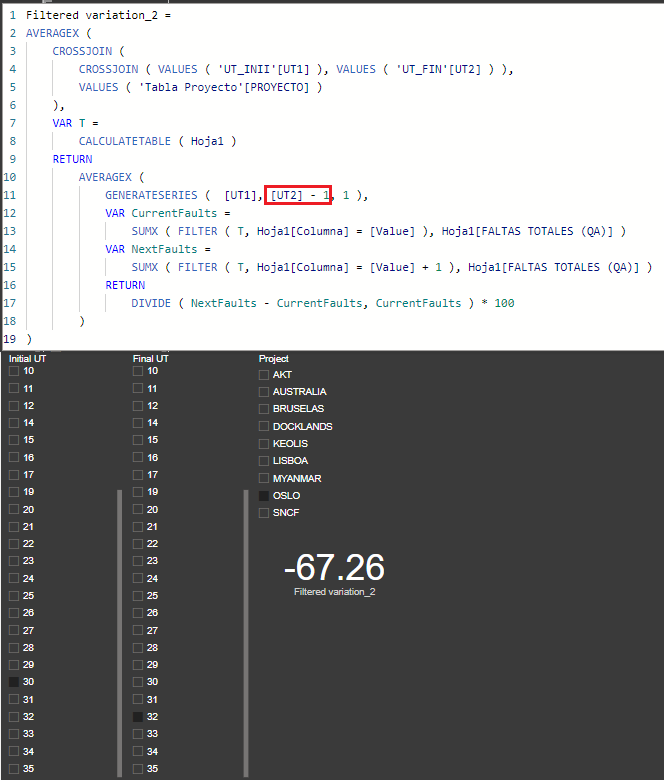
Hi @turcelaygoy 
I think now is correct.

1.png

Filtered variation_2 = 
AVERAGEX (
    CROSSJOIN (
        CROSSJOIN ( VALUES ( 'UT_INII'[UT1] ), VALUES ( 'UT_FIN'[UT2] ) ),
        VALUES ( 'Tabla Proyecto'[PROYECTO] )
    ),
    VAR T =
        CALCULATETABLE ( Hoja1 )
    RETURN
        AVERAGEX (
            GENERATESERIES (  [UT1], [UT2] - 1, 1 ),
            VAR CurrentFaults =
                SUMX ( FILTER ( T, Hoja1[Columna] = [Value] ), Hoja1[FALTAS TOTALES (QA)] )
            VAR NextFaults =
                SUMX ( FILTER ( T, Hoja1[Columna] = [Value] + 1 ), Hoja1[FALTAS TOTALES (QA)] )
            RETURN
                DIVIDE ( NextFaults - CurrentFaults, CurrentFaults ) * 100
        )
)

View solution in original post

23 REPLIES 23
turcelaygoy
Helper I
Helper I

Ok. This is the measure I'm using right now to calculate the variation:

First of all I take the values of the UT from a table that lists all the possible units. Then I do the same with the project and I calculate the variation as follows:

Filtered variation = Var UT= SELECTEDVALUE('inicial unit'[UT]) Var UT2=SELECTEDVALUE('final unit'[UT]) Var Project=SELECTEDVALUE('Project'[PROJECT] )
Return CALCULATE(DIVIDE((CALCULATE(SUMX(Sheet1,Sheet1[TOTAL FAULTS (QA)]),Sheet1[UT]=UT2,Sheet1[PROJECT]=Project)-(CALCULATE(SUMX(Sheet1,Sheet1[TOTAL FAULTS (QA)]),Sheet1[UT]=UT,Sheet1[PROJECT]=Project))),(CALCULATE(SUMX(Sheet1,Sheet1[TOTAL FAULTS (QA)]),Sheet1[UT]=UT,Sheet1[PROJECT]=Project)))*100)
 
But what I would like to calculate is the variation between all the units that are included between the given variables.
Example: If I choose units 3 an 6 I would like to calculate:
(Variation 3-4+Variation 4-5+Variation 5-6)/3
So I would need a loop to change the variable UT that I'm using in the current measure. 
 
I don't know if this example works or you still need more information. Feel free to ask for more info or examples.

@turcelaygoy 
Assumptions:

  • Both 'inicial unit' and 'final unit' tables are disconnected
  • 'Project' table is connected to 'Sheet1' table (1-* single direction)

Please try

Filtered variation =
AVERAGEX (
    CROSSJOIN (
        CROSSJOIN ( VALUES ( 'inicial unit'[UT] ), VALUES ( 'final unit'[UT] ) ),
        VALUES ( 'Project'[PROJECT] )
    ),
    VAR T =
        CALCULATETABLE ( Sheet1 )
    RETURN
        AVERAGEX (
            GENERATESERIES ( 'inicial unit'[UT], 'final unit'[UT] ),
            VAR CurrentFaults =
                SUMX ( FILTER ( T, Sheet1[UT] = [Value] ), Sheet1[TOTAL FAULTS (QA)] )
            VAR NextFaults =
                SUMX ( FILTER ( T, Sheet1[UT] = [Value] + 1 ), Sheet1[TOTAL FAULTS (QA)] )
            RETURN
                IF (
                    NextFaults <> BLANK (),
                    DIVIDE ( NextFaults - CurrentFaults, CurrentFaults ) * 100
                )
        )
)


tamerj1
Super User
Super User

Hi @turcelaygoy 
Please clarify further with some examples.

Helpful resources

Announcements
Power BI DataViz World Championships

Power BI Dataviz World Championships

The Power BI Data Visualization World Championships is back! Get ahead of the game and start preparing now!

December 2025 Power BI Update Carousel

Power BI Monthly Update - December 2025

Check out the December 2025 Power BI Holiday Recap!

FabCon Atlanta 2026 carousel

FabCon Atlanta 2026

Join us at FabCon Atlanta, March 16-20, for the ultimate Fabric, Power BI, AI and SQL community-led event. Save $200 with code FABCOMM.