Hello,
I trying to figure out on how to solve this problem, if it's even possible.
I have a table Date - with years, another table Category (a,b,c) and facts table with value.
| Year | A(PC) | B(PC) | C(PC) |
| 2000 | 8 | 9 | 88 |
| 2001 | 5 | 15 | 55 |
| 2002 | 23 | 45 | 11 |
| 2003 | 69 | 35 | 22 |
| 2004 | 14 | 22 | 33 |
| 2005 | 8 | 22 | 5 |
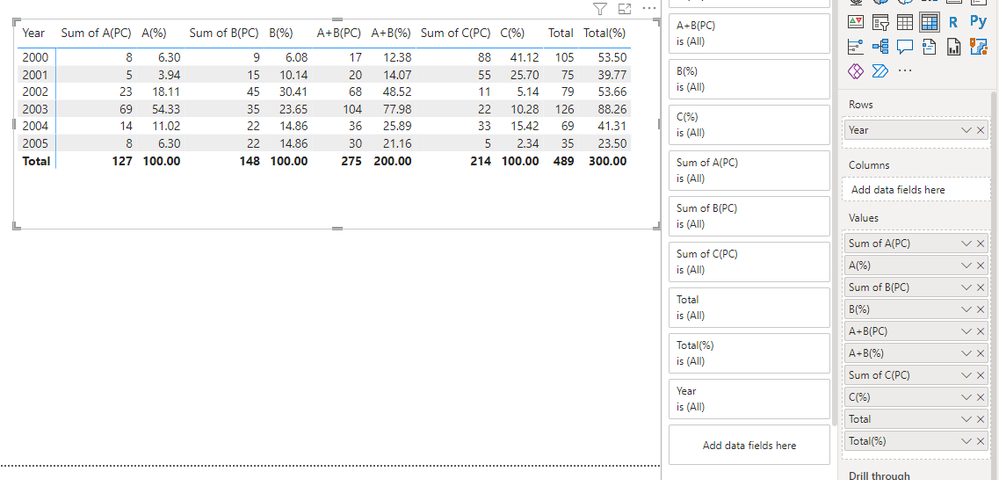
I want to make a matrix with new calculated fields and the add percentage of row total to it. Firstly I've created a measure where I sum up values from the category A with Category B - that gives me the column A+B(PC).
And then create another measure to get the percentage of row total.
The problem is I'm not sure on how to get the calculated filed A+B(PC) into the matrix as a seperate column and include it in the sum of row total.
| Year | A(PC) | A(%) | B(PC) | B(%) | A+B(PC) | A+B(%) | C(PC) | C(%) | Total | Total % |
| 2000 | 8 | 6,6 | 9 | 7,4 | 17 | 13,9 | 88 | 72,1 | 122 | 100 |
| 2001 | 5 | 5,3 | 15 | 15,8 | 20 | 21,1 | 55 | 57,9 | 95 | 100 |
| 2002 | 23 | 15,6 | 45 | 30,6 | 68 | 46,3 | 11 | 7,5 | 147 | 100 |
| 2003 | 69 | 30,0 | 35 | 15,2 | 104 | 45,2 | 22 | 9,6 | 230 | 100 |
| 2004 | 14 | 13,3 | 22 | 21,0 | 36 | 34,3 | 33 | 31,4 | 105 | 100 |
| 2005 | 8 | 12,3 | 22 | 33,8 | 30 | 46,2 | 5 | 7,7 | 65 | 100 |
Thank you for all the advice!!