Join us at FabCon Atlanta from March 16 - 20, 2026, for the ultimate Fabric, Power BI, AI and SQL community-led event. Save $200 with code FABCOMM.
Register now!Get Fabric Certified for FREE during Fabric Data Days. Don't miss your chance! Request now
Hi,
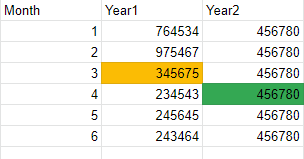
I have this excel formula that i need to convert to power bi =year2/year1 - 1
I would like to calculate the growth rate using year 2 Month 4 divided by the previous year's, previous month (year 1 month 3)
How would i write this in power bi?
Hi @pro_x ,
was your problem solved?
Marcus Wegener works as Full Stack Power BI Engineer at BI or DIE.
His mission is clear: "Get the most out of data, with Power BI."
twitter - LinkedIn - YouTube - website - podcast - Power BI Tutorials
Hi @pro_x ,
Assuming you have a Dates Table.
Create Measures
Sales Amount = SUMX ( Sales, Sales[Quantity] * Sales[Net Price] )
Sales Amount LY = CALCULATE(Sales[Sales Amount], SAMEPERIODLASTYEAR('Date'[Date]))
Growth = DIVIDE(Sales[Sales Amount],Sales[Sales Amount LY])
Regards,
Harsh Nathani
Appreciate with a Kudos!! (Click the Thumbs Up Button)
Did I answer your question? Mark my post as a solution!
@pro_x , For Change % prefer divide(curr -prior,prior)
For Year and YTD refer
YTD Sales = CALCULATE(SUM(Sales[Sales Amount]),DATESYTD('Date'[Date],"12/31"))
Last YTD Sales = CALCULATE(SUM(Sales[Sales Amount]),DATESYTD(dateadd('Date'[Date],-1,Year),"12/31"))
This year Sales = CALCULATE(SUM(Sales[Sales Amount]),DATESYTD(ENDOFYEAR('Date'[Date]),"12/31"))
Last year Sales = CALCULATE(SUM(Sales[Sales Amount]),DATESYTD(ENDOFYEAR(dateadd('Date'[Date],-1,Year)),"12/31"))
Last to last YTD Sales = CALCULATE(SUM(Sales[Sales Amount]),DATESYTD(dateadd('Date'[Date],-2,Year),"12/31"))
Year behind Sales = CALCULATE(SUM(Sales[Sales Amount]),dateadd('Date'[Date],-1,Year))
refer to my blog
https://medium.com/@amitchandak.1978/power-bi-ytd-questions-time-intelligence-1-5-e3174b39f38a
=
DIVIDE (
[Measure],
CALCULATE ( [Measure], SAMEPERIODLASTYEAR ( Dates[Date] ) )
)
What will you do in case of Year 2 Month 1?
Check out the November 2025 Power BI update to learn about new features.
Advance your Data & AI career with 50 days of live learning, contests, hands-on challenges, study groups & certifications and more!
| User | Count |
|---|---|
| 12 | |
| 9 | |
| 9 | |
| 5 | |
| 4 |
| User | Count |
|---|---|
| 27 | |
| 22 | |
| 20 | |
| 18 | |
| 12 |