cancel
Showing results for 
Search instead for 
Did you mean: 

The Power BI Data Visualization World Championships is back! Get ahead of the game and start preparing now! Learn more

Reply
akhoury
Helper I
Helper I

Pareto Curve in Power BI/DAX - % customers vs % sales

Hello dear community members,


I've been trying to solve this for a while, but not luck so far.


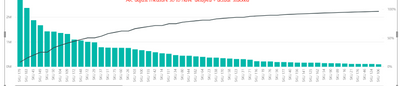
I need to have a 'Sales Concentration Curve', that is a Pareto curve basically, but instead of having CUSTOMERS on the X-Axis, having a percentage (i.e: X% of customers give Y % of volume).


I got this for now:
 

akhoury_0-1596714582371.png

It only works if I add the Bar values (that is sales value) which is basically Sum of Sales Value. and creating the following measure which draws the curve using the below code:


Cust volume Concentration =
VAR total_SalesVol = CALCULATE(SUM(oos_master_customer[Sales LY]),ALLSELECTED(oos_master_customer))
VAR current_SalesVol = SUM(oos_master_customer[Sales LY])
VAR summarized_Table =
SUMMARIZE(
ALLSELECTED(oos_master_customer),
oos_master_customer[customer_unique_code],
"volume",SUM(oos_master_customer[Sales LY])
)
VAR CumulativeSum =
SUMX(
FILTER(summarized_Table,[volume] >= current_SalesVol),
[volume]
)
RETURN
DIVIDE(CumulativeSum,total_SalesVol)

 The curve is redrawn appropriatly when applying filters on the graph. So all works perfectly.

What I am missing: is to have on the X-axis, instead of the customer (11k of them), just percentage 0-100% based on their ranking of largest to smallest.


My model has: 1 Transaction (facts) table for sales

linked to 1 Customer (Dim) table

linked to 1 Product (Dim) table (to the facts table obviously)

Thanks a lot

I spent too many hours trying to figur that out - your help is very much appreciated. thanks a lot

4 REPLIES 4
mahoneypat
Microsoft Employee
Microsoft Employee

Do you already have a percentile column in your customer table?  If not, I would add a calculated column using one of the PERCENTILE functions to show the percentile of each customer.  You can then write a measure that shows the running total percent for your Y axis (i.e., include current percentile and all lower/higher percentiles).


If you need it to be dynamic with slicers, you will need a disconnected table with the percentile values for your X axis, and calculate the %Y dynamically.  If you post a link to the pbix, more specific help can be given.


If this works for you, please mark it as the solution.  Kudos are appreciated too.  Please let me know if not.

Regards,

Pat


Did I answer your question? Mark my post as a solution! Kudos are also appreciated!

To learn more about Power BI, follow me on Twitter or subscribe on YouTube.


@mahoneypa HoosierBI on YouTube


First Thanks a lot for your reply, Pat. 


My objective is to implement the second solution you proposed; I already have a version with your first proposed aproach. The problem is that its hardcoded and it's not dynamic/wouldn't filter.


As to the second aproach, I did read before that it will need a table (or a table within a measure possibly/if I understood well), but I don't think I have the DAX experience level required to be able to implement it. I have been trying for a while.


Here is the pbix link: https://we.tl/t-R1PSSzUOmT

(Tried to reduce its size as much as possible, leaving just what is needed)


In this PBIX you will find the sample (hard coded) curve on the right, just to explain what I need have as an output, and on the left hand side, the concentration curve I already have, but listing all the customers on the x-axis; its missing what I was mentionning, that is to have them as %. 1-100%, 1% corresponding the largest customers and 100% to the smallest.


Thanks again.

Amine

Testing to see if the thread is still accepting replies 

akhoury
Helper I
Helper I

testing the reply as I saw no takers yet - apologies for the spam

Helpful resources

Announcements
Power BI DataViz World Championships

Power BI Dataviz World Championships

The Power BI Data Visualization World Championships is back! Get ahead of the game and start preparing now!

December 2025 Power BI Update Carousel

Power BI Monthly Update - December 2025

Check out the December 2025 Power BI Holiday Recap!

FabCon Atlanta 2026 carousel

FabCon Atlanta 2026

Join us at FabCon Atlanta, March 16-20, for the ultimate Fabric, Power BI, AI and SQL community-led event. Save $200 with code FABCOMM.