This is best Fabric, Power BI, SQL and AI community event. How do we know? The last event sold out! Save €200 with code FABCMTY200.
Register nowA new Data Days event is coming soon! This time we’re going bigger than ever. Fabric, Power BI, SQL, AI and more. Don't miss out.
Hi all,
Enyone else experiencing probles with the RANKX?
I've soon browsed the entire web for a solution, but no matter what DAX I'm trying I get the same minor errors.
My "basic" DAX (at the moment) is as follows:
RANK - share =
RANKX(
ALLSELECTED(ORGANIZATION[STORE]) ; [SHARE] ; ; DESC ; Dense
)
The purpose is to rank stores based on share of sales of certain products.
[SHARE] is a meassure.
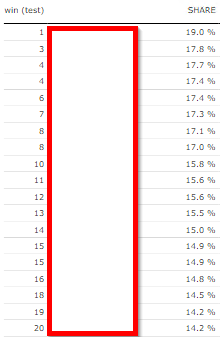
No matter what I try, I get some MINOR errors in the ranking.
Stores are placed in correct order, but the ranking differs from time to time.
Sometimes no stores are ranked as #1
Sometimes two stores are given he same ranking allthough share is not the same
Sometmes it just skippes a (random) ranking
etc. (see picture)
Any bright minds out there who can help me solve this anoying little bug?
Thanks in advance!
Hello @Anonymous ,
RANK - share =
RANKX ( ALL ( ORGANIZATION ), [SHARE], ,DESC, DENSE )
You can refer to this link .
@Anonymous
Thanks for your reply & effort, but unfortunately this doesn't work either...
I've read the blog-post, but it just don't add up.
I have tried de-tours via both ALL and ALLSELECTED among others, but It never gets closer then 95% correct.
Possibly it is a result of problems with the measure (SHARE) that is ranked.
Share is again a function of misc other measures.
Maybe I need to go up the entire line one more time.
Hello @Anonymous ,
Can you please provide the sample data in table format so I can check?
Thanks
Thanks, but I think I finally found the solution.
Format the SHARE as CURRENCY.
Ref. this article - seems to be a general DAX issue
My final solution was this:
RANK - share = RANKX(ORGANIZATION[STORE];CURRENCY([SHARE]);;DESC)
(For some reason I also had to skip the Dense to get it correct)
https://www.sqlbi.com/blog/marco/2014/07/16/use-of-rankx-with-decimal-numbers-in-dax/
Check out the May 2026 Power BI update to learn about new features.
Sign up to receive a private message when registration opens and key events begin.
If you have recently started exploring Fabric, we'd love to hear how it's going. Your feedback can help with product improvements.
| User | Count |
|---|---|
| 5 | |
| 3 | |
| 3 | |
| 3 | |
| 2 |
| User | Count |
|---|---|
| 10 | |
| 6 | |
| 6 | |
| 5 | |
| 5 |