cancel
Showing results for 
Search instead for 
Did you mean: 

Data Days is here! Join us now for 60+ days of learning, challenges, and connection. Learn more

Reply
Anonymous
Not applicable

One measure to display desired value on card

Hello everyone i have the pbxi file below:

https://1drv.ms/u/s!Ag9tIyk2ofNRjkrl7o_3GnzH9bQW?e=y3s9iy


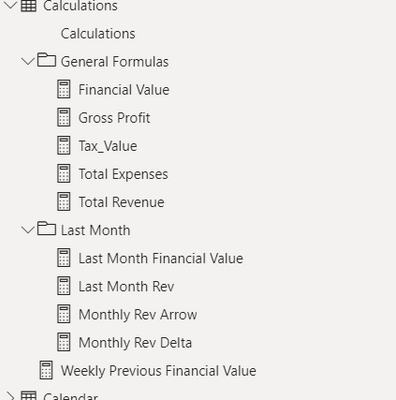
i want to make one measure for current period and another measure for previous month period as in i want revenue,expense or any desired value inside one current measure which desplays it on my desire without having to create alot of measures like below:

you can see my calculations

Screenshot 2022-09-30 134524.png

so current value = 
var rev = calculation for rev
var exp = calculation for expense
var gross = rev - exp

switch (
if i want my card on revenue, choose revenue calculation
if i want expense on card choose expense calculation...


i hope i was clear and didnt make you guys confused

i reall appreciate the help from anyone

1 ACCEPTED SOLUTION
johnt75
Super User
Super User

Create a measure to use on your card visual like

Measure for card = 1

Create a calculation group with a calculation item for each measure you want to be able to select. The calculation items would check whether the measure for your card visual was active and then simply return the appropriate measure. e.g. your calculation item for revenue would be

IF( ISSELECTEDMEASURE( [Measure for card]), [Total revenue], SELECTEDMEASURE())

View solution in original post

3 REPLIES 3
johnt75
Super User
Super User

Create a measure to use on your card visual like

Measure for card = 1

Create a calculation group with a calculation item for each measure you want to be able to select. The calculation items would check whether the measure for your card visual was active and then simply return the appropriate measure. e.g. your calculation item for revenue would be

IF( ISSELECTEDMEASURE( [Measure for card]), [Total revenue], SELECTEDMEASURE())
Anonymous
Not applicable

will this help me create one mwasure for multiple calculations?


You would need to have the calculations already created, but this would allow you to show one measure on a card and have a user decide which calculation to show based on a slicer selection

Helpful resources

Announcements
Fabric Data Days is here Carousel

Fabric Data Days 2026

Don't miss out on Data Days, June 15 through August 7. Learn Fabric, Power BI, SQL, AI and more.

May Power BI Update Carousel

Power BI Monthly Update - May 2026

Check out the May 2026 Power BI update to learn about new features.

Power BI DataViz World Championships carousel

Power BI DataViz World Championships - June 2026

A new Power BI DataViz World Championship is coming this June! Don't miss out on submitting your entry.