Join us at FabCon Atlanta from March 16 - 20, 2026, for the ultimate Fabric, Power BI, AI and SQL community-led event. Save $200 with code FABCOMM.
Register now!Get Fabric Certified for FREE during Fabric Data Days. Don't miss your chance! Request now
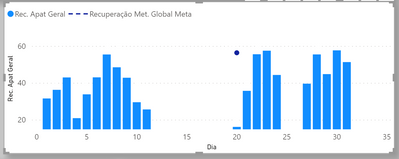
I have two tables connected to a calendar table. One has daily values from the beginning and until the end of the month. Another table has a monthly target value, that is, that table only has one day per month. How do I return this value for every day on a chart? watch
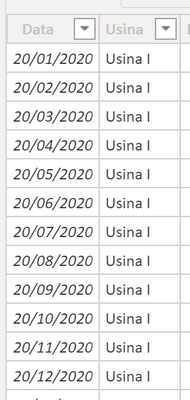
In the goal table, there is only the 20th of each month, but I wanted to expand this value as if it were a monthly goal, you know?
Solved! Go to Solution.
[Monthly Goal Extended] =
// YearMonthID must be something that uniquely
// identifies the month across the entire Calendar.
// It could, for instance, be the integer YYYYMM.
var __months = DISTINCT( 'Calendar'[YearMonthID] )
var __sumOfMonthlyTargets =
calculate(
sum( 'Monthly Targets'[Projected Amount] ),
__months,
removefilters( 'Calendar' )
)
return
__sumOfMonthlyTargets
[Monthly Goal Extended] =
// YearMonthID must be something that uniquely
// identifies the month across the entire Calendar.
// It could, for instance, be the integer YYYYMM.
var __months = DISTINCT( 'Calendar'[YearMonthID] )
var __sumOfMonthlyTargets =
calculate(
sum( 'Monthly Targets'[Projected Amount] ),
__months,
removefilters( 'Calendar' )
)
return
__sumOfMonthlyTargets
Check out the November 2025 Power BI update to learn about new features.
Advance your Data & AI career with 50 days of live learning, contests, hands-on challenges, study groups & certifications and more!
| User | Count |
|---|---|
| 12 | |
| 9 | |
| 8 | |
| 5 | |
| 3 |
| User | Count |
|---|---|
| 28 | |
| 21 | |
| 20 | |
| 18 | |
| 12 |