
cancel
Showing results for 
Search instead for 
Did you mean: 

Level up your Power BI skills this month - build one visual each week and tell better stories with data! Get started

Reply
PowerBIOrg
Resolver II
Resolver II

Number of Days fall on weekday

Hi All,

I would like to count number of days fall on certain day (Sun, Mon, etc) providing StartDate and EndDate.

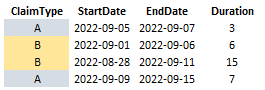
The following is the data structure:

PowerBIOrg_2-1663900843274.png


I expect the output as following:

1) Filtered Date: 2022-08-01 to 2022-09-30:

PowerBIOrg_4-1663900961761.png

2) Filterd Date: 2022-09-01 to 2022-09-10

PowerBIOrg_0-1663903595030.png


Thanks!

1 ACCEPTED SOLUTION
Jihwan_Kim
Super User
Super User

Hi,

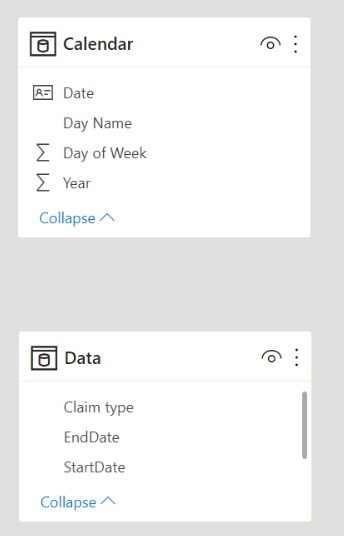
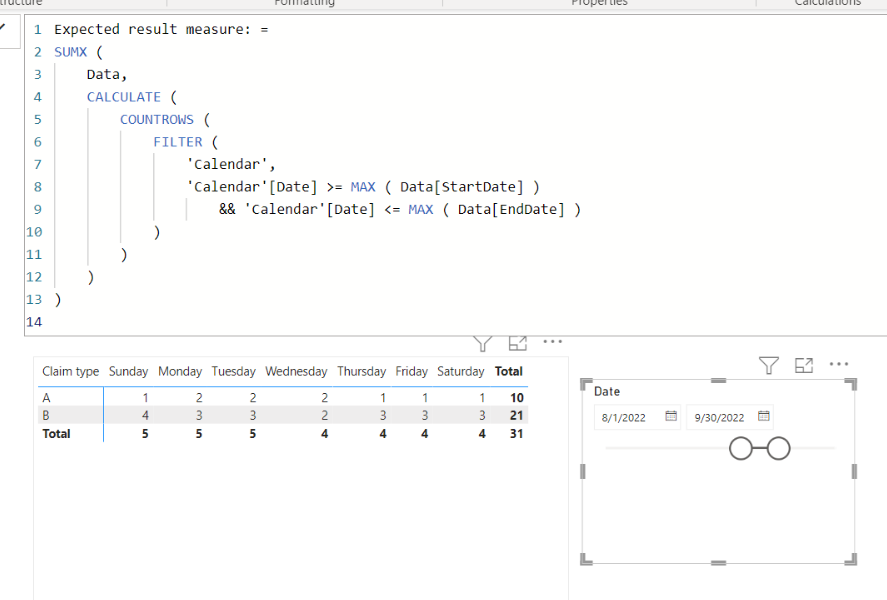
I am not sure about the result that is shown in your sample, but please check the below picture and the attached pbix file.

It is for creating a measure.


Jihwan_Kim_1-1663902935979.png


Jihwan_Kim_0-1663902925202.png


Expected result measure: =
SUMX (
    Data,
    CALCULATE (
        COUNTROWS (
            FILTER (
                'Calendar',
                'Calendar'[Date] >= MAX ( Data[StartDate] )
                    && 'Calendar'[Date] <= MAX ( Data[EndDate] )
            )
        )
    )
)


If this post helps, then please consider accepting it as the solution to help other members find it faster, and give a big thumbs up.


Click here to visit my LinkedIn page

View solution in original post

5 REPLIES 5
Jihwan_Kim
Super User
Super User

Hi,

I am not sure about the result that is shown in your sample, but please check the below picture and the attached pbix file.

It is for creating a measure.


Jihwan_Kim_1-1663902935979.png


Jihwan_Kim_0-1663902925202.png


Expected result measure: =
SUMX (
    Data,
    CALCULATE (
        COUNTROWS (
            FILTER (
                'Calendar',
                'Calendar'[Date] >= MAX ( Data[StartDate] )
                    && 'Calendar'[Date] <= MAX ( Data[EndDate] )
            )
        )
    )
)


If this post helps, then please consider accepting it as the solution to help other members find it faster, and give a big thumbs up.


Click here to visit my LinkedIn page

Hi, 
what if the duration in decimal places? and I would like the decimal place count in start date. 

PowerBIOrg_1-1664160774322.png

Thanks!


Hi,

I am not sure if I understood your question correctly, but please check the attached file.

Thank you.


If this post helps, then please consider accepting it as the solution to help other members find it faster, and give a big thumbs up.


Click here to visit my LinkedIn page

Hi, is there anyway that can do this without creating another calculated table? I worry there will be performance issue. 

Hi,

Thank you for your message.

Please check the attached file.

I tried to add two more measures and created a table visualization by only using two measures, and without using a physical-calculated-table.

Please kindly check if the result shows correct numbers or not.

Thank you.


If this post helps, then please consider accepting it as the solution to help other members find it faster, and give a big thumbs up.


Click here to visit my LinkedIn page

Helpful resources

Announcements
April Power BI Update Carousel

Power BI Monthly Update - April 2026

Check out the April 2026 Power BI update to learn about new features.

Fabric SQL PBI Data Days

Data Days 2026 coming soon!

Sign up to receive a private message when registration opens and key events begin.

New to Fabric survey Carousel

New to Fabric Survey

If you have recently started exploring Fabric, we'd love to hear how it's going. Your feedback can help with product improvements.

Power BI DataViz World Championships carousel

Power BI DataViz World Championships - June 2026

A new Power BI DataViz World Championship is coming this June! Don't miss out on submitting your entry.