Join us at FabCon Atlanta from March 16 - 20, 2026, for the ultimate Fabric, Power BI, AI and SQL community-led event. Save $200 with code FABCOMM.
Register now!The Power BI Data Visualization World Championships is back! Get ahead of the game and start preparing now! Learn more
Power BI Community Good Day!
I am using the following measure in my dashboard as a label.
The number is negative. How can I modify the dax measure below to show red if the number is negative?
Solved! Go to Solution.
Hi, @PBI-Curious
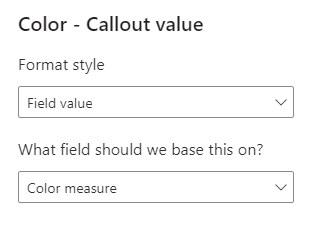
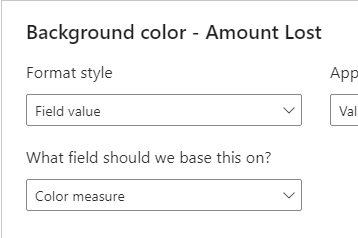
Conditionally formatted measures need to be written separately.
Color measure = IF([Amount Lost]<0,"Red")
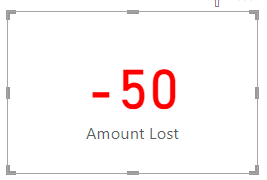
This is the Card view.
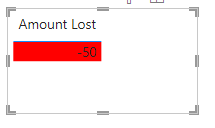
This is the Table view.
Is this the result you expect?
Best Regards,
Community Support Team _Charlotte
If this post helps, then please consider Accept it as the solution to help the other members find it more quickly.
Hi, @PBI-Curious
Conditionally formatted measures need to be written separately.
Color measure = IF([Amount Lost]<0,"Red")
This is the Card view.
This is the Table view.
Is this the result you expect?
Best Regards,
Community Support Team _Charlotte
If this post helps, then please consider Accept it as the solution to help the other members find it more quickly.
You can use conditional formatting on the visual - see this guide for how to do that: https://radacad.com/dax-and-conditional-formatting-better-together-find-the-biggest-and-smallest-num...
The Power BI Data Visualization World Championships is back! Get ahead of the game and start preparing now!
| User | Count |
|---|---|
| 19 | |
| 13 | |
| 8 | |
| 4 | |
| 4 |
| User | Count |
|---|---|
| 29 | |
| 19 | |
| 18 | |
| 11 | |
| 10 |