FabCon is coming to Atlanta
Join us at FabCon Atlanta from March 16 - 20, 2026, for the ultimate Fabric, Power BI, AI and SQL community-led event. Save $200 with code FABCOMM.
Register now!- Power BI forums
- Get Help with Power BI
- Desktop
- Service
- Report Server
- Power Query
- Mobile Apps
- Developer
- DAX Commands and Tips
- Custom Visuals Development Discussion
- Health and Life Sciences
- Power BI Spanish forums
- Translated Spanish Desktop
- Training and Consulting
- Instructor Led Training
- Dashboard in a Day for Women, by Women
- Galleries
- Data Stories Gallery
- Themes Gallery
- Contests Gallery
- QuickViz Gallery
- Quick Measures Gallery
- Visual Calculations Gallery
- Notebook Gallery
- Translytical Task Flow Gallery
- TMDL Gallery
- R Script Showcase
- Webinars and Video Gallery
- Ideas
- Custom Visuals Ideas (read-only)
- Issues
- Issues
- Events
- Upcoming Events
The Power BI Data Visualization World Championships is back! Get ahead of the game and start preparing now! Learn more
- Power BI forums
- Forums
- Get Help with Power BI
- DAX Commands and Tips
- Re: Need to find latest end date and earliest star...
- Subscribe to RSS Feed
- Mark Topic as New
- Mark Topic as Read
- Float this Topic for Current User
- Bookmark
- Subscribe
- Printer Friendly Page

- Mark as New
- Bookmark
- Subscribe
- Mute
- Subscribe to RSS Feed
- Permalink
- Report Inappropriate Content
Need to find latest end date and earliest start date based on ID group and output 1 line of data
| Project | st date1 | end date 1 | st date 2 | end date 2 |
| P1 | 2/2/2018 | 2/2/2020 | 4/4/2020 | 5/5/2022 |
| P1 | 3/3/2019 | 3/3/2021 | 3/3/2018 | 6/6/2020 |
| P2 | 1/1/2019 | 3/3/2022 | 1/3/2017 | 3/5/2020 |
| P2 | 1/2/2018 | 4/4/2023 | 3/4/2018 | 5/1/2022 |
What I want output to be is
| Project | st date 1 | end date 1 | start date 2 | end date 2 |
| P1 | 2/2/2018 | 3/3/2021 | 3/3/2018 | 5/5/2022 |
| P2 | 1/2/2018 | 4/4/2023 | 1/3/2017 | 5/1/2022 |
Help will be greatly appreciated.
Thanks
Solved! Go to Solution.
- Mark as New
- Bookmark
- Subscribe
- Mute
- Subscribe to RSS Feed
- Permalink
- Report Inappropriate Content
Hi,
it depends a littel bit on what you want to do. Do you want to add a new table to the model? Or show the data in a table visual?
If you want to show it in a table you could just use 4 different measures:
Start 1 = MIN('ProjectTable'[st date1])
End 1 = MAX('ProjectTable'[end date 1])
Start 2 = MIN('ProjectTable'[st date2])
End 2 = MAX('ProjectTable'[end date 2])
If you want to get rid of the total row:
Start 1 = IF (HASONEVALUE('ProjectTable'[Project]), MIN('ProjectTable'[st date 1]))
End 1 = IF (HASONEVALUE('ProjectTable'[Project]), MAX('ProjectTable'[end date 1]))
Start 2 = IF (HASONEVALUE('ProjectTable'[Project]), MIN('ProjectTable'[st date2]))
End 2 = IF (HASONEVALUE('ProjectTable'[Project]), MAX('ProjectTable'[end date 2]))
To create a calculated table:
NewTable =
ADDCOLUMNS (
    VALUES ( ProjectTable[Project] ),
    "Start 1", CALCULATE ( MIN ( 'ProjectTable'[st date1] ) ),
    "End 1", CALCULATE ( MAX ( 'ProjectTable'[end date 1] ) ),
    "Start 2", CALCULATE ( MIN ( 'ProjectTable'[st date 2] ) ),
    "End 2", CALCULATE ( MAX ( 'ProjectTable'[end date 2] ) )
)


- Mark as New
- Bookmark
- Subscribe
- Mute
- Subscribe to RSS Feed
- Permalink
- Report Inappropriate Content
Hello @Anonymous , I have written 2 of the 4 DAX Measures required here. You can easily substitute Start Date 1 and End Date 1 with Start Date 2 and End Date 2 in the formula. See formulas below:
- Earliest Start Date 1 =
CALCULATE (
MINX (
SUMMARIZE (
'Table',
'Table'[Project],
"minimumdate", MIN ( 'Table'[st date1] )
),
[minimumdate]
)
) - Latest End Date 1 =
CALCULATE (
MAXX (
SUMMARIZE (
'Table',
'Table'[Project],
"maximumdate", MAX ( 'Table'[end date 1] )
),
[maximumdate]
)
)
If this answers your question, kindly mark it as a solution.
- Mark as New
- Bookmark
- Subscribe
- Mute
- Subscribe to RSS Feed
- Permalink
- Report Inappropriate Content
Hello @Anonymous , I have written 2 of the 4 DAX Measures required here. You can easily substitute Start Date 1 and End Date 1 with Start Date 2 and End Date 2 in the formula. See formulas below:
- Earliest Start Date 1 =
CALCULATE (
MINX (
SUMMARIZE (
'Table',
'Table'[Project],
"minimumdate", MIN ( 'Table'[st date1] )
),
[minimumdate]
)
) - Latest End Date 1 =
CALCULATE (
MAXX (
SUMMARIZE (
'Table',
'Table'[Project],
"maximumdate", MAX ( 'Table'[end date 1] )
),
[maximumdate]
)
)
If this answers your question, kindly mark it as a solution.
- Mark as New
- Bookmark
- Subscribe
- Mute
- Subscribe to RSS Feed
- Permalink
- Report Inappropriate Content
Hi, there is just one small thing I am not able to format it on the date, its not giving any option to change, would you be able to help?
- Mark as New
- Bookmark
- Subscribe
- Mute
- Subscribe to RSS Feed
- Permalink
- Report Inappropriate Content
In a table/calculated table in Power BI you can change the display format here if that's what you mean. The same for measures.
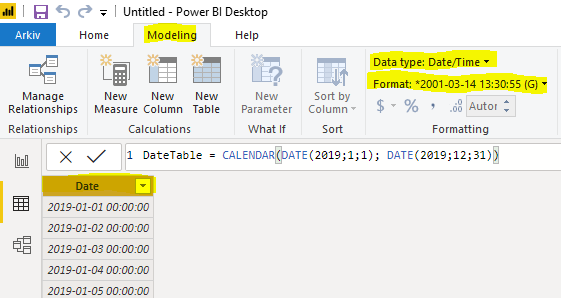
Hope it helps 🙂
- Mark as New
- Bookmark
- Subscribe
- Mute
- Subscribe to RSS Feed
- Permalink
- Report Inappropriate Content
Hi Thanks for your suggestions, I did apply those formulas but somehow its not bringing in the right values.
For some its picking up correctly but for most its just picking a random dates from the column.
- Mark as New
- Bookmark
- Subscribe
- Mute
- Subscribe to RSS Feed
- Permalink
- Report Inappropriate Content
Hi @Anonymous,
I tried my formulas on your example data and it gave the same result as what you wanted.
- Mark as New
- Bookmark
- Subscribe
- Mute
- Subscribe to RSS Feed
- Permalink
- Report Inappropriate Content
Thanks . Thats strange it does not for me.
| PR 1 | 03-Feb-20 | 31-May-22 | 17-Mar-20 | 14-Jul-22 |
| PR 1 | 03-Feb-20 | 31-Oct-22 | 17-Mar-20 | 15-Dec-22 |
| PR 1 | 03-Feb-20 | 31-Mar-23 | 17-Mar-20 | 15-May-23 |
| PR 1 | 03-Feb-20 | 14-Oct-21 | 17-Mar-20 | 30-Nov-21 |
| PR 1 | 03-Feb-20 | 29-Jul-22 | 17-Mar-20 | 13-Sep-22 |
| PR 1 | 2020-02-03 | 29-Jul-22 | 17-Mar-20 | 13-Sep-22 |
| PR 1 | 03-Feb-20 | 29-Jul-22 | 17-Mar-20 | 13-Sep-22 |
| PR 1 | 03-Feb-20 | 29-Jul-22 | 17-Mar-20 | 13-Sep-22 |
| PR 1 | 03-Feb-20 | 29-Jul-22 | 17-Mar-20 | 13-Sep-22 |
| PR 1 | 03-Feb-20 | 01-Mar-22 | 17-Mar-20 | 10-Mar-22 |
| PR 1 | 03-Feb-20 | 31-Mar-23 | 17-Mar-20 | 15-May-23 |
| PR 1 | 03-Feb-20 | 31-Mar-23 | 17-Mar-20 | 15-May-23 |
| PR 1 | 03-Feb-20 | 29-Jul-22 | 17-Mar-20 | 13-Sep-22 |
| PR 1 | 03-Feb-20 | 2029-Jul-22 | 17-Mar-20 | 13-Sep-22 |
| PR 1 | 03-Feb-20 | 31-May-22 | 17-Mar-20 | 01-Nov-22 |
| PR 1 | 03-Feb-20 | 31-May-22 | 17-Mar-20 | 01-Nov-22 |
| PR2 | 26-Jan-22 | 18-May-22 | 22-Feb-22 | 14-Jun-22 |
| PR2 | 08-Sep-22 | 04-Jan-23 | 19-Dec-22 | 11-Apr-23 |
| PR2 | 02-Sep-22 | 29-Dec-22 | 19-Jul-22 | 09-Nov-22 |
| PR2 | 14-Jul-22 | 04-Nov-22 | 14-Jul-22 | 04-Nov-22 |
| PR2 | 12-Sep-22 | 05-Jan-23 | 01-Sep-22 | 28-Dec-22 |
| PR2 | 11-May-22 | 02-Sep-22 | 19-Aug-22 | 13-Dec-22 |
| PR2 | 25-Jan-23 | 16-May-23 | 21-Feb-23 | 13-Jun-23 |
| PR2 | 06-Mar-23 | 27-Jun-23 | 03-Feb-23 | 26-May-23 |
| PR2 | 11-Jan-23 | 02-May-23 | 11-Jan-23 | 02-May-23 |
| PR2 | 13-Mar-23 | 05-Jul-23 | 02-Mar-23 | 23-Jun-23 |
| PR2 | 09-Nov-22 | 07-Mar-23 | 14-Sep-22 | 09-Jan-23 |
| PR2 | 31-Jul-23 | 20-Nov-23 | 17-Aug-23 | 12-Dec-23 |
| PR2 | 06-Sep-23 | 02-Jan-24 | 08-Aug-23 | 01-Dec-23 |
| PR2 | 12-May-23 | 06-Sep-23 | 12-May-23 | 06-Sep-23 |
| PR2 | 11-Jul-23 | 01-Nov-23 | 28-Jun-23 | 20-Oct-23 |
- Mark as New
- Bookmark
- Subscribe
- Mute
- Subscribe to RSS Feed
- Permalink
- Report Inappropriate Content
How are you using the measures? In a table? Pivot table? Did you try the calculated table?
NewTable =
ADDCOLUMNS (
    VALUES ( ProjectTable[Project] ),
    "Start 1", CALCULATE ( MIN ( 'ProjectTable'[st date1] ) ),
    "End 1", CALCULATE ( MAX ( 'ProjectTable'[end date 1] ) ),
    "Start 2", CALCULATE ( MIN ( 'ProjectTable'[st date 2] ) ),
    "End 2", CALCULATE ( MAX ( 'ProjectTable'[end date 2] ) )
)- Mark as New
- Bookmark
- Subscribe
- Mute
- Subscribe to RSS Feed
- Permalink
- Report Inappropriate Content
Yes, I did , with same results unfortunately.
- Mark as New
- Bookmark
- Subscribe
- Mute
- Subscribe to RSS Feed
- Permalink
- Report Inappropriate Content
@Anonymous Please share the formulas you have written for a check.
- Mark as New
- Bookmark
- Subscribe
- Mute
- Subscribe to RSS Feed
- Permalink
- Report Inappropriate Content
- Mark as New
- Bookmark
- Subscribe
- Mute
- Subscribe to RSS Feed
- Permalink
- Report Inappropriate Content
@Anonymous this looks very correct to me. Have you checked that you don't have some other report filters hindering this? Do you mind a call via Zoom and you share your screen?
- Mark as New
- Bookmark
- Subscribe
- Mute
- Subscribe to RSS Feed
- Permalink
- Report Inappropriate Content
I dont mind at all , I dont ahve an account on zoom though.
- Mark as New
- Bookmark
- Subscribe
- Mute
- Subscribe to RSS Feed
- Permalink
- Report Inappropriate Content
Ok I opened a zoom account .
- Mark as New
- Bookmark
- Subscribe
- Mute
- Subscribe to RSS Feed
- Permalink
- Report Inappropriate Content
Hi,
it depends a littel bit on what you want to do. Do you want to add a new table to the model? Or show the data in a table visual?
If you want to show it in a table you could just use 4 different measures:
Start 1 = MIN('ProjectTable'[st date1])
End 1 = MAX('ProjectTable'[end date 1])
Start 2 = MIN('ProjectTable'[st date2])
End 2 = MAX('ProjectTable'[end date 2])
If you want to get rid of the total row:
Start 1 = IF (HASONEVALUE('ProjectTable'[Project]), MIN('ProjectTable'[st date 1]))
End 1 = IF (HASONEVALUE('ProjectTable'[Project]), MAX('ProjectTable'[end date 1]))
Start 2 = IF (HASONEVALUE('ProjectTable'[Project]), MIN('ProjectTable'[st date2]))
End 2 = IF (HASONEVALUE('ProjectTable'[Project]), MAX('ProjectTable'[end date 2]))
To create a calculated table:
NewTable =
ADDCOLUMNS (
    VALUES ( ProjectTable[Project] ),
    "Start 1", CALCULATE ( MIN ( 'ProjectTable'[st date1] ) ),
    "End 1", CALCULATE ( MAX ( 'ProjectTable'[end date 1] ) ),
    "Start 2", CALCULATE ( MIN ( 'ProjectTable'[st date 2] ) ),
    "End 2", CALCULATE ( MAX ( 'ProjectTable'[end date 2] ) )
)
Helpful resources

Power BI Dataviz World Championships
The Power BI Data Visualization World Championships is back! Get ahead of the game and start preparing now!

Power BI Monthly Update - November 2025
Check out the November 2025 Power BI update to learn about new features.

FabCon Atlanta 2026
Join us at FabCon Atlanta, March 16-20, for the ultimate Fabric, Power BI, AI and SQL community-led event. Save $200 with code FABCOMM.

| User | Count |
|---|---|
| 20 | |
| 10 | |
| 9 | |
| 4 | |
| 4 |


| User | Count |
|---|---|
| 33 | |
| 31 | |
| 19 | |
| 12 | |
| 11 |


