Join us at FabCon Atlanta from March 16 - 20, 2026, for the ultimate Fabric, Power BI, AI and SQL community-led event. Save $200 with code FABCOMM.
Register now!Get Fabric Certified for FREE during Fabric Data Days. Don't miss your chance! Request now
Hello folks - Need one help with calculating a DAX measure.
I have a Sales Rep Table:
| RepID | RepName |
| 1001 | Sam |
| 1002 | Paul |
| 1003 | Hans |
| 1004 | Ram |
| 1005 | **bleep** |
| 1006 | John |
| 1007 | KK |
| 1008 | Ether |
| 1009 | Nancy |
| 1010 | Kim |
| 1011 | Su |
A Product Table:
| ProdID | ProdName |
| 5001 | Milk |
| 5002 | Egg |
| 5003 | Salad |
| 5004 | Dress |
| 5005 | Shoe |
and one sales table (fact)
| SalesID | ProdID | RepID |
| 101 | 5004 | 1006 |
| 102 | 5005 | 1007 |
| 103 | 5003 | 1010 |
| 104 | 5002 | 1009 |
| 105 | 5003 | 1003 |
| 106 | 5001 | 1008 |
| 107 | 5005 | 1004 |
| 108 | 5005 | 1004 |
| 109 | 5005 | 1010 |
| 110 | 5002 | 1001 |
| 111 | 5002 | 1002 |
| 112 | 5001 | 1003 |
| 113 | 5005 | 1010 |
| 114 | 5003 | 1009 |
| 115 | 5004 | 1007 |
| 116 | 5003 | 1005 |
| 117 | 5001 | 1004 |
| 118 | 5003 | 1004 |
| 119 | 5004 | 1004 |
| 120 | 5002 | 1001 |
| 121 | 5002 | 1001 |
| 122 | 5002 | 1001 |
| 123 | 5003 | 1006 |
| 124 | 5005 | 1002 |
| 125 | 5003 | 1003 |
| 126 | 5003 | 1003 |
| 127 | 5001 | 1005 |
| 128 | 5005 | 1009 |
| 129 | 5003 | 1009 |
| 130 | 5001 | 1008 |
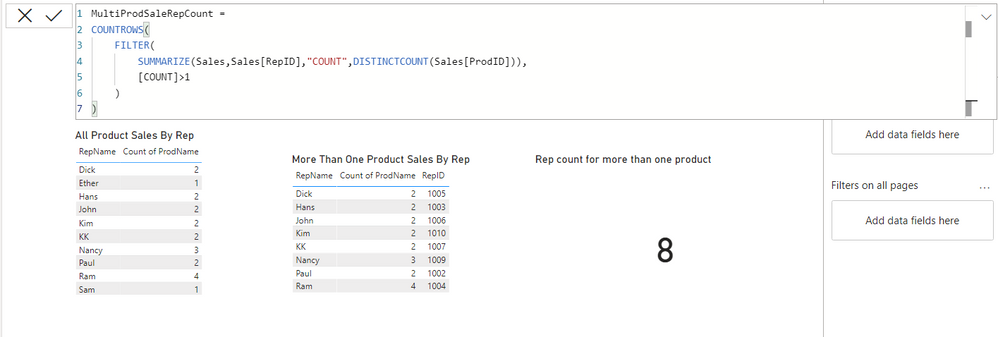
I am trying to show count of sales rep who are selling more than one product. I can show in a table as individuals who are selling more than one product, but when I try to get the count of sales rep, that is where I am strugging. Please see the excel file and pbix attached for you reference. Appreciate any help calculationg the measure, so I can show the count in a card visual.
Solved! Go to Solution.
Hi @Anonymous ,
// Assumptions:
// All ID columns should be hidden and
// all slicing must be done through
// dimensions. Fact tables should (almost)
// always be hidden unless they contain
// degenerate dimensions (but this is not
// the case here).
[Num Of Reps With > 1 Prod Sold] =
SUMX(
DISTINCT( 'Sales Rep'[RepID] ),
// For each RepID it returns 1
// if the representative sold more
// than 1 ProdID in the current context.
// Otherwise, it returns 0.
CALCULATE(
INT( DISTINCTCOUNT( 'Sales'[ProdID] ) > 1 )
)
)
hey! Thank you for this 🙂
How do I get it to work with a "Product name" -filter in the report. Product name is an attribute i the product dimension. At the moment the total value is correct, but i would like it to work with a product name filter in order to see which and how many sales representatives that have been selling a certain product.
br,
Hi @Anonymous ,
You should not use the SUMMARIZE function to do anything more than just group rows. This function has a fatal flaw and sometimes can return totally bogus, unexpected results. For more info on this unfixable bug, please find the article about SUMMARIZE and its quirks on www.sqlbi.com.
I strongly advise against using this function in measures if you put expressions under it. Instead, one should always use the combination SUMMARIZE/ADDCOLUMNS as suggested by Alberto Ferrari and Marco Russo.
Thanks.
Check out the November 2025 Power BI update to learn about new features.
Advance your Data & AI career with 50 days of live learning, contests, hands-on challenges, study groups & certifications and more!
| User | Count |
|---|---|
| 11 | |
| 9 | |
| 9 | |
| 6 | |
| 5 |
| User | Count |
|---|---|
| 27 | |
| 22 | |
| 19 | |
| 17 | |
| 11 |