Join us at FabCon Atlanta from March 16 - 20, 2026, for the ultimate Fabric, Power BI, AI and SQL community-led event. Save $200 with code FABCOMM.
Register now!The Power BI Data Visualization World Championships is back! Get ahead of the game and start preparing now! Learn more
Hi Team,
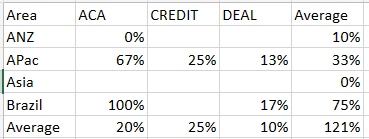
As you can see i have a matrix visualization here , Having Rows : Area , Columns : Controls , And Values : A measure
i need to find the average but the average is showing here as wrong as below picture :
Data given in rows,columns and values :
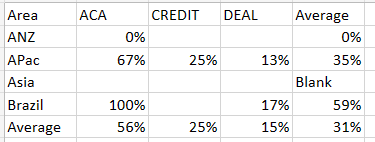
My expected outcome is :
Example for averages : ACA average is calculated as 0/1=0%
Brazil Average is calculated as 100+17/2=59%
Solved! Go to Solution.
@Anonymous
Then use
Exception HAndling % Average Total =
AVERAGEX (
SUMMARIZE ( 'Table', 'Table'[Area], 'Table'[Control] ),
[Exception HAndling %]
)
Hi @Anonymous
Please try this measure in the values of the matrix
Exception HAndling % Average Total =
AVERAGEX ( VALUES ( 'Table'[Control] ), [Exception HAndling %] )
Hey thanks for the quick reply,
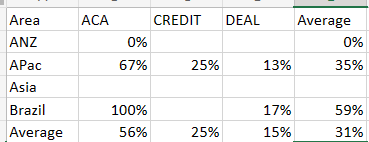
now the row wise average are correct
but column wise is wrong
@Anonymous
Are area and Control from the same table? If different tables, would you please provide details about the relationships?
coming from same table
@Anonymous
Then use
Exception HAndling % Average Total =
AVERAGEX (
SUMMARIZE ( 'Table', 'Table'[Area], 'Table'[Control] ),
[Exception HAndling %]
)
its working now thank you
The Power BI Data Visualization World Championships is back! Get ahead of the game and start preparing now!
| User | Count |
|---|---|
| 19 | |
| 13 | |
| 9 | |
| 4 | |
| 4 |
| User | Count |
|---|---|
| 30 | |
| 26 | |
| 17 | |
| 11 | |
| 10 |