cancel
Showing results for 
Search instead for 
Did you mean: 

The Power BI Data Visualization World Championships is back! Get ahead of the game and start preparing now! Learn more

Reply
DataNoobie
Helper I
Helper I

Need measures that will work with a larger dataset (out of memory errors)

I have 4 working measures prefixed with # in this example Power BI report. The measures work fine with the example data but when I use real data (approx. 90 million imported rows with filters applied to reduce the dataset for scenario testing) I get out of memory errors on some visuals, unless I apply more filters to reduce the dataset. 


Is there a way to re-write these measures so that they will work better with a large dataset?


Measure 1 is an interim measure to calculate Measure 2:

#RT =
    CALCULATE(
         SUMX(
              ADDCOLUMNS(
                  SUMMARIZE(
                      DummyDataID, DummyDataID[ID]
                  ),
                   "ExAmt",
                   [Exceeded Amount]
                   ),
                   [ExAmt]
                    ),
                    FILTER(ALLSELECTED(DummyDataID), DummyDataID[ID] <= MAX(DummyDataDemand[ID]))
)
 
Measure 2
#RT_filtered =
VAR currentID = SELECTEDVALUE ( DummyDataID[ID] )
VAR firstID = MINX ( ALLSELECTED ( DummyDataID ), DummyDataID[ID] )
VAR minValue = MINX ( FILTER ( DummyDataID, DummyDataID[ID] = firstID ), [Exceeded Amount] )
VAR minOfSum =
    MIN (
    0,
    MINX ( FILTER ( ALLSELECTED ( DummyDataID ), DummyDataID[ID] <= currentID ), [#RT] )
    )
RETURN
IF (
currentID = firstID && minValue < 0,
[#RT] - minValue,
[#RT] - minOfSum
)
 
Measure 3 is the sum of the values from Measure 2
#RT with sum =
IF(HASONEVALUE(DummyDataID[ID]), [#RT_filtered], SUMX(VALUES(DummyDataID[ID]), [#RT_filtered]))
 
Measure 4 is the highest value
#RT max =
MAXX(
ADDCOLUMNS(
SUMMARIZE(DummyDataID, DummyDataID[ID]),
"@RT", [#RT with sum]
),
[#RT with sum]
)
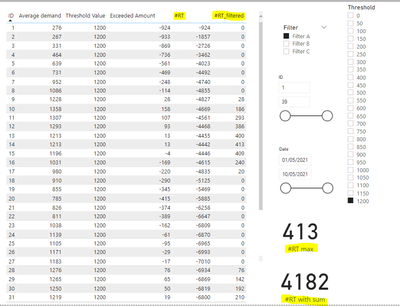
 

DataNoobie_0-1623426109923.png


3 REPLIES 3
DataNoobie
Helper I
Helper I

@mahoneypat I've looked at the most optimal solution from the link you provided. 

Sales Amount Optimal :=
SUMX (
    VALUES ( Customer[Customer Discount] ),
    SUMX (
        VALUES ( 'Product'[Product Discount] ),
        VAR DiscountedProduct = 1 - 'Product'[Product Discount]
        VAR DiscountedCustomer = 1 - Customer[Customer Discount]
        RETURN
            [Gross Amount]
                * DiscountedProduct
                * DiscountedCustomer
    )
)

The measure I need to get into this pattern (I'm assuming) is below. How do I change it to get into the pattern (the pattern above isn't using a running total)?


#RT =
CALCULATE
SUMX(
ADDCOLUMNS(
SUMMARIZE(
DummyDataID, DummyDataID[ID]
),
"ExAmt",
[Exceeded Amount]
),
[ExAmt]
),
FILTER(ALLSELECTED(DummyDataID), DummyDataID[ID] <= MAX(DummyDataDemand[ID]))
)

The link I sent was for general knowledge on optimizing iterators, and wasn't necessarily specific to your scenario.  Sorry for the confusion.  The #RT measure probably performs ok; the performance issue is because you are calling that measure within other nested iterators on a high granularity column (ID).  You need to reduce the granularity and try to avoid nested iteration.


Pat


Did I answer your question? Mark my post as a solution! Kudos are also appreciated!

To learn more about Power BI, follow me on Twitter or subscribe on YouTube.


@mahoneypa HoosierBI on YouTube


mahoneypat
Microsoft Employee
Microsoft Employee

It would be hard to optimize this without a decent # of rows of data and then use DAX studio to optimize.  In any case, your measures have iterators than call functions that also have nested iterators, and that is the source of the problem.  If you have a high number of values for ID (and you likely do with 90 M rows), that will get very slow very fast.  Please see this article to see how to approach optimizing them.

Optimizing nested iterators in DAX - SQLBI


Pat


Did I answer your question? Mark my post as a solution! Kudos are also appreciated!

To learn more about Power BI, follow me on Twitter or subscribe on YouTube.


@mahoneypa HoosierBI on YouTube


Helpful resources

Announcements
Power BI DataViz World Championships

Power BI Dataviz World Championships

The Power BI Data Visualization World Championships is back! Get ahead of the game and start preparing now!

December 2025 Power BI Update Carousel

Power BI Monthly Update - December 2025

Check out the December 2025 Power BI Holiday Recap!

FabCon Atlanta 2026 carousel

FabCon Atlanta 2026

Join us at FabCon Atlanta, March 16-20, for the ultimate Fabric, Power BI, AI and SQL community-led event. Save $200 with code FABCOMM.