FabCon is coming to Atlanta
Join us at FabCon Atlanta from March 16 - 20, 2026, for the ultimate Fabric, Power BI, AI and SQL community-led event. Save $200 with code FABCOMM.
Register now!- Power BI forums
- Get Help with Power BI
- Desktop
- Service
- Report Server
- Power Query
- Mobile Apps
- Developer
- DAX Commands and Tips
- Custom Visuals Development Discussion
- Health and Life Sciences
- Power BI Spanish forums
- Translated Spanish Desktop
- Training and Consulting
- Instructor Led Training
- Dashboard in a Day for Women, by Women
- Galleries
- Data Stories Gallery
- Themes Gallery
- Contests Gallery
- QuickViz Gallery
- Quick Measures Gallery
- Visual Calculations Gallery
- Notebook Gallery
- Translytical Task Flow Gallery
- TMDL Gallery
- R Script Showcase
- Webinars and Video Gallery
- Ideas
- Custom Visuals Ideas (read-only)
- Issues
- Issues
- Events
- Upcoming Events
The Power BI Data Visualization World Championships is back! Get ahead of the game and start preparing now! Learn more
- Power BI forums
- Forums
- Get Help with Power BI
- DAX Commands and Tips
- Need help with summarizecolumns and conditional fo...
- Subscribe to RSS Feed
- Mark Topic as New
- Mark Topic as Read
- Float this Topic for Current User
- Bookmark
- Subscribe
- Printer Friendly Page

- Mark as New
- Bookmark
- Subscribe
- Mute
- Subscribe to RSS Feed
- Permalink
- Report Inappropriate Content
Need help with summarizecolumns and conditional formatting.
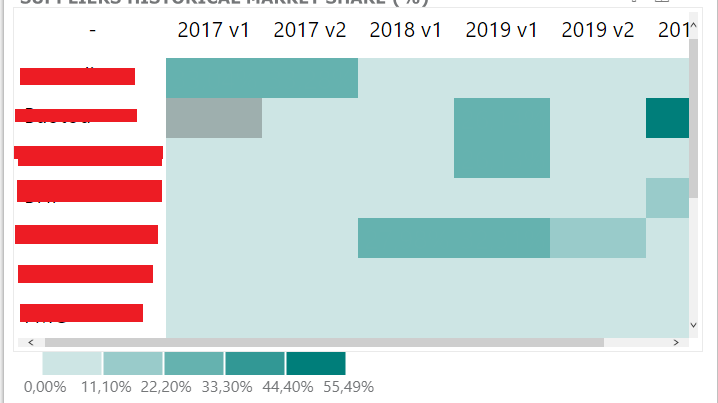
Hello, i want to use a measure in conditional formatting, but i keep getting the message that SUMMARIZECOLUMNS are not made for this context, but there is a way to create the data i want in other way?
Heatmap Maximum Value =
VAR _table = SUMMARIZECOLUMNS(dAccount[Code]
    ,dStudies[Year]
    ,"_share"
    ,[Value % by Account]
)
VAR _maximum = CALCULATE(MAXX(_table,[_share]), ALL(dAccount[Code]))
RETURN _maximum
This is the measure, i use this to find the maximum value in a table visualization my idea is to create a heatmap table, but the visuals i see for this not working well as i expected.
So the measure im using for get the maximum value in this visual, in this case is 55,49% but for conditional formating this not work well, so i was trying to create another measure only for this, something like:
Conditional Heatmap =
VAR _percentage = [Heatmap Maximum Value] / 5
VAR _20percent = _percentage * 1
VAR _40percent = _percentage * 2
VAR _60percent = _percentage * 3
VAR _80percent = _percentage * 4
VAR _value = [Value % by Account]
VAR _pos =
IF(_value <= _20percent, 0
    ,IF(_value > _20percent && _value <= _40percent, 1
        ,IF(_value > _40percent && _value <= _60percent, 2
            ,IF(_value > _60percent && _value <= _80percent, 3
                ,IF(_value > _80percent, 4, 0)
            )
        )
    )
)
RETURN _pos
Someone have an idea on how to solve this? or another way to get similar results?
thanks for help 😉
Solved! Go to Solution.

- Mark as New
- Bookmark
- Subscribe
- Mute
- Subscribe to RSS Feed
- Permalink
- Report Inappropriate Content
// Try this measure. It uses
// ALLSELECTED to just return the
// maximum of the values across
// the visible accounts and visible
// Years. Visible in the matrix,
// of course.

[Heatmap Maximum Value] =
CALCULATE(
    MAXX(
        SUMMARIZE(
            // FactTable is the table
            // that the dims Account and
            // Studies link to.
            FactTable,
            dAccount[Code],
            dStudies[Year]
        ),
        [Value % by Account]
    ),
    ALLSELECTED( dAccount ),
    ALLSELECTED( dStudies )
)- Mark as New
- Bookmark
- Subscribe
- Mute
- Subscribe to RSS Feed
- Permalink
- Report Inappropriate Content
// Try this measure. It uses
// ALLSELECTED to just return the
// maximum of the values across
// the visible accounts and visible
// Years. Visible in the matrix,
// of course.

[Heatmap Maximum Value] =
CALCULATE(
    MAXX(
        SUMMARIZE(
            // FactTable is the table
            // that the dims Account and
            // Studies link to.
            FactTable,
            dAccount[Code],
            dStudies[Year]
        ),
        [Value % by Account]
    ),
    ALLSELECTED( dAccount ),
    ALLSELECTED( dStudies )
)- Mark as New
- Bookmark
- Subscribe
- Mute
- Subscribe to RSS Feed
- Permalink
- Report Inappropriate Content
This works pretty well thank you o/
- Mark as New
- Bookmark
- Subscribe
- Mute
- Subscribe to RSS Feed
- Permalink
- Report Inappropriate Content
// Once you've sorted out [Meatmap Maximum Value]
// you can simplify your other measure like this:

Conditional Heatmap =
VAR _percentage = [Heatmap Maximum Value] / 5
VAR _value = [Value % by Account]
VAR _pos =
    switch( true(),
    	// _percentage is 20%
        _value <= 1 * _percentage, (1 - 1),
        _value <= 2 * _percentage, (2 - 1),
        _value <= 3 * _percentage, (3 - 1),
        _value <= 4 * _percentage, (4 - 1),
        (5 - 1)
    )
RETURN
_pos- Mark as New
- Bookmark
- Subscribe
- Mute
- Subscribe to RSS Feed
- Permalink
- Report Inappropriate Content
Ahn this works pretty well, i didn't know how to use the switch haha, one question why the (1 - 1) instead 0 value?
- Mark as New
- Bookmark
- Subscribe
- Mute
- Subscribe to RSS Feed
- Permalink
- Report Inappropriate Content
- Mark as New
- Bookmark
- Subscribe
- Mute
- Subscribe to RSS Feed
- Permalink
- Report Inappropriate Content
CALCULATE(MAXX(_table,[_share]), ALL(dAccount[Code]))
is also wrong. Variables can't react to filters once they've been evaluated. So, ALL( dAccount[Code] ) does nothing at all.
- Mark as New
- Bookmark
- Subscribe
- Mute
- Subscribe to RSS Feed
- Permalink
- Report Inappropriate Content
i was trying something i seen on the web HAHA, but now i know how it works o/
Helpful resources

Power BI Dataviz World Championships
The Power BI Data Visualization World Championships is back! Get ahead of the game and start preparing now!

Power BI Monthly Update - November 2025
Check out the November 2025 Power BI update to learn about new features.

FabCon Atlanta 2026
Join us at FabCon Atlanta, March 16-20, for the ultimate Fabric, Power BI, AI and SQL community-led event. Save $200 with code FABCOMM.

| User | Count |
|---|---|
| 20 | |
| 11 | |
| 10 | |
| 4 | |
| 4 |


| User | Count |
|---|---|
| 34 | |
| 30 | |
| 19 | |
| 12 | |
| 11 |


