This is best Fabric, Power BI, SQL and AI community event. How do we know? The last event sold out! Save €200 with code FABCMTY200.
Register nowA new Data Days event is coming soon! This time we’re going bigger than ever. Fabric, Power BI, SQL, AI and more. Don't miss out.
See the description of the problem below, "Metric_to_Show" in the red box.
As you can see I have one solution that is working fast if I use the actual metric,
but when I replace the actual metric with my dynamic selection it is slow.
So my Q is why is it not working with ’Dynamic_Metrics’[Metric to show]?
Solved! Go to Solution.
I have found the problem in the switch statement.
After changing the switch statement to this, it is working.
Metric to show:=
SWITCH(
SELECTEDVALUE(Dynamic_Metrics[Metric Name], "All/No selected"),
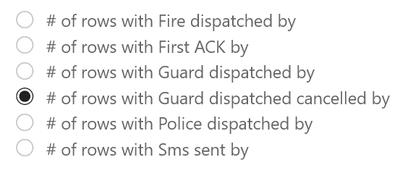
"# of rows with Police dispatched by",[# of rows with Police dispatched by],
"# of rows with Fire dispatched by",[# of rows with Fire dispatched by],
"# of rows with Guard dispatched by",[# of rows with Guard dispatched by],
"# of rows with Guard dispatched cancelled by",[# of rows with Guard dispatched cancelled by],
"# of rows with Sms sent by",[# of rows with Sms sent by],
"# of rows with First ACK by",[# of rows with First ACK by],
[# of rows with Guard dispatched by]
)
@Anonymous
You have to share the URL to the file hosted elsewhere: Dropbox, Onedrive... or just upload the file to a site like tinyupload.com (no sign-up required).
Hi @Anonymous
Can you share the pbix? Otherwise:
Can you show the code for [Selected Metric Name]?
Can you show where you are using the measure (what visual, what fields are in the visual and the relevant tables)?
What exactly do you mean by "keep my filters"?
Please mark the question solved when done and consider giving a thumbs up if posts are helpful.
Contact me privately for support with any larger-scale BI needs, tutoring, etc.
Cheers
I have created a testfile, but I can't find how to upload it here. Do you know how to do that?
I have found the problem in the switch statement.
After changing the switch statement to this, it is working.
Metric to show:=
SWITCH(
SELECTEDVALUE(Dynamic_Metrics[Metric Name], "All/No selected"),
"# of rows with Police dispatched by",[# of rows with Police dispatched by],
"# of rows with Fire dispatched by",[# of rows with Fire dispatched by],
"# of rows with Guard dispatched by",[# of rows with Guard dispatched by],
"# of rows with Guard dispatched cancelled by",[# of rows with Guard dispatched cancelled by],
"# of rows with Sms sent by",[# of rows with Sms sent by],
"# of rows with First ACK by",[# of rows with First ACK by],
[# of rows with Guard dispatched by]
)
Sorry, I can't share the pbix.
The model is build in SSAS also.
But I can share the code 😃
Selected Metric Name:= SELECTEDVALUE(Dynamic_Metrics[Metric Name], "No selected")
And I select the Metric Name from a slicer in the pbix.
Check out the May 2026 Power BI update to learn about new features.
Sign up to receive a private message when registration opens and key events begin.
If you have recently started exploring Fabric, we'd love to hear how it's going. Your feedback can help with product improvements.
| User | Count |
|---|---|
| 5 | |
| 3 | |
| 3 | |
| 3 | |
| 3 |
| User | Count |
|---|---|
| 9 | |
| 6 | |
| 6 | |
| 6 | |
| 6 |